
You’ve just bought an iPhone and you’re looking at a row of smart home devices at Best Buy. Several carry a label that reads “Works with Apple HomeKit”. You’ve also seen “Works with Alexa” and “Works with Google Home”. You know roughly what Alexa is. But HomeKit? The name tells you almost nothing. Is it an app? A hub? A subscription? And does it actually matter which label you pick?
HomeKit is Apple’s smart home platform – the framework that lets compatible devices connect to your iPhone, respond to Siri, and work together through Apple’s Home app. It’s been around since 2014, it’s built into every iPhone and iPad, and it sits quietly in the background of millions of Apple households, often without people realizing it’s there. Understanding what it does (and what it doesn’t) will help you make smarter decisions about which smart home devices are worth buying if you’re already in Apple’s world.
What Is HomeKit?
HomeKit is a software framework built into iOS, iPadOS and macOS. It defines a standard way for smart home devices (lights, locks, thermostats, sensors, cameras) to communicate with Apple devices. Manufacturers who want their products to carry the “Works with Apple HomeKit” badge must meet Apple’s certification requirements, which cover security standards, communication protocols and how devices present themselves to the Home app.
When a device is HomeKit-certified, it can usually be added to the Apple Home app with a simple scan of its QR code or NFC tag. From there, you can control it with Siri, group it with other devices, set automations based on time or your location, and share access with family members through the Home app. None of that requires a separate hub from the device manufacturer, a third-party app running in the background, or an account with the device brand’s cloud service – at least in principle. In practice, there are some nuances, which are covered below.
HomeKit doesn’t replace your router or act as a hub in the physical sense. It’s a software layer, a common language that Apple-certified devices speak so your iPhone can understand and control them without needing manufacturer-specific apps to be open or active.
The Home App: Where HomeKit Lives
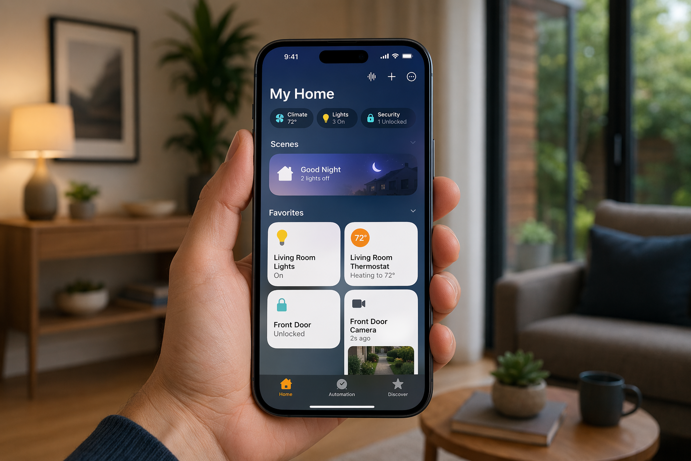
The Home app is Apple’s interface for HomeKit. It comes preinstalled on iPhones and iPads and has been gradually improved since its somewhat limited debut. You use it to add devices and control them individually or in groups. Scenes – preset combinations of device states – and automations that trigger based on time, your location or the state of other devices are also set up here. A “Good Morning” scene might dim the lights to 40% and unlock the front door simultaneously, for example.
Apple significantly updated the underlying architecture in iOS 16, silently migrating the Home app’s data model to improve reliability and support for larger device counts. If you’ve been using HomeKit for a few years and remember a period when devices would occasionally drop offline for no obvious reason, the post-iOS 16 experience is noticeably more stable.
Siri integration lets you control HomeKit devices by voice from any Apple device, including iPhone, iPad, HomePod, Apple Watch or Apple TV. Commands like “Hey Siri, turn off the kitchen lights” or “Hey Siri, lock the front door” work across all of them. The response quality depends on how clearly you’ve named your devices and rooms in the Home app. Poorly named devices can lead to confusing voice interactions, so it’s worth thinking about naming conventions during setup.
What You Need for HomeKit to Work
At a minimum, you’ll need an iPhone or iPad running a reasonably current version of iOS, and a HomeKit-certified device. That combination covers basic, local control when you’re at home. Your phone talks directly to the device over your Wi-Fi network, and commands generally execute quickly.
Remote access – controlling your home while you’re away – requires what Apple calls a home hub. A home hub keeps a persistent connection to your HomeKit setup so commands from your phone (now routing over the Internet rather than your local network) have something to reach. Without a home hub, remote control and location-based automations simply don’t work.
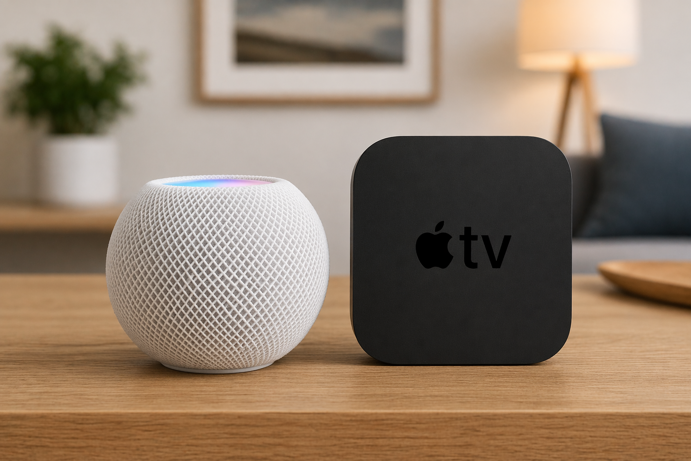
Current home hub options are the HomePod mini (around $99), the full-size HomePod 2nd gen (around $299-$329), and the Apple TV 4K (around $129-$149 depending on model). All three stay connected to your home network around the clock and handle the routing of remote commands and automation triggers. If you already own an Apple TV 4K or a HomePod for other reasons, you already have a home hub. HomeKit uses it in the background without any additional setup.
You’ll need an Apple ID signed into iCloud for features like remote access, shared access, and syncing your Home setup across Apple devices. HomeKit stores your home configuration in iCloud with end-to-end encryption, which is part of the platform’s broader security story.
HomeKit and Matter: How They Fit Together
Apple’s HomeKit predates Matter by nearly a decade, and the two aren’t the same thing, though they increasingly overlap. Matter is an open interoperability standard developed by the Connectivity Standards Alliance, a cross-industry initiative involving Apple, Google, Amazon, Samsung and others. Its goal is to allow smart home devices to work across different ecosystems without needing separate versions for each one.
Apple was a founding contributor to Matter and integrated support into HomeKit starting with iOS 16.1. Devices carrying the Matter certification badge can now join Apple Home just like native HomeKit devices (via a simple QR code scan) without needing separate HomeKit certification. A Matter-certified smart plug can join Alexa, Google Home and Apple Home from the same device, using the same pairing process.
This marks a notable shift from the earlier HomeKit era. Apple’s certification requirements were once strict enough that many popular devices (particularly those from brands like IKEA, Wyze and Tuya-based manufacturers) never supported HomeKit at all. Matter lowers that barrier considerably. If a device is Matter-certified and you have a compatible home hub, it will generally work in your Apple Home setup.
Some Matter devices use Thread as their underlying network protocol – a low power mesh standard designed for battery operated sensors and small devices. For Thread-based Matter devices to work in your HomeKit setup, you need a Thread Border Router. Both the HomePod mini and certain Apple TV 4K models (2nd generation and newer, depending on the variant) include Thread Border Router support, making them useful for Matter-over-Thread devices as well as standard HomeKit ones.
What Kinds of Devices Work with HomeKit
HomeKit supports a wide range of device categories: lights and switches, smart plugs, thermostats, door locks, garage door openers, video doorbells and security cameras. Window coverings, fans, air purifiers, sensors (motion, contact, temperature, humidity, air quality) and irrigation controllers are also supported.
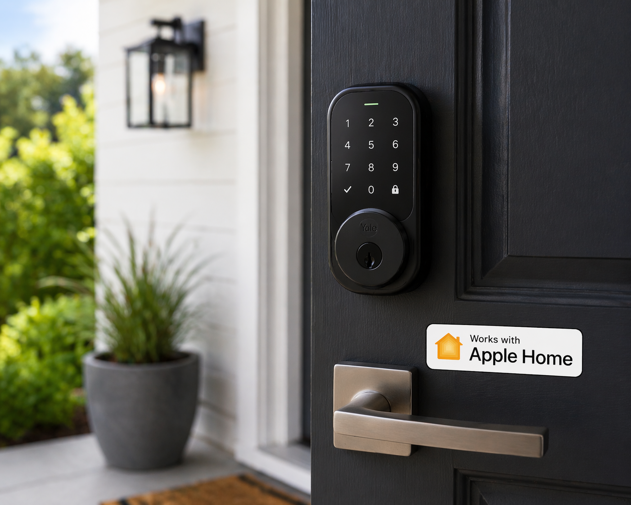
Lighting is one of the strongest categories. Nanoleaf, Eve, LIFX and Philips Hue all offer solid HomeKit support, with Hue’s hub-based system supporting HomeKit natively since 2015. Eve Energy smart plugs typically run $35-45, while Meross HomeKit-compatible plugs start around $12-15 per plug. Smart locks from Schlage, Yale and August are available in HomeKit-compatible versions ranging from $150 to $330 depending on features.
Security cameras with HomeKit Secure Video (Apple’s encrypted camera recording feature) include options from Logitech Circle and Eufy, typically $80-$200. HomeKit Secure Video analyzes footage locally on your home hub, encrypts it on-device, then uploads it to iCloud, rather than relying on the manufacturer’s cloud for video analysis and storage by default. For privacy-conscious buyers, that’s a distinct advantage over most camera brands’ default behavior.
The device selection has historically been narrower than Alexa’s or Google Home’s, but that gap has narrowed considerably since Matter’s arrival. Checking the current “Works with Apple Home” page or filtering by HomeKit on a retailer’s site gives you the most accurate picture of current availability. Older packaging and some retailer listings still use the legacy “Works with Apple HomeKit” label. Both refer to the same certification.
HomeKit Security and Privacy
Privacy is where HomeKit has consistently differentiated itself from Alexa and Google Home. Apple’s certification process requires end-to-end encryption throughout. Commands between your iPhone and a device are encrypted and authenticated in transit, and your home configuration syncs through iCloud without Apple being able to access it. HomeKit Secure Video extends this to camera footage, analyzed on-device before encryption and storage.
This architecture limits certain cloud-dependent features. HomeKit doesn’t support third-party cloud processing of your device data the way some Alexa integrations do, which restricts some manufacturer-specific analytics but also reduces the data exposure those features create.
For users who’ve thought carefully about smart home privacy and the IoT security considerations that come with connecting devices to a home network, HomeKit’s approach is notably more conservative than its competitors. Apple’s incentive structure (hardware revenue, not advertising) aligns reasonably well with that privacy commitment, even if it doesn’t make the platform invulnerable.
How HomeKit Compares to Alexa and Google Home
All three platforms can control smart home devices, respond to voice commands, run automations and share access with household members. The main differences lie in ecosystem fit, device selection, privacy approach and day-to-day usability.
Alexa and Google Home have broader device compatibility, particularly for older or budget-priced devices. Both platforms also integrate more deeply with their own ecosystems – Alexa with Amazon shopping and music, Google Home with Google Calendar, Gmail and YouTube. Android-first households will find Google Home the more natural fit, while heavy Amazon users tend to prefer Alexa.
HomeKit’s strength is the depth of Apple device integration. Automations can trigger based on which family members are home using iPhone location data, sync instantly across all Apple devices, and respond through any Siri-enabled device, such as Apple Watch, CarPlay or HomePod. Small touches like the Home app widget on the iPhone lock screen and Control Center shortcuts add up noticeably in daily use.
Mixed-platform households, where an iPhone user and an Android user live under the same roof, face the most complexity. HomeKit doesn’t support Android, so a shared smart home built around HomeKit excludes non-Apple users from the native app experience. Choosing Matter-certified devices that support both HomeKit and Google Home, or defaulting to Alexa as a cross-platform option, tends to work better in those situations. For a fuller breakdown, the smart home hub guide outlines how the platforms stack up on features and device support.
Honest Limitations Worth Knowing
HomeKit’s device selection, while improved, still lags Alexa and Google Home for budget and niche categories. Many Zigbee-based devices that work natively with Amazon or Google require an additional bridge or hub to appear in Apple Home. The Zigbee hubs that bridge to HomeKit tend to cost more than those targeting Alexa or Google. Philips Hue’s bridge handles this seamlessly, but that’s an exception rather than a general rule.
The home hub requirement is a real barrier for some users. Without an Apple TV 4K or HomePod, remote access and location-based automations aren’t available. Alexa and Google Home build remote access into their free cloud services without requiring additional hardware.
Siri’s smart home capabilities lag behind Alexa’s natural language processing for complex or multi-step commands. Basic requests work reliably, but Siri is generally less flexible than Alexa when commands are phrased more conversationally or ambiguously.
HomeKit is also an Apple-only ecosystem by design. Every device you add becomes more tightly integrated with Apple hardware and services, which is an advantage if you stay in Apple’s world, but a complication if you ever move away from it. That lock-in is worth factoring in before committing to a large HomeKit-based setup.
On the plus side, current home hubs include both Matter support and Thread Border Router hardware, which positions the platform well for the next wave of smart home devices. For older adults in Apple households especially, Siri voice control and a single Home app without additional accounts or cloud services offer a real practical advantage – an angle covered more fully in the smart home devices for elderly adults guide.
The Apple of Your Smart Home Eye
HomeKit makes the most sense when it matches the devices and habits already shaping your home. For iPhone-first households, it offers a cleaner path to smart home control – one app, one voice assistant, tighter privacy controls, and less day-to-day hassle. Matter support also means buying into Apple’s ecosystem no longer cuts you off from as many device choices as it once did.
That said, the best HomeKit setup starts with a little planning. Check for Apple Home or Matter support before you buy, think about whether you need a HomePod or Apple TV for remote access, and pay attention to how your household uses phones, voice control and automations. A smart home works best when the platform fits the people living in it.
Pick the right ecosystem at the start, and every light, lock, camera and sensor that follows has a better chance of feeling less like tech – and more like home.