You’re standing in the cereal aisle trying to remember whether you’re out of milk or just craving cereal. A smart fridge promises to settle that argument before you leave the house, but “smart” covers a wide range of features across different brands, and not every one of them changes how you actually use a refrigerator.
This guide breaks down what smart fridges do, feature by feature, so you can tell genuinely useful technology apart from a touchscreen that looks impressive in a showroom.
What Counts as a Smart Fridge?
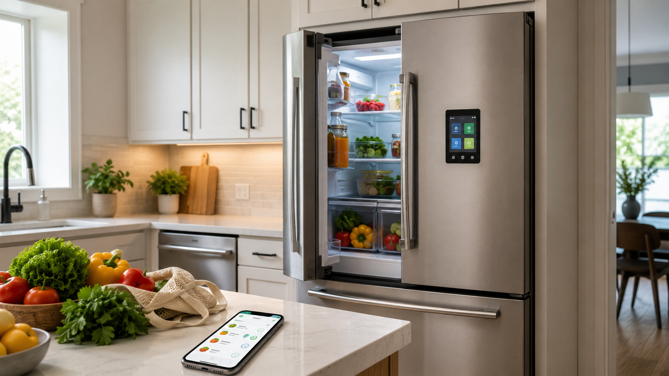
A smart fridge connects to your home Wi-Fi network and a companion app, letting you monitor or control it remotely, and on higher end models, interact with it through a built-in touchscreen or voice assistant. “Smart” stretches from a basic temperature alert pushed to your phone up to a 32-inch touchscreen running its own AI assistant.
The three major US appliance brands – Samsung, LG and GE – each take a different approach, though the gap between them has narrowed recently. Samsung’s Family Hub line leans hardest into the “touchscreen as control center” idea. LG’s InstaView focuses on a single, narrower problem – letting you see inside without opening the door. GE Profile has historically favored practical alerts and remote control over flashy interfaces, though its newly announced Kitchen Assistant model adds a touchscreen, barcode-based grocery tracking and an internal camera, putting it much closer to Samsung and LG’s feature set. None of this is an endorsement of any particular model. It’s useful context for understanding why “smart fridge” means something different depending on which brand you’re looking at.
Core Features, Explained
Internal Cameras and Food Tracking
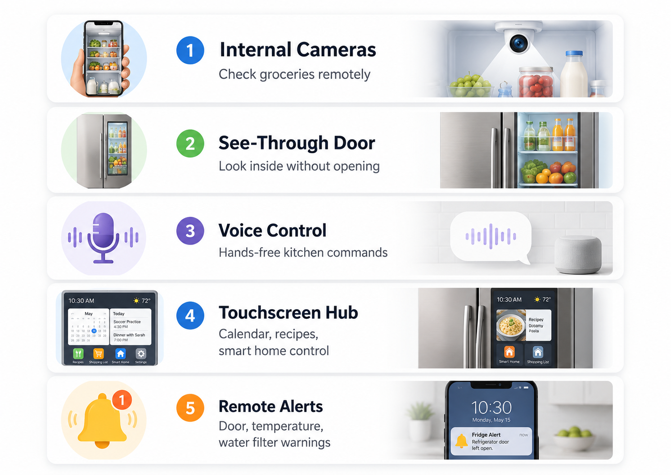
This is the feature most people think of first. A camera mounted inside the fridge lets you check what’s in there from your phone while you’re at the grocery store, without anyone at home having to manually take a photo. Samsung’s current Family Hub line goes further with AI Vision, which identifies individual food items using image recognition. On select 32-inch Family Hub models, AI Vision is being updated with Google’s Gemini model to recognize a wider range of fresh and packaged foods beyond the roughly 40 pre-studied food types the system already handled. This rollout will also reach the smaller 9-inch AI Home screens later, in phases. In practice, this powers an automatically generated grocery list and recipe suggestions based on what’s currently inside the fridge, pulled from Samsung’s SmartThings Food ecosystem. The system can also learn consumption habits and flag when a frequently used item is running low.
Food recognition is improving quickly but isn’t perfect, and exactly which models have received the Gemini update will vary by region and timing. How well it works for homemade meals, unlabeled leftovers or uncommon ingredients will also vary. It’s a feature that’s gotten meaningfully better in the past year, but not yet a substitute for knowing what’s in your fridge.
See Through Doors Without Opening Them
LG’s InstaView feature takes a simpler, more mechanical approach to the same underlying problem – reducing how often you open the fridge door and let cold air escape. A tinted glass panel built into the door illuminates when you knock on it twice, letting you see the contents without opening anything. Every second a fridge door stays open lets cold air out and makes the compressor work harder to recover, so cutting down on unnecessary door-opening has a plausible, if modest, effect on energy use. It’s a feature you’ll either use constantly or barely notice, depending on how often you open the fridge just to look rather than to get something out.
Voice Assistant Integration
Many smart fridge platforms support voice control through Amazon Alexa, Google Assistant, a brand-specific built-in assistant, or some combination, depending on the brand and model. GE’s SmartHQ platform, for instance, routes voice commands like checking or adjusting the fridge temperature through Alexa or Google Assistant instead of a brand-specific assistant, though the exact set of supported commands varies by model.
Samsung has taken a different path, building its own assistant, Bixby, directly into the Family Hub touchscreen. Recent updates have focused on more natural, conversational speech. On Samsung’s newest Bespoke AI Family Hub refrigerators shown at CES 2026, voice commands can also open or close the fridge doors, depending on the model – a step beyond the touch-only Auto Open Door feature on earlier models, which opens but doesn’t close automatically. Built-in or third-party, the practical value of voice control is the same. Hands-free access is important here, perhaps more than anywhere else in the home.
Touchscreens and Smart Home Hubs
On higher-end models, the fridge door itself becomes a display, ranging from a compact 9-inch AI Home screen to a 32-inch panel on Samsung’s largest current Family Hub models. These screens typically handle shared family calendars, photo displays and daily personalized widgets like trending recipes or a summary of frequently used ingredients, with the larger Family Hub displays adding video calls, music and video streaming, and sticky notes.
Some of these fridges double as a smart home hub. Samsung’s SmartThings integration lets the fridge screen control other connected devices directly. Whether this matters or not depends on whether you’d otherwise use a dedicated smart display elsewhere in the kitchen. If you already have one, a touchscreen fridge duplicates functionality you’ve already paid for.
Remote Monitoring and Alerts
This is the least flashy smart fridge feature but arguably the most consistently useful one across every brand. Connected fridges can push notifications for practical issues, including the door being left open too long, internal temperature drifting outside a safe range, or a water filter becoming due for replacement. None of that requires a touchscreen or a camera, just a reliable Wi-Fi connection and a notification system that works. It’s also the easiest feature category to evaluate honestly. A “door left open” alert either saves you from spoiled groceries or it doesn’t, and you’ll know quickly which applies to your household.
What Smart Fridges Need to Work Properly
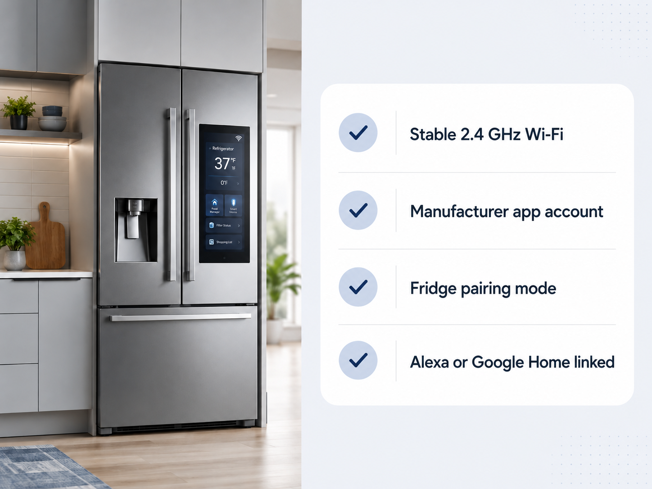
Every feature above depends on a stable Wi-Fi connection, typically on the 2.4GHz band given the fridge’s usual distance from the router. Weak kitchen Wi-Fi means slow-loading camera feeds, late or missing notifications, and a sluggish touchscreen even on capable hardware.
Setting up the connected features takes a real step, not something that happens automatically out of the box. Both Samsung’s SmartThings and GE’s SmartHQ require creating a manufacturer account and putting the fridge into a pairing or provisioning mode (usually a button combination on the unit) before any remote features activate. Voice assistant integration, where supported, generally needs to be enabled separately within the Alexa or Google Home app afterward.
Where the Limitations Start to Show
App and Account Dependency
A smart fridge’s connected features live or die by the manufacturer’s app and cloud service. If that service is discontinued or stops receiving updates years down the line, the smart features stop working even though the refrigeration keeps running fine. This is worth factoring into a purchase meant to last a decade or more, longer than most companion apps have stayed unchanged.
Feature Overlap With Things You May Already Own
A touchscreen fridge handling calendars, music, video calls and smart home control is doing a job that a dedicated kitchen display or smart speaker already does in plenty of homes, often for far less. If you’re buying mainly for these general purpose features, not food tracking or door monitoring, it’s worth pricing out whether a separate display delivers the same value more cheaply.
Cost
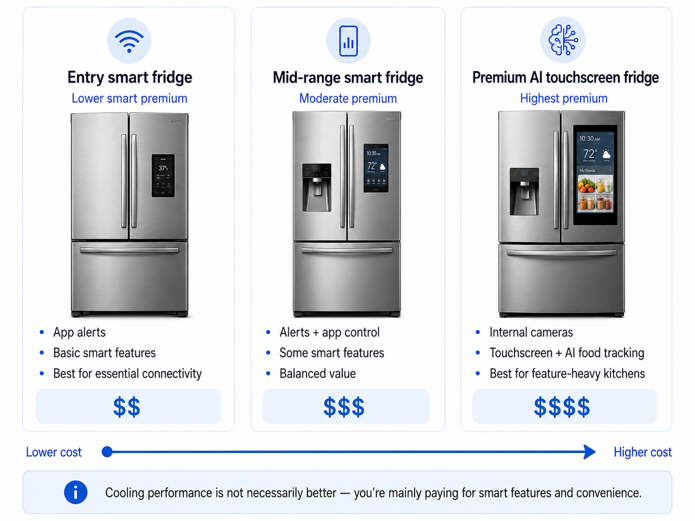
Smart refrigerators with full touchscreen and camera features commonly start around $2,000 and climb toward $5,000 on premium AI-equipped models, depending on size, finish and display configuration. That premium pays for the screen, camera hardware and software, not better cooling performance. A non-smart fridge from the same brand and size class will keep food just as cold for a fraction of the price.
Keep Your Cool Before You Buy
The smartest choice is not always the fridge with the biggest screen. Before paying the premium, think about the problem you want the fridge to solve. Door alerts, temperature warnings and filter reminders can quietly protect your groceries. Cameras and food tracking can help if you often shop from memory. A touchscreen makes more sense if your kitchen already acts as the family command center.
For most buyers, the right question is simple: will this fridge save you time, prevent waste or remove a repeat annoyance in your household? If the answer is yes, the smart features may earn their place. If the answer is no, a reliable regular refrigerator and a separate smart display may give you better value.
A smart fridge should make the kitchen easier to live with, not just more expensive to look at.
A smart fridge is one piece of a wider smart kitchen setup. For the full picture of which appliance categories are worth considering and which tend to be more style than substance, my guide to what makes a kitchen smart covers the rest.