
You’re stuck in a delayed train, the kids are already asking what’s for dinner, and the chicken you’d planned to roast hasn’t even made it into a cold oven yet. Or perhaps you’re standing in front of a touchscreen oven in a showroom. You’re wondering if “AI-assisted cooking” is real or just marketing hype built on top of an ordinary Wi-Fi chip. Smart ovens span a wide range, from basic remote preheat to in-oven cameras, barcode-based cooking, and app-guided programs that turn select foods or recipes into custom cook settings.
This guide breaks down what a smart oven does, category by category. That way you can tell which features solve a genuine problem and which just look good on a spec sheet.
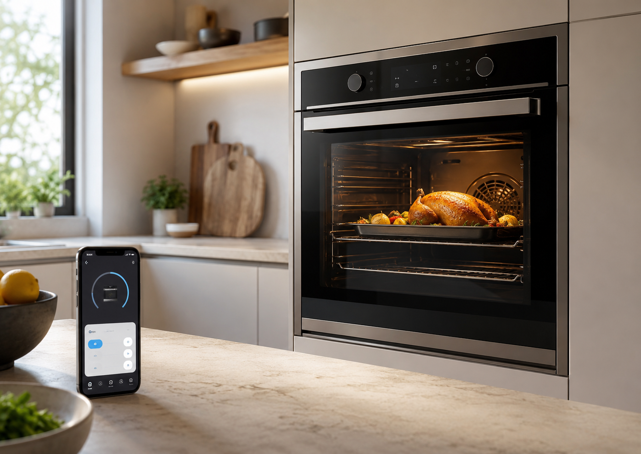
What Counts as a Smart Oven?
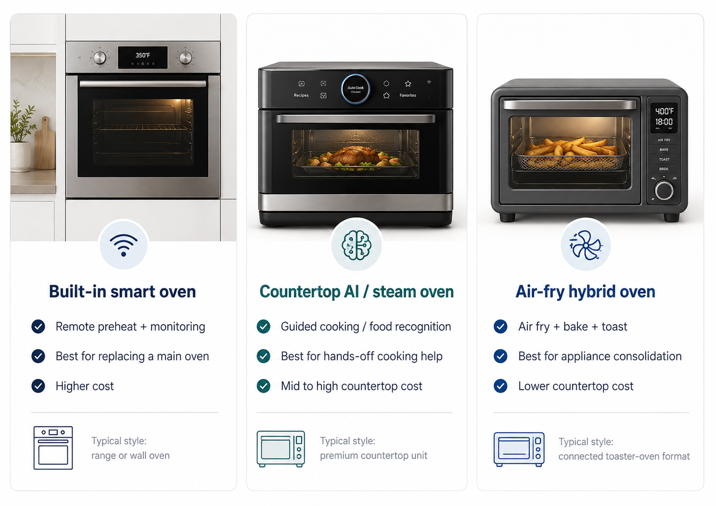
A smart oven connects to your home Wi-Fi and a companion app, letting you monitor or control cooking remotely, and on higher end models, interact with it through a built-in camera, touchscreen or AI-assisted cook program. “Smart oven” is a broad term, spanning three distinct product categories that solve different problems, and the rest of this guide is organized around them.
Built-in smart ranges and wall ovens are the connected version of the oven most kitchens already have. Brands like Whirlpool, GE and KitchenAid lead this category. These start with remote preheat and monitoring, and on newer models, add cameras and selective food recognition cook programs.
Countertop AI and steam ovens are a newer standalone category built around guided, automated cooking. How that works varies by brand. Some use a built-in camera that identifies what’s on the rack and applies a cook program. Others rely on a barcode scanner that reads packaging and pulls a pre-set cook cycle from the cloud. Either way, the goal is the same. Point it at certain foods and skip the manual time and temperature guesswork, often alongside precision steam cooking.
Air-fry hybrid countertop ovens sit closer to a traditional toaster oven. They combine convection baking, roasting, toasting and air frying in one connected unit. This category is less about AI food recognition and more about consolidating several countertop appliances into one.
Core Features, Explained
Remote Preheat and Monitoring
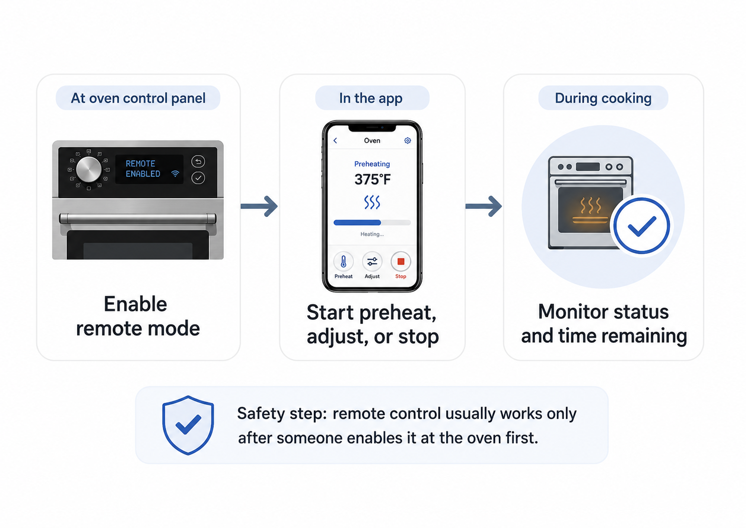
This is the baseline feature across every category, and the one with the clearest everyday utility. Preheat on your way home, check time remaining, or turn the oven off if you forgot. On built-in smart ranges and wall ovens, it almost always requires a separate step first. Whirlpool, GE and KitchenAid all require the oven to be set to a “remote enable” mode at the control panel first. Only then can the app start, stop or adjust it. This is a safety measure, so the oven can’t be triggered remotely without someone confirming in person first – worth knowing about before you assume remote start works out of the box.
Built-In Cameras and Food Recognition
An in-oven camera streaming to your phone lets you check on food without opening the door. It’s still mostly a select model or premium feature rather than something every smart oven includes. GE, for instance, sells camera-equipped models as a distinct, pricier line alongside its non-camera connected ranges. Where it is included, GE’s SmartHQ shows a live feed alongside guided cooking. KitchenAid’s Live Look-In does the same through an Intelligent Cooking Camera, though KitchenAid notes performance can vary with network strength – worth factoring in if your kitchen Wi-Fi is already weak.
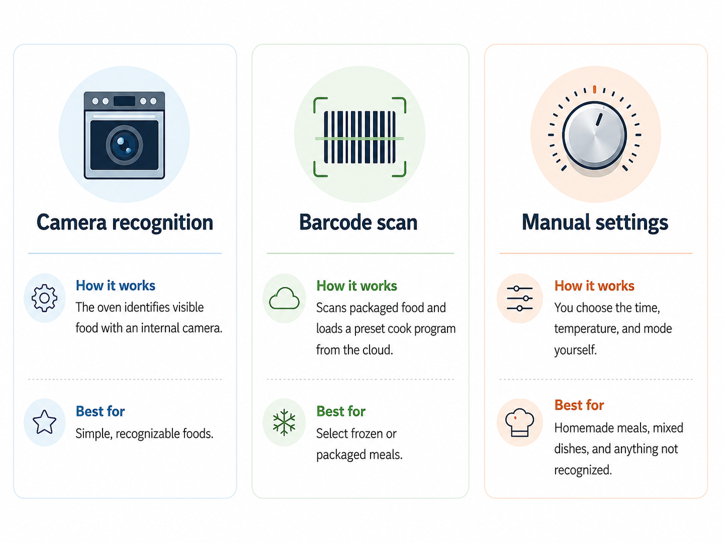
Food recognition is where the categories diverge most, and where it exists, the level of automation varies by brand. Whirlpool’s Scan-to-Cook works by scanning the barcode on packaged food (mostly frozen meals) and pulling cook settings from the app, though not every product in the freezer aisle is in the database. KitchenAid’s newer Intelligent Cooking Camera models go further. Once it recognizes what’s in the oven, it lets you choose how you want it done – crispier, softer, and so on – then monitors and adjusts the cook time on its own. GE’s newer Profile line works similarly on select camera-equipped models, identifying food directly from the camera and adjusting settings.
Countertop AI and steam ovens push this further still. Guided, automated cooking is the category’s defining feature. Depending on the brand, the oven may use a camera to identify what’s inside, a barcode scanner to pull a cook cycle from the cloud, or both. It then applies custom time, temperature and steam settings, though database coverage varies a lot, and anything it doesn’t recognize still needs manual settings.
The honest caveat across every version? Food recognition is improving quickly but isn’t perfect. Mixed dishes, homemade meals and uncommon ingredients are harder to identify than a single recognizable item like a chicken breast or frozen pizza.
Air Fry, Voice Control and Touchscreens
Air fry is now common across many smart ranges and countertop ovens. Some built-in smart ranges include it from the start. Others add it later through a downloadable update over Wi-Fi. Dedicated air-fry hybrid ovens go further, combining roasting, baking, toasting, dehydrating and air frying in one unit, useful for consolidating several countertop appliances into one footprint.
Voice control through Alexa or Google Assistant is available on many connected ovens from major brands. Floury or raw-meat hands are a real reason to want it. Built-in ranges and wall ovens are the most likely to add a color touchscreen for recipe browsing and cooking guidance. Some integrate with a matching smart fridge to share recipes and grocery lists. Air-fry hybrids typically use a simpler display on the unit itself, with a fuller-featured app handling the more advanced controls.
What a Smart Oven Needs to Work Properly
Every feature above depends on stable Wi-Fi. Whirlpool and GE both require the 2.4GHz band specifically for their connected ranges and wall ovens. This is easy to miss if your router broadcasts both bands under one network name. Weak kitchen Wi-Fi will usually mean delayed notifications, a camera feed that won’t load, or remote commands that time out.
Where the Limitations Start to Show
A smart oven’s connected features live or die by the manufacturer’s app and cloud service. If a feature is discontinued or an app stops getting updates, the connected layer can stop working even though the oven keeps heating fine. This is a bigger concern here than for most kitchen gadgets, since a wall oven is typically a decade-plus purchase – far longer than most apps remain unchanged.
Some countertop AI and steam ovens also put their most advanced software features behind a paid subscription. Depending on the brand, that can include guided recipes, expanded recipe libraries, recipe-to-settings conversion, food recognition and remote monitoring. This comes on top of an upfront price already higher than a standard toaster oven. The oven usually still works as a basic appliance without the subscription, but some of the features that justify the price tag may not, and that’s worth factoring into the real multi-year cost.
The right answer to “is a smart oven worth it” looks very different across the three categories. Built-in smart wall ovens carry the highest price tag, often significantly more than a comparable non-smart model, and more again once cameras and AI cooking features enter the picture. Countertop AI and steam ovens sit in the mid-range for countertop appliances, reflecting the camera, sensors and steam hardware packed into a relatively compact unit. Air-fry hybrid ovens are the most accessible of the three, priced closer to a premium toaster oven than a wall oven replacement. Whichever category you’re considering, the premium only pays off if you’ll actually use the features driving it.
The Right Setting
The best smart oven is not the one that promises to cook for you. It’s the one that solves a problem you face every week – preheating before you get home, checking on food without opening the door, or getting more consistent results without hovering over the oven.
That makes the choice much clearer. A built-in smart range or wall oven suits everyday convenience. A countertop AI or steam oven makes more sense for guided cooking. An air-fry hybrid is the practical pick if you want one appliance to replace several smaller ones.
Before paying extra for a touchscreen model, it’s also worth considering whether a dedicated smart kitchen display could handle recipes, timers and hands-free voice control instead.
The right oven does not need to impress you in the showroom. It simply needs to prove itself on a Tuesday night when dinner still has to get done.
A smart oven is one piece of a wider smart kitchen setup. For the full picture of which appliance categories are worth considering and which tend to be more style than substance, my guide to what makes a kitchen smart covers the rest.