When temperatures fall, smart thermostats and whole-home heating systems tend to get most of the attention. There’s another cozy corner of home automation just starting to heat up – smart heated blankets.
Imagine slipping into a comfortably warm bed without waiting, or avoiding the need to heat your entire home just to stay comfortable at night. If you’ve ever wished you could preheat your bed from the comfort of your couch (or on supported models, before you even leave work), you’re not alone. The combination of IoT technology and heated blankets has created a surprisingly practical, energy efficient addition to smart homes.
This guide covers everything you need to know about smart heated blankets, from how they work to whether they’re actually worth the investment. Smart heated blankets are particularly useful in colder climates, for couples with different warmth preferences, and for anyone who wants targeted comfort without heating an entire bedroom.
What Makes a Heated Blanket “Smart”?
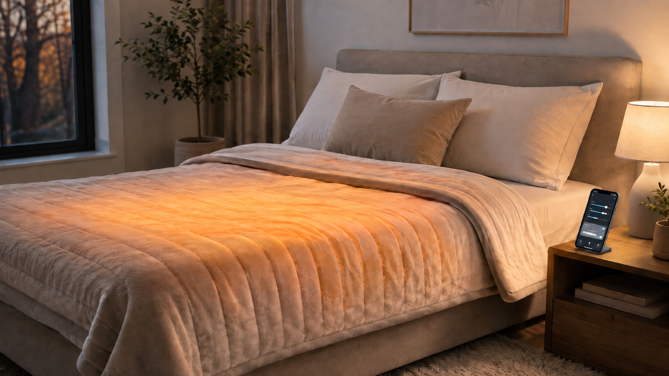
A smart heated blanket is electrically heated bedding that adds app or network control to the heat settings and safety timers on conventional models. Traditional heated blankets usually rely on a handheld dial or digital controller, while smart models may also provide scheduling, remote access and smartphone control through Wi-Fi (often 2.4GHz) or Bluetooth. Some established models also add voice control through Alexa or Google Assistant. Native Apple Home support remains exceptionally uncommon.
The key capabilities can include scheduling based on your routine, remote access from anywhere with Internet (on Wi-Fi models), and dual-zone heating that lets each side of a larger blanket use a different heat setting. Some models offer 5-20 heat levels, allowing finer adjustment.
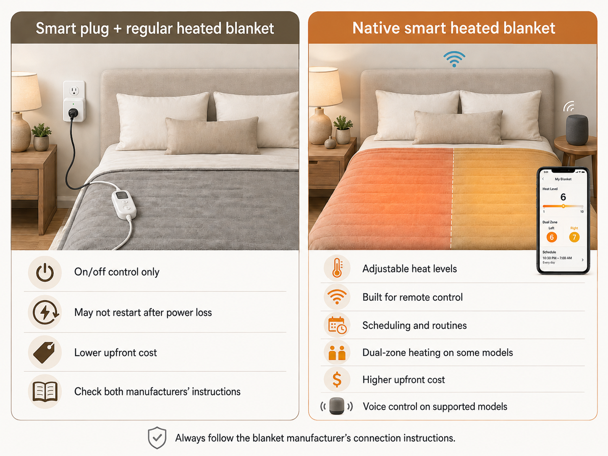
The crucial difference from using a smart plug with a traditional blanket is granular remote heat level control. While a smart plug only offers on/off functionality, native smart blankets let you adjust heat levels remotely, create detailed schedules and connect with compatible smart home routines and voice assistants.
How Do Smart Heated Blankets Work?
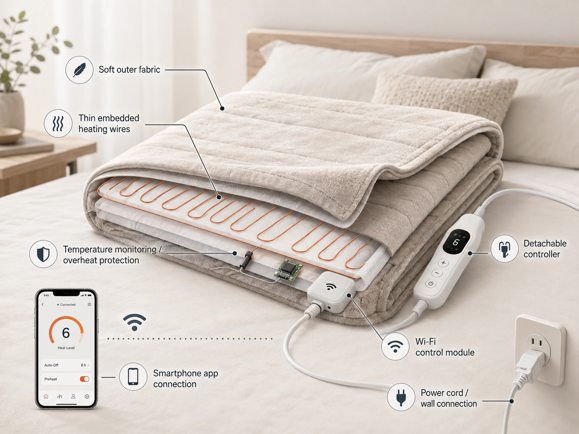
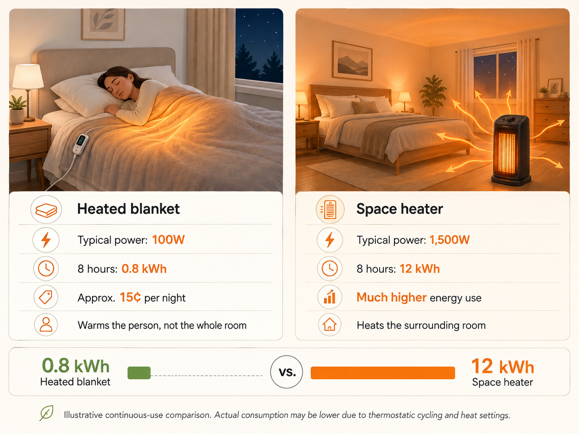
Smart heated blankets use thin, flexible heating wires embedded throughout the fabric. Modern models often use ultra-thin wiring (some brands call it “Invisiwire”) that’s hard to feel through the fabric for most sleepers. The heating element typically draws 50-150 watts, though larger dual-zone models can draw more. Overall, a heated blanket uses far less energy than a space heater or whole-home heating because it warms the sleeper directly rather than the surrounding room. Running a typical 100-watt blanket continuously for eight hours costs only about 15 cents at current average U.S. electricity rates.
The smart functionality comes from a control module connecting to your home Wi-Fi, communicating with cloud servers to enable remote access, voice commands, smart home integration and firmware updates. Some models rely on third-party IoT platforms such as Tuya for their app connectivity and cloud services instead of using a fully proprietary system. Advanced users can sometimes achieve local control through platforms like Home Assistant.
Safety features may include automatic shut-off, overheat protection, independent safety certification and app alerts on some models. Look for a recognized certification mark such as UL Listed or ETL Listed. Connected heated bedding should meet the applicable requirements of UL 964, including the provisions added in 2020 for remotely operated, smart-enabled products. Some brands also advertise “low EMF” wiring, but this is primarily a product design claim – not a standardized safety measure – so it shouldn’t replace checking for proper certification.
Can You Use a Smart Plug With a Heated Blanket?
A common question smart home enthusiasts ask is: “Can’t I just use a smart plug with a regular heated blanket?”
Sometimes, but it’s not that simple.
The Smart Plug Approach
Smart plugs generally cost around $10-25, compared with $100 or more for many native smart blankets. A traditional blanket with a mechanical switch will often resume heating on its own once power is restored through a smart plug. That doesn’t necessarily mean the arrangement is approved, though. Heated bedding instructions commonly require plugging the blanket directly into a wall outlet, and using a smart plug (or any external switching device) may conflict with the manufacturer’s instructions or the product’s built-in safety controls. Only use this setup if both the blanket manufacturer and the smart plug manufacturer explicitly permit it. And regardless of which approach you choose, never use a heated blanket with an extension cord or power strip.
Many modern blankets with digital controls require manual button presses to reactivate after a power loss, even when the manufacturer does permit smart plug use. If you’ve ever turned a blanket on with a smart plug and found it didn’t resume heating, that’s why.
That said, a smart plug only offers on/off control, with no heat level profiles or gradual heating patterns.
The Native Smart Blanket Approach
Native smart blankets give you everything described above – remote heat level control, scheduling, and on larger models, dual-zone heating – built directly into the blanket.
The downsides include a price of 2-4 times that of traditional blankets, dependence on Wi-Fi and manufacturer cloud services, potential connectivity issues and more limited model selection.
Features to Look for in a Smart Heated Blanket
Not all smart heated blankets are created equal. Here are the main features to consider.
Connectivity & Control
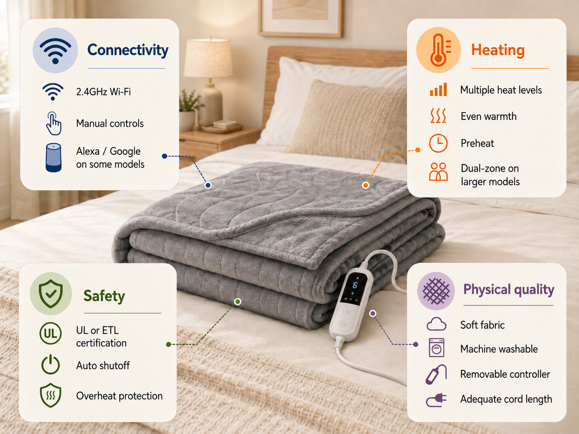
Check if the blanket supports 2.4GHz Wi-Fi only, and keep in mind that routers broadcasting a single combined network for both 2.4GHz and 5GHz bands can complicate setup. You may need to temporarily split them into separate 2.4GHz and 5GHz networks to get the blanket connected. Some established Wi-Fi models add Alexa or Google Assistant control, but integration varies substantially by brand, and native Apple Home or Matter protocol support remains rare. Check recent app store reviews before buying, since connectivity problems are common with lesser-known brands, and confirm the blanket still offers manual control if Wi-Fi goes down.
Heating Performance
Heat settings range from 5 to 20 levels depending on the model, with more settings giving you finer control over the amount of warmth. Dual-zone control is especially valuable if you share a bed with someone who prefers a different level of warmth, and preheat capability lets you warm the bed before you’re ready to sleep. Look for reviews that specifically mention consistent, even warmth without cold spots.
Safety & Certifications
Look for a recognized certification mark such as UL Listed or ETL Listed, and check the product documentation or certification listing to confirm evaluation to UL 964, the applicable standard for electrically heated bedding. Quality models generally include automatic shut-off, with timing options ranging from roughly one to ten hours depending on the product. They should also include built-in protection designed to detect abnormal heating or electrical faults. Warranty terms vary widely, from around a year on some connected sleep products to five years from established heated bedding brands.
Physical Quality
Quality blankets minimize how much you can feel the heating wires through the fabric, with microplush, fleece and sherpa among the most common options. Confirm the blanket is machine washable after removing the controller. Also check that the power and controller cords reach the intended wall outlet without stretching, pinching or routing them beneath the mattress.
Energy Efficiency: Are Smart Heated Blankets Worth It?
One of the most compelling arguments for smart heated blankets is energy savings, though results depend on your heating situation and usage patterns.
The Numbers
A typical smart heated blanket uses 50-150 watts (dual-zone models usually draw more). If a blanket averaged a continuous 100-watt draw for eight hours nightly, that works out to 0.8 kWh per night, or about 24 kWh a month. In practice, thermostatic cycling and lower heat settings often reduce actual consumption below this.
Compare this to a 1,500-watt space heater, which uses around 12 kWh over the same eight hours when it runs continuously. Neither device necessarily runs at full power the entire time, but the comparison still shows why heating a person takes far less energy than heating a room.
At the current U.S. average residential rate of just over 18 cents per kWh, that 24 kWh a month costs roughly $4.40, or about 15 cents a night. Rates vary considerably by state, from around 14 cents in North Dakota to over 50 cents in Hawaii. So your cost could end up noticeably higher or lower.
The Energy Saving Strategy
Smart heated blankets work best as part of zone heating. If comfortable and appropriate for your household, try lowering the whole-home thermostat by 2-3°F while sleeping. Even a small reduction may help, depending on your home and heating system. Combine this with a short preheat schedule, and where the manufacturer permits overnight use, a suitable low setting with automatic shut-off. Dual-zone control helps, letting each person manage their own heat setting without overheating shared spaces. Some users set up presence detection to avoid heating empty beds.
The meaningful savings come only if the blanket actually allows you to reduce whole-home heating. When it does, the savings can be modest or substantial depending on your climate, fuel costs, insulation and thermostat habits. Simply running a heated blanket on top of an unchanged thermostat schedule, on the other hand, increases your electricity use without offsetting savings elsewhere. Either way, the blanket’s low power draw makes targeted personal heating far cheaper than running a 1,500-watt space heater for the same number of hours, and smart features help it run only when needed and at the heat level you selected.
Integration with Smart Home Platforms
Smart heated blankets fit naturally into broader home automation systems.
Alexa and Google Assistant
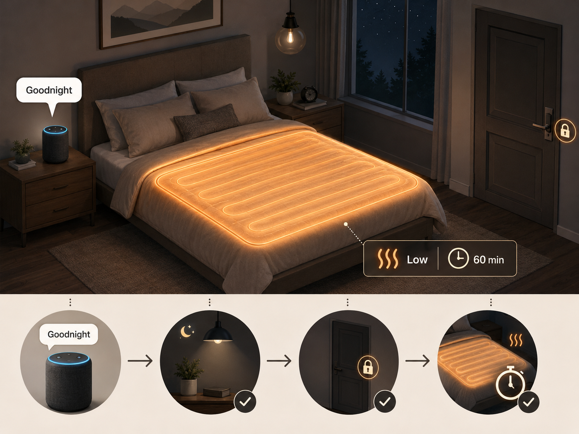
Some established Wi-Fi heated blankets link to Alexa or Google Assistant through a manufacturer’s account and skill. Depending on the integration, commands may include turning the bedding on or off, and raising or lowering its heat setting. More specific actions like a delayed shut-off usually go through the app or an assistant routine instead of a single voice command.
You can create routines combining multiple actions. On a model designed for remote operation, a “Goodnight” routine might lock the doors, turn off the lights and begin a timed low-heat cycle, while a “Wake up” routine turns off the blanket, starts coffee and reads the weather.
Apple Home and Homebridge
Very few heated blankets integrate natively with Apple Home. Some technically experienced users may be able to bridge compatible products through Homebridge.
Home Assistant and Local Control
For advanced users, Home Assistant offers more flexibility. Home Assistant’s official Tuya integration generally relies on Tuya’s cloud service, so it works with more devices but keeps the same cloud dependency as the manufacturer’s own app. Community options such as LocalTuya can provide local control for compatible devices instead, but setup is more involved. It typically requires obtaining device keys and correctly mapping the blanket’s controls, and support varies by model. Where a local setup works, it can enable more complex automations, energy monitoring, room temperature-based adjustments and presence detection to avoid heating empty rooms, without depending on the manufacturer’s cloud service.
Where a brand supports IFTTT or a similar automation service, you may be able to link short preheat routines to time, temperature or presence conditions. Build in fail-safe timers on any automation. Be especially cautious with location-based triggers like turning the blanket on when you leave work, since a change of plans could leave it heating with nobody coming home.
Safety Considerations for Smart Heated Blankets
Modern smart heated blankets are generally safe if you follow the manufacturer’s instructions, but smart connectivity requires paying attention to both physical safety and cybersecurity.
Physical Safety
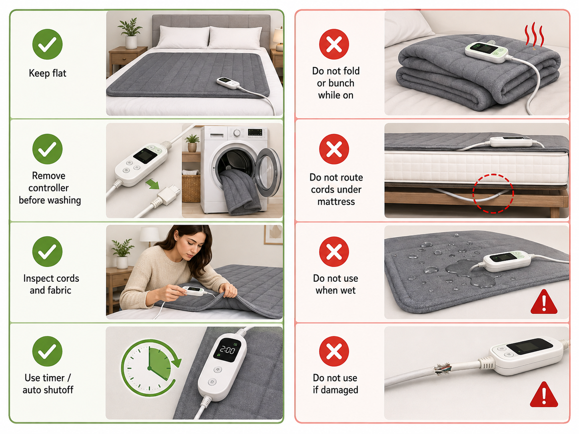
Never bunch or fold a heated blanket while powered on. This creates dangerous hot spots. Inspect regularly for frayed cords, damaged fabric or exposed wires, replacing immediately if you spot a problem. Follow washing instructions carefully, always removing controllers before washing and ensuring complete drying before reconnection.
Always enable timer functions for extra protection beyond automatic safety shut-offs and never use in areas where the blanket could get wet. Follow all age and health-related warnings in the manual. Manufacturers commonly discourage heated bedding for anyone who can’t reliably detect excessive heat, move away from it, or operate the controls independently. If pets share the bed, inspect the blanket more often, since claws and chewing can damage the internal wiring.
Cybersecurity and Cloud Dependency
Secure your Wi-Fi network with a strong, unique password, and use a separate strong password for the blanket’s app account. Enable two-factor authentication when available, keep firmware updated for security patches, review app permissions to ensure only necessary access and consider network segmentation (for advanced users).
Many app-controlled heated blankets rely on manufacturer cloud services for remote access. Important questions here are:
- What happens if the company discontinues the product line?
- Can you use basic functions without Internet?
- Is there manual controller backup? How does the device handle Wi-Fi outages?
Some manufacturers have discontinued cloud services for older products, effectively “orphaning” purchased devices. Research brand track records and long term support commitment. Before relying on automations, test that manual controllers fully operate heat levels and timers during Wi-Fi outages.
A Blanket Recommendation
A smart heated blanket earns its premium when the connected features solve a real problem – warming the bed on schedule, accommodating two temperature preferences or helping you lower the thermostat without sacrificing comfort. Otherwise, a well-certified conventional model may deliver the warmth you need with less expense and fewer points of failure.
Whichever route you choose, prioritize independent safety certification, dependable manual controls and sensible timer settings over flashy app features. The smartest blanket is the one you can trust long after the novelty wears off.
Because when comfort meets electricity, peace of mind should always be part of the package.
Ready to buy one? For model recommendations, see my best smart heated blankets and mattress pads review.