
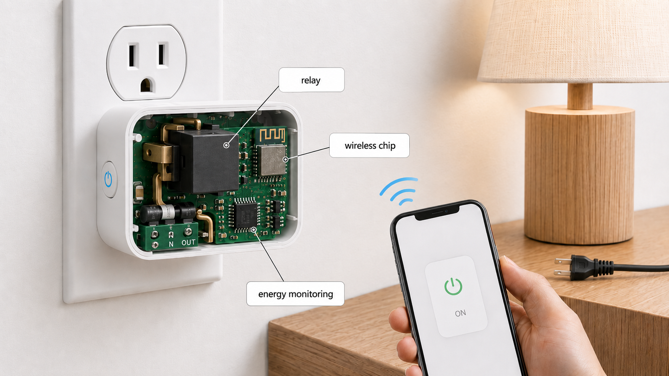
A smart plug doesn’t generate electricity or change how much of it your appliance uses. It sits between your wall outlet and your device, and it handles three things – switching the circuit on or off, talking to your phone or smart home platform, and on models with the feature, measuring how much electricity is flowing through it. The rest is software wrapped around those three jobs.
Most explanations of “how a smart plug works” stop at “plug it in and use an app”, which describes the experience but skips the mechanism. This guide covers what’s actually happening inside the housing – the switching, the pairing process, and how energy monitoring models calculate wattage.
How the Switching Works
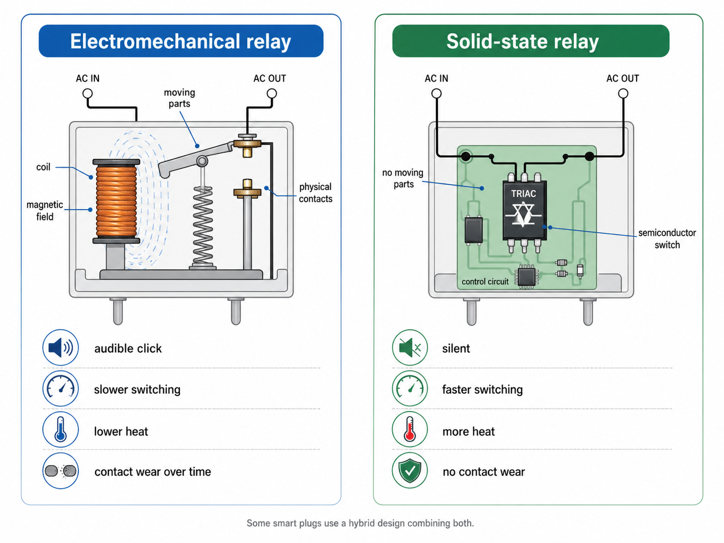
At its core, a smart plug does the same job as a wall switch. It opens or closes a circuit. The difference is what triggers this. A wall switch responds to your hand. A smart plug responds to a signal from its onboard chip, typically received from your phone over Wi-Fi. On some Matter devices, that signal travels over a low-power mesh protocol called Thread instead. The switching happens inside a relay, built one of two different ways.
An electromechanical relay is the traditional approach. A small coil of wire, when energized, creates a magnetic field that pulls a physical lever called an armature, closing a connection between two metal contacts. This is a real moving part, and it’s why some smart plugs make a faint click when switched through the app. Electromechanical relays are simple and well understood, but the contacts wear over many switching cycles, and the moving parts limit switching speed.
A solid-state relay does the same job with no moving parts. Instead of a coil and a physical contact, it uses semiconductor electronics, commonly a triac or a MOSFET, to control current flow. With nothing mechanical to move, solid-state relays switch faster and generally outlast electromechanical ones on switching cycles alone, since there are no contacts to wear out or arc. Heat, not mechanical wear, becomes the thing that limits their lifespan.
Why Manufacturers Mix the Two
Neither type is simply “better”, and this is where smart plug design runs into a trade-off rarely mentioned outside patent filings and engineering literature. Fast solid-state switching generates heat, and a smart plug sits inside a small, mostly sealed, palm-sized outlet adapter with limited airflow. Mechanical relays are slower but produce less heat. Because of that, some designs use a hybrid, composed of a fast semiconductor switch paired with a slower mechanical relay. This balances speed against heat buildup in that confined space.
How a Smart Plug Gets Connected
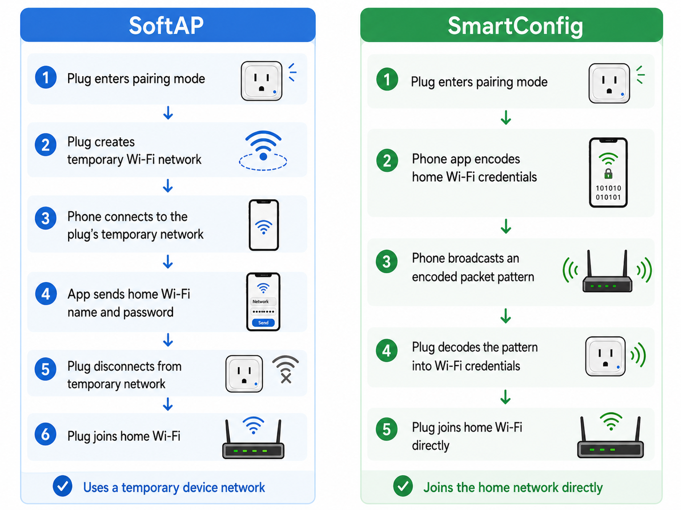
Before a Wi-Fi smart plug can do anything useful, it needs to join your home network. That’s a small technical puzzle. The plug has no screen, no keyboard, and no way for you to type in your network name and password. Pairing solves that, usually one of two ways.
SoftAP
The first is SoftAP, short for software-enabled access point. Putting a new plug into pairing mode usually means holding its button until the indicator light flashes. That makes it temporarily act as its own miniature Wi-Fi network. Your phone connects to that network directly, and the app hands over your home network’s credentials through that connection. Once the plug has those credentials, it disconnects from the temporary Wi-Fi network and joins your home one. That’s why setup sometimes asks you to briefly connect to a network named something like “SmartLife-XXXX” before pairing finishes.
SmartConfig
The second method is a provisioning technology often called SmartConfig. That’s the name Texas Instruments gave its version, though similar approaches exist under other names depending on the chipset. Rather than creating its own network, the unconfigured plug listens while your phone broadcasts your network’s credentials in a specially encoded way over your existing Wi-Fi. The smart plug then joins directly, without first creating its own temporary Wi-Fi network.
This whole process is generally faster when it works, but it depends on the router cooperating. Some routers block or filter the broadcast traffic SmartConfig relies on by default, especially newer routers with stricter security settings. That can cause pairing to fail silently with no clear error message.
Wi-Fi Band Considerations
One detail explains a lot of pairing frustration. Most consumer smart plugs only support 2.4GHz Wi-Fi, not 5GHz. If your router broadcasts both bands under the same network name, setup can fail. When this happens, it’s usually because the router has steered your phone onto 5GHz during pairing. The plug, which typically only supports 2.4GHz, is left waiting on a band it can’t reach, so the handshake never completes. This isn’t a flaw in the plug. 2.4GHz has better range through walls than 5GHz – for a small, inexpensive device, that range advantage outweighs the loss in raw speed.
How Matter Plugs Pair Differently
Matter-certified smart plugs pair differently. Setup usually starts with a setup code, most often a QR code on the device, though some implementations support a manually typed numeric code, or on newer hardware, NFC. The most common path still hands your smart home platform a cryptographic code over a Bluetooth handshake first. From there, the plug switches to Wi-Fi, or on Thread-based models, joins the Thread mesh for ongoing communication. That extra step buys broader compatibility. A Matter plug can work with Apple Home, Amazon Alexa, Google Home, and Samsung SmartThings without being tied to one manufacturer’s app. The catch is that adding it to each additional platform takes its own short setup step. It doesn’t happen automatically just because the first pairing worked.
Read my guide to Matter smart plugs with energy monitoring to find out what’s currently available, if cross-platform flexibility matters to you.
How Energy Monitoring Measures What You’re Using
Not every smart plug measures energy use, but the ones that do perform real electrical measurement, not just an estimation. The math is simple. Wattage equals voltage multiplied by current. A plug with energy monitoring measures both continuously and does that multiplication itself, many times per second, to produce the real-time wattage reading in the app.
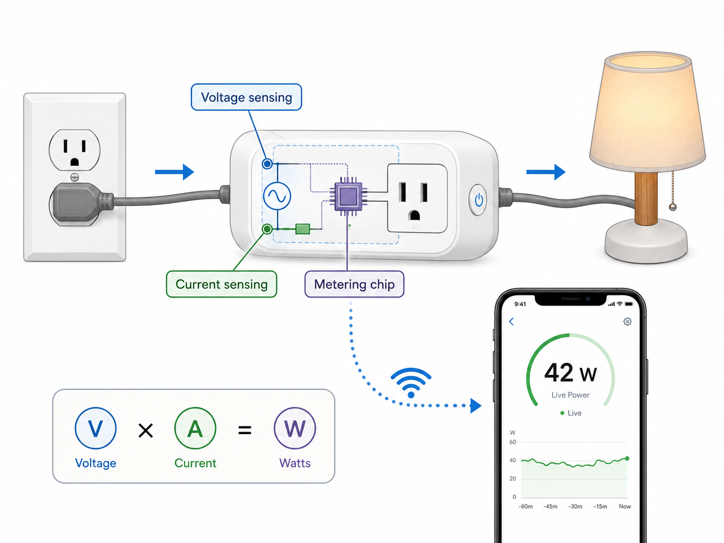
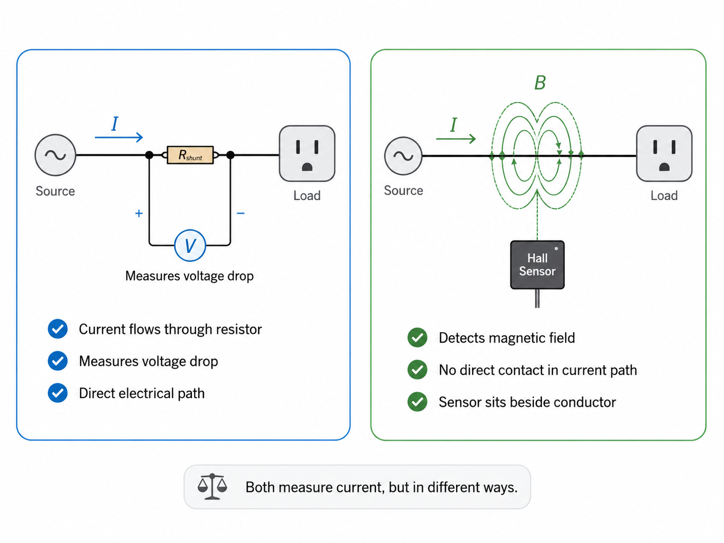
Manufacturers use a couple of different approaches to measure current.
One uses a shunt resistor – a tiny resistor of precisely known value placed directly in the current’s path. Current flowing through it creates a small, measurable voltage drop. Voltage, current and resistance are mathematically linked (a relationship known as Ohm’s law). With the resistor’s value and the voltage drop both known, the current itself can be calculated.
Consumer smart plugs that hobbyists have opened up and documented show shunt resistor values as small as 0.001 ohms. These are often paired with a dedicated metering chip, such as the HLW8012 or BL0937, whose job is reading that voltage drop and the line voltage, then calculating power.
A second approach uses a Hall-effect current sensor, like the ACS712 chip from Allegro MicroSystems. Instead of calculating current from the voltage drop across a precision shunt resistor, it uses a Hall element to detect the magnetic field produced as current flows through an internal conductor. That magnetic field is converted into a small voltage, which the plug’s electronics can read.
Both approaches are legitimate. Which one a given plug uses comes down to manufacturer choice, cost and targeted accuracy.
How Accurate Is the Reading You See?
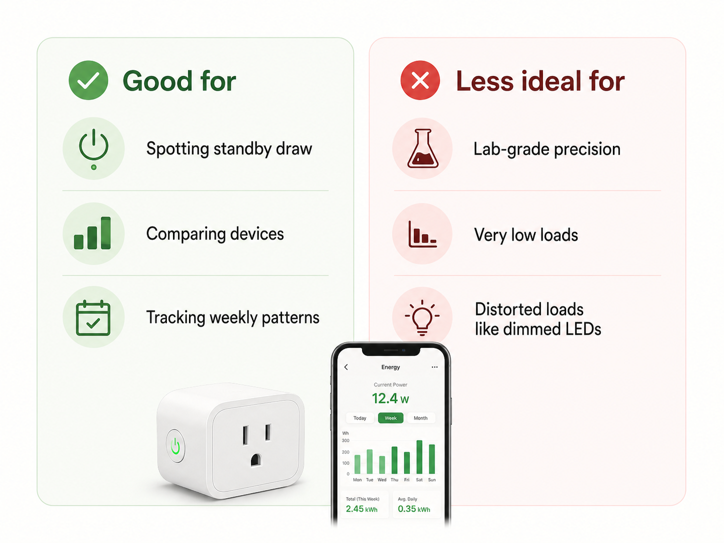
It is worth being honest about what this hardware can and can’t do well. Consumer smart plugs are genuinely useful for spotting patterns, like which device draws more power, whether something’s still on when you thought it was off, or how usage trends over a week.
They’re less suited to lab-grade precision, for real, documented reasons. One source of error is built into how the plug converts what it measures into a number you can read. Electricity flows smoothly and continuously, but the plug’s chip can only report it in small, discrete steps – like reading a ruler that’s only marked in quarter-inches instead of in fine fractions. That small, unavoidable rounding is called quantization error, and it happens every time an analog signal like electricity gets turned into a digital reading.
Current sensors also work best when what they’re measuring is close to what they were built to handle, the same way a kitchen scale built for weighing a 5-pound bag of flour won’t give you a precise reading on a single paperclip. At very low power draw, that means the numbers get less reliable.
Why Waveform Shape Throws Off the Numbers
Waveform shape plays a bigger role than most buyers realize. A smart plug does not always see a smooth, steady current draw. Imagine the difference between a faucet running at a constant trickle versus one being rapidly turned on and off. Both deliver water, but one is far easier to measure accurately than the other. LED lights on a dimmer, electronics with power adapters and variable-speed appliances do something similar with electricity. Instead of pulling power in one steady, predictable stream, they pull it in short, uneven bursts. A plug’s sensor, taking its periodic readings the same way, can easily catch that kind of fast, uneven draw at the wrong moment and report a number that doesn’t reflect what’s really happening.
A 2023 peer-reviewed study tested five smart plug brands – Belkin, TP-Link, Etekcity, Emporia and Sonoff – under both steady and rapidly changing loads. Belkin performed well, keeping its maximum energy measurement error below 1.7%. The other four brands showed much larger maximum errors, from 54% to 100%, when measuring variable loads. Every plug tested had some reporting delay, usually three to six seconds, and sometimes up to twenty.
That does not make energy monitoring smart plugs useless. It means they are best treated as practical home use tools, not lab instruments. They are useful for spotting standby draw, comparing everyday devices, and tracking rough usage patterns over time. For dimmed lights, pulsing electronics or variable-speed appliances, the live number can lag by several seconds and land far from the real reading (though the app may show it with a false sense of precision).
Putting It Together: What Happens When You Tap “On”
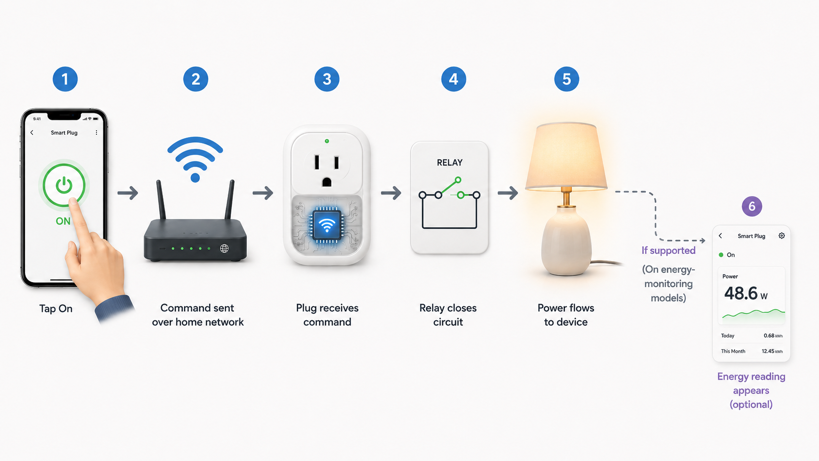
Put the three mechanisms together, and here’s what actually happens between tapping a button and your lamp turning on. Your phone sends a command, typically through your home network, to the plug’s onboard chip, which has been connected and listening since pairing completed. That chip triggers the relay, closing the circuit and letting current flow. If the plug has energy monitoring, its sensing circuit starts reading current and voltage almost immediately, and your app shows a live wattage number within moments. The whole sequence normally takes well under a second.
The Current Takeaway
Knowing how a smart plug works changes the way you judge one. You stop treating it as a cheap upgrade for anything with a cord and start seeing it as a small control point – a relay rated for a load, a wireless connection that has to stay reliable, and sometimes a meter that gives useful guidance.
For simple plug-in devices like lamps, fans, chargers and holiday lights, that control can be surprisingly valuable. When several of them share one outlet, a smart power strip with individual outlet control handles them all in one go. For heaters, large appliances, dimmed lighting, variable-speed motors or anything where bad data could mislead you, the details inside the adapter deserve more attention.
The real power comes from knowing when a smart plug belongs – and when it should stay out of the outlet.
Now that you know what’s happening inside the housing, the natural next question is whether it’s safe. The guide to whether smart plugs are safe covers UL and ETL certification, amperage limits, and the actual fire risk data behind that question.