
Halloween lighting does more for a spooky house than almost any decoration. A glowing orange window, a few long shadows and a purple porch will set the mood faster than a yard full of inflatables. With the right setup, most of it can switch on at dusk and off at bedtime by itself.
This guide covers indoor and outdoor Halloween lighting ideas that work with ordinary bulbs. It also covers the color combinations that read as Halloween from the street, and what certain porch light colors actually mean. Several ideas include a smart upgrade for anyone who wants their lighting on a schedule, including a scheduled routine I tested with an Innr color bulb and an Echo Dot Max.
Some of the best Halloween lighting ideas include a glowing front window, a colored porch bulb, lit rooflines and string lights, uplit trees, backlit window silhouettes and a clearly lit path to your door. Smart lights can also be scheduled to come on automatically at sunset.
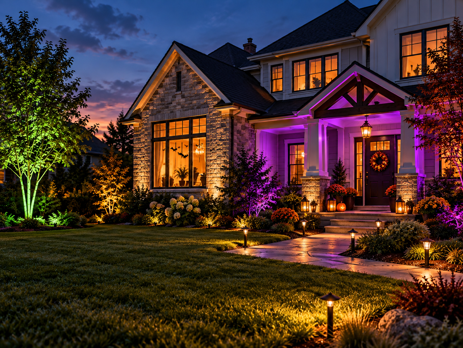
Indoor Halloween Lighting Ideas
Indoor lighting is the easiest place to start. You don’t need any outdoor-rated equipment, and a single lamp in the right spot can be seen from the street.
Turn Your Front Window Into a Glowing Display
Your front window is the first thing trick-or-treaters see as they walk up. Place a lamp with an orange or purple bulb close to the glass, and the whole window glows after dark. Sheer curtains or closed blinds help here. They diffuse the light and spread the color across the window instead of leaving one bright spot.
Smart upgrade: A color smart bulb switches between orange, purple and green without swapping bulbs. A schedule can also turn it on at dusk automatically. This is the setup I tested for this guide – the full walkthrough is further down.
Go Low and Warm for a Candlelit Feel
Rooms look more atmospheric with less light, not more. Switch off the overhead lights and rely on lamps set to a very warm, dim glow. It gives you the flickering candle mood of an old house without any open flames. Amber or “candlelight” LED bulbs do this in any standard lamp.
Smart upgrade: Tunable white smart bulbs can go much warmer than a standard 2700K bulb. The Innr A19 White and Color (around $30 for a 2-pack) drops to 1800K. At low brightness, that looks far closer to candlelight than a regular warm white. Animated effects like flickering candles usually live in the manufacturer’s own app, not in Alexa or Google Home. Check what your bulb and platform support before counting on them.
Use Colored Uplighting to Create Shadows
Light from below is what makes a room feel unsettling. Place a lamp or small uplight on the floor behind a plant, coat stand or skeleton. Aim it at the wall. Green or deep red from a low angle throws long, distorted shadows across walls and ceilings. The same color from a table lamp looks nothing like it.
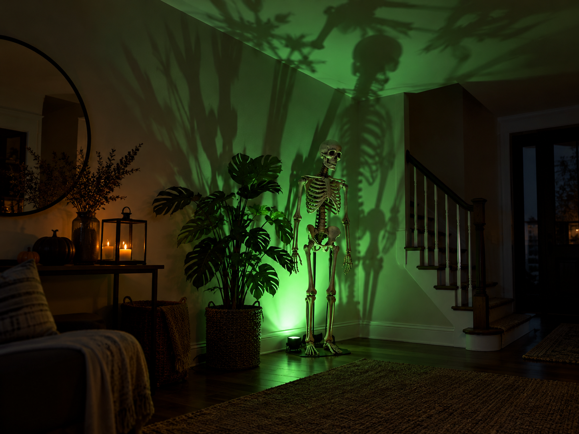
Smart upgrade: Any color smart bulb in a floor lamp works. Put it in the same room group as your window lamp, and both change color together from one command or schedule.
Backlight Silhouettes in Your Windows
Tape black paper cutouts to the inside of a window – bats, a witch on a broom, a figure reaching out. With a lamp on behind them, they become sharp silhouettes. Keep the rest of the room dark so only the window glows. An orange or deep red bulb behind the cutouts makes them stand out even more from the street.
Outdoor Halloween Lighting Ideas
Outdoor lighting is where Halloween displays get noticed, but it’s also where equipment ratings matter. Anything you use outside needs to be rated for outdoor use. Anything plugged in outdoors should go into a GFCI-protected outdoor outlet with a weatherproof cover.
Swap Your Porch Light Color
The quickest outdoor change is the porch bulb itself. An orange bulb in the porch fixture immediately signals Halloween to anyone walking past, and it costs almost nothing. Before swapping, check the fixture. If your porch fixture is enclosed or exposed to damp conditions, make sure the bulb manufacturer lists it as suitable for that use. That applies to smart and regular bulbs alike.
Smart upgrade: A color smart bulb works in a porch fixture if it’s rated for that location. Your network also needs to reach it. Wi-Fi bulbs need a decent signal at the front door. Zigbee bulbs rely on the mesh reaching outside, so a powered Zigbee device near the front of the house helps. The Zigbee bulbs guide explains which bulbs strengthen the mesh and which don’t.
Outline Your Roofline
Lighting the eaves turns the whole shape of your house into part of the display. For Halloween-only use, clip-on string lights along the gutters do the job at low cost. Orange and purple work well, and the lights come down easily in November.
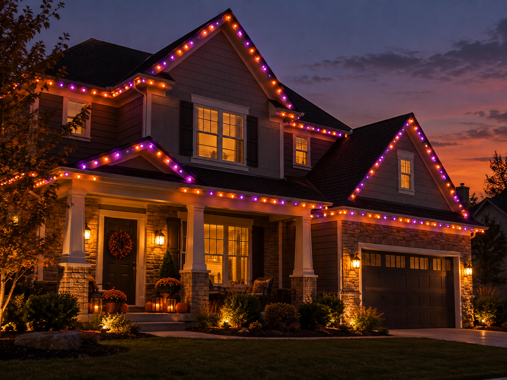
Smart upgrade: Permanent outdoor lights stay up year-round and change color from an app. The Govee Permanent Outdoor Lights 2 ($280-$330 for 100 ft) include 100 scene modes, including Halloween presets. The same install carries straight through to Christmas. The lights are IP67 rated with an IP65 control box, and they work with Alexa, Google Assistant and Matter. There are two things worth knowing before you buy – the lights can’t be cut to length, so measure your roofline first, and Govee specifies installation to a covered Class A GFCI outlet only.
Hang String Lights on a Fence, Porch or Patio
Permanent lights aren’t practical for everyone, especially renters. String lights give you color outdoors with no installation. Drape them along a fence, wrap them around porch railings, or zigzag them over a patio.
Smart upgrade: The Govee S14 Bulb Outdoor String Lights 2 ($80-$160 depending on length) come in 48 ft (15 bulbs), 96 ft (30 bulbs) and 144 ft (45 bulbs) versions. The 48 ft length suits a porch or small patio, while the longer runs cover a fence line or backyard. Each bulb can show a different color. The lights are IP66 rated and work with Alexa, Google Home and Matter. Govee rates them for temperatures from -4°F to 104°F.
Uplight Trees and the Front of Your House
A stake-mounted floodlight aimed up into a tree or across your siding makes a big visual impact for very little effort. Green or purple light on a bare tree trunk looks especially eerie. Colored LED floodlights are sold specifically for this. Weatherproof smart spotlights from brands like Philips Hue and Govee add app control and color changing, at a higher price.
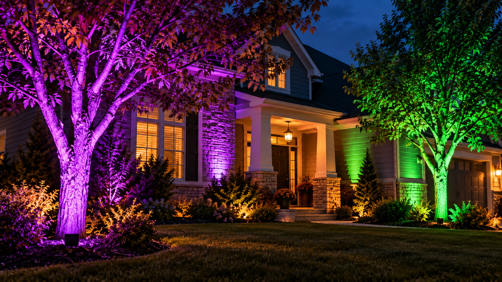
Light the Path to Your Door
Trick-or-treaters need to see where they’re walking, especially small ones in costumes. Lanterns or stake lights along the path keep the route clear. Battery-powered LED candles inside carved pumpkins avoid the open-flame risk around costumes and dry leaves.
Keep the path itself bright and steady, and save flashing or strobing effects for the yard. Rapid flashing near the door can be hard on some visitors, and it makes steps and edges harder to judge in the dark.
Halloween Light Colors
Color does most of the work in Halloween lighting. The same lamp can look festive, eerie or unsettling depending on the colors you pair and how bright you run them.
Classic Halloween Color Combinations
| Combination | Mood | Where It Works Best |
|---|---|---|
| Orange + purple | Classic, playful | Porches, front windows, rooflines |
| Green + purple | Witchy, eerie | Uplit trees, accent lamps |
| Deep red + dim amber | Horror, haunted house | Entryways, living rooms |
| Cool blue + white | Ghostly, moonlit | Yards, fences, fog effects |
| Very warm white (1800K-2200K), dimmed | Candlelit, old house | Living rooms, lanterns |
Brightness is just as important as color. As a starting point, try 20-50% brightness. At full brightness, orange tends to look more like a sports bar than a haunted house.
What Porch Light Colors Mean
Most colored porch lights at Halloween are simply decoration. A few colors do carry associations that some neighbors may recognize, although none of them are universal.
Purple: October is Domestic Violence Awareness Month, and purple is its recognized awareness color. Some local organizations run purple porch light campaigns in October, encouraging residents to use purple lights in support of survivors. Purple is also a Halloween staple, so most people won’t read a purple porch light as a statement. Some will, though, and it’s a meaningful reason to choose it.
Teal: Teal is linked to the Teal Pumpkin Project, run by Food Allergy Research & Education (FARE). The official signal is a teal pumpkin or sign outside your home. It shows you have non-food treats for children with food allergies. A teal light isn’t part of the campaign on its own. It does make a good companion to a teal pumpkin if you’re taking part.
Green: Green lights in early November are often part of Operation Green Light for Veterans, led by the National Association of Counties (NACo). Counties light buildings green in the week leading up to Veterans Day (November 4-11 in recent years). Residents are encouraged to switch a porch or window bulb to green too. With a color smart bulb, switching from Halloween orange to green later is a single change in the app.
Blue: You may have seen claims that blue signals autism awareness at Halloween. The idea comes from blue trick-or-treat buckets, promoted as an informal autism-related signal in a viral 2018 Facebook post. It isn’t an official or widely standardized symbol, and there’s no established meaning for a blue porch light on Halloween.
Automating Your Halloween Lighting
The most useful Halloween automation is also the simplest. Lights come on by themselves at dusk and switch off at the end of the night. Nobody has to remember to turn the display on, and nothing stays lit until morning.
Schedule Your Lights for Sunset
A sunset trigger is better than a fixed time because sunset moves. Through October, it gets earlier every evening. A fixed on time that suits early October will switch your lights on well after dark by Halloween, unless you keep moving it earlier.
In the Alexa app, open Routines and tap +. Add a Schedule event and choose Sunset, which sits alongside At Time and Sunrise. A Time Offset slider lets you run the routine a set number of minutes before or after sunset, and Repeat defaults to every day. Google Home and Apple Home offer similar sunrise and sunset triggers in their automation settings.
There’s one extra reason to use sunset this year. Halloween 2026 falls on a Saturday, and Daylight Saving Time ends the following morning (Sunday, November 1) in most of the U.S. If you’re keeping the lights running into November, the sunset trigger also adjusts automatically when the clocks go back.
Hands-On: A Halloween Schedule With the Innr Bulb
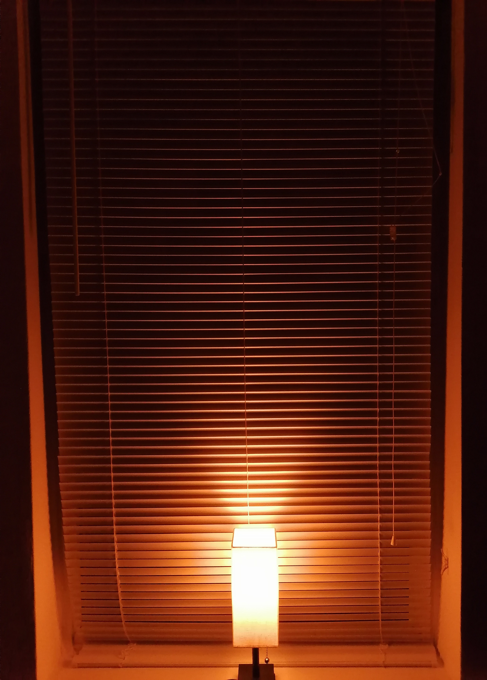
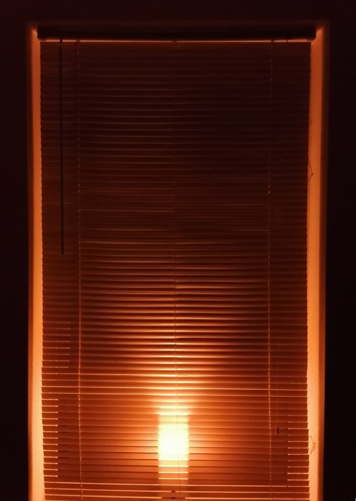
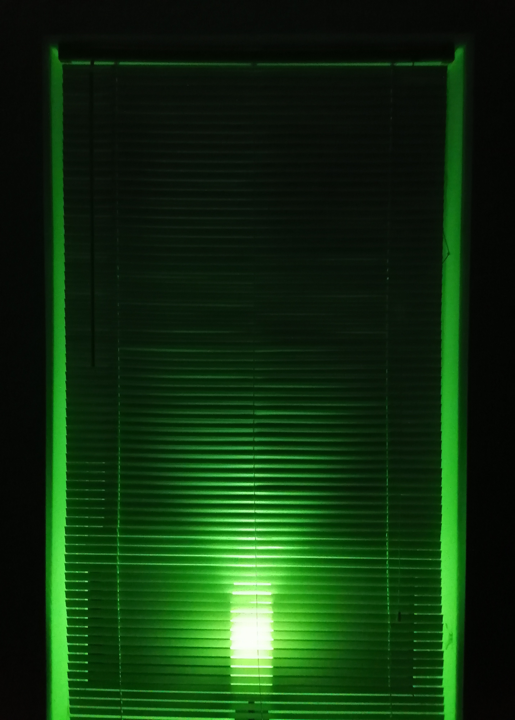
To test this, I set up an Innr A19 White and Color bulb in a table lamp on a windowsill, behind closed blinds. The bulb is paired directly to the Echo Dot Max, which has a built-in Zigbee hub. There’s no Innr app or bridge involved. Everything runs through Alexa routines.
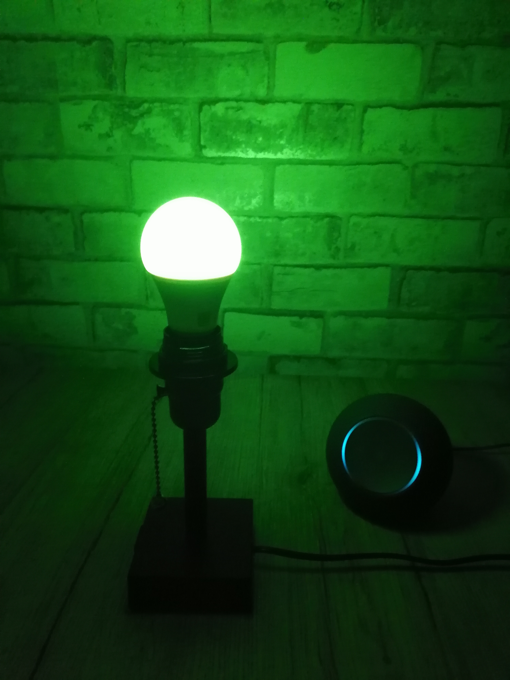
For the test, I used fixed times rather than a sunset trigger, across three routines:
- Halloween on: At 6:30 PM, the bulb turns on in dark orange at 30% brightness.
- Color change: At 8:00 PM, the bulb switches to lime green, still at 30%.
- Halloween off: At 9:00 PM, the bulb turns off.
Building the Routines
One setup detail caught me out. When I built the color routines in the Alexa app, the color picker only offered a handful of default colors, and neither dark orange nor lime green was among them. Creating the routines by voice instead let me use Alexa’s named colors. For the first routine, I said: “Alexa, create a routine which turns on Innr light, changes the color to dark orange, and sets the brightness to 30% at 6:30 PM every day.” The green routine used the same wording with lime green and 8:00 PM. Swap in your own bulb’s name as it appears in the Alexa app. The off routine was built in the app as normal.
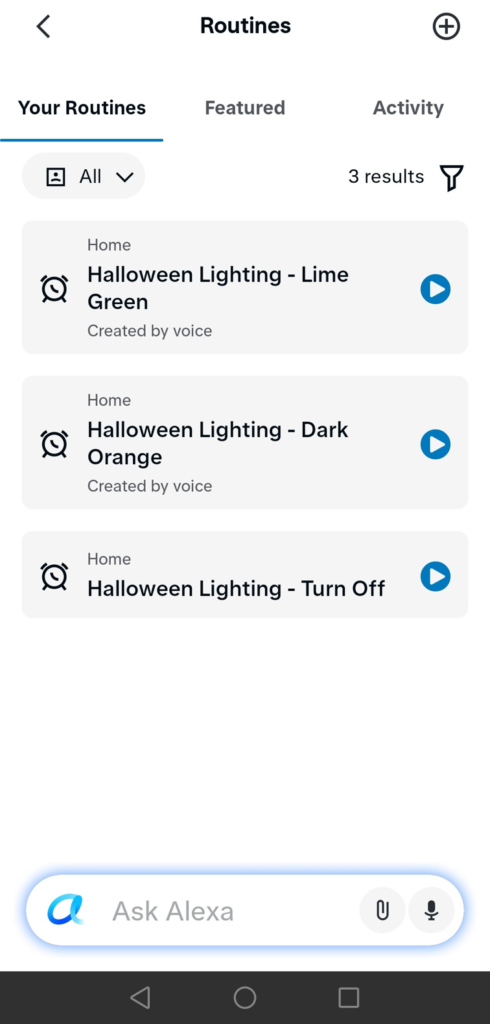
I originally planned purple for the second color, but on this bulb every purple shade I tried, including dark violet, came out closer to pink or magenta. Lime green read clearly as a Halloween color, so I switched. If you’re set on purple, check how your bulb renders it before building a routine around it.
How It Performed
Over six evenings, every routine ran without a miss. I watched many of the changes happen in real time, and the Alexa app’s activity log confirmed the exact trigger times. The dark orange routine fired at exactly 6:30 PM every time. The color change and off routines were consistently a little late, landing between two and five minutes after their scheduled times. For a Halloween display, a few minutes either way doesn’t really make a difference, but don’t necessarily expect to-the-minute precision from every routine.
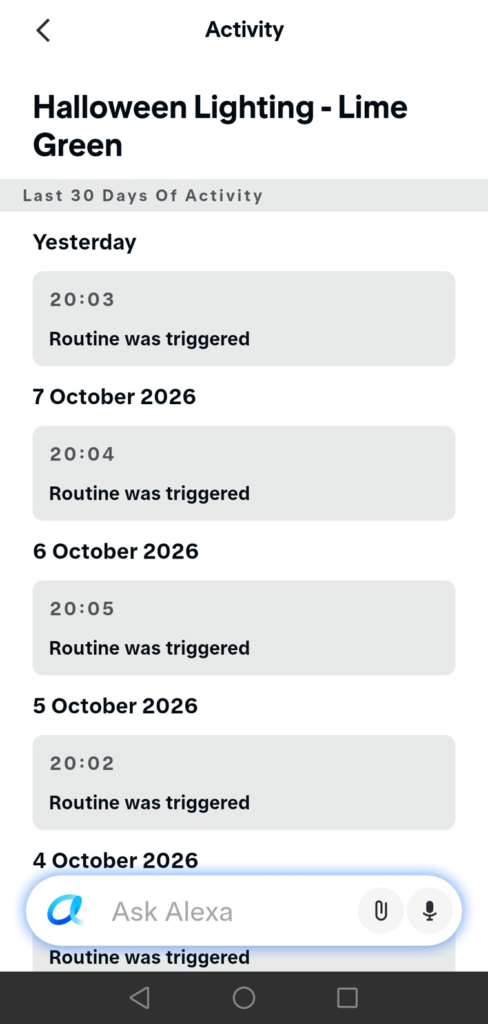
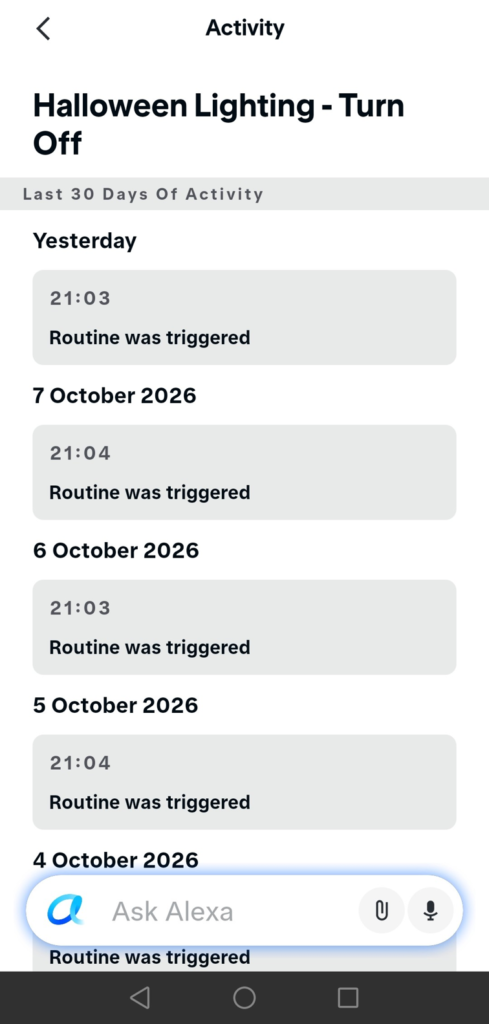
Placing the lamp behind the blinds made a bigger difference than I expected. With the lamp in front, the light stayed concentrated around the shade. Behind the blinds, the slats spread the color across more of the window, which is far closer to the glowing-window effect you want people to see from outside. At 30% brightness, both colors looked rich.
My Zigbee hub guide covers the full pairing process with the Echo Dot Max, along with the motion-triggered color automation I tested earlier.
Put Your Existing Decorations on an Outdoor Smart Plug
Most Halloween decorations aren’t smart. Inflatables, animatronics, projectors and ordinary string lights all just plug in. An outdoor smart plug lets them follow the same schedule as your smart bulbs, so the whole display comes on together. If you’re new to them, you can learn how smart plugs work here.
These plug picks are research-based, drawing on manufacturer specifications and retailer listings.
Tapo P400M ($20-$30) is the most flexible option. It’s Matter-certified with two independently controlled outlets, rated IP65 and for temperatures from -4°F to 122°F. TP-Link rates its Wi-Fi reach at up to 300 ft in open areas. Walls and distance from your router will reduce that in practice. Because it supports Matter, you can set it up by scanning its code in the Alexa, Google Home or Apple Home app. It then joins the same routines as your lights.
Kasa EP40 ($15-$25) is the budget pick with the longest track record of the three. It has two independently controlled outlets with a maximum load of 15A/1875W across the plug. It’s rated IP64 and works with Alexa and Google Home. The Kasa app also has its own sunrise and sunset schedules with offsets, if you’d prefer to manage the schedule there rather than through Alexa routines.
Already using the Kasa app and want Apple Home support? The Kasa EP40M ($20-$30) is the Matter version of the same dual-outlet design. It works with Apple Home, Alexa, Google Home and SmartThings.
Whichever plug you choose, add up the wattage of everything plugged into it. Use a covered outdoor outlet, and avoid chaining extension cords together. Are smart plugs safe? covers load limits and safety certification in more detail. The Matter smart plugs guide covers plugs with energy monitoring, so you can see what your display costs to run.
Switch Everything Off When the Candy Runs Out
A dark porch is the traditional signal that a house is done for the night. Put all your Halloween lights and plugs into one group in the Alexa, Google Home or Apple Home app. A single tap then switches the whole display off. You can do it from the couch, or from your phone while you’re out trick-or-treating with your own kids.
Lights Out, Frights Out
The best Halloween displays give people something to notice from the street, but the details matter just as much up close. A glowing window creates intrigue, carefully placed shadows add atmosphere, and a well-lit path makes sure even the smallest trick-or-treaters can enjoy it safely.
Before October 31, take one walk past your house after dark, ideally right after your schedule switches on. See what catches your eye, check for harsh glare or dark spots, and adjust your lighting accordingly. It’s a simple test that can make a bigger difference than buying another decoration.
The trick is getting the atmosphere right. The treat is seeing everyone’s reactions.
For more help choosing your setup, my guide to how smart bulbs work covers compatibility, hubs and fixtures, while the Philips Hue vs Govee comparison helps you decide which ecosystem deserves your money.