
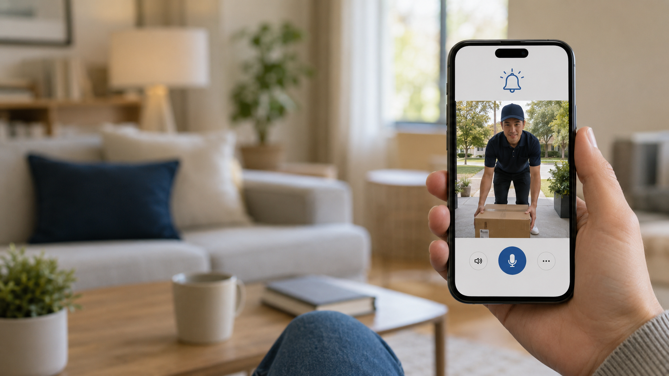
A shadow crosses the porch, and your phone buzzes before the visitor reaches the button. You tap the notification, see a delivery driver setting down a box, and say thanks through a speaker built into the unit above your door.
So how do doorbell cameras work? This guide explains what happens between someone approaching your door and an alert appearing on your phone. That includes motion detection, video capture, two-way audio, storage, smart home integration, and either wired or battery power.
What a Doorbell Camera Actually Is
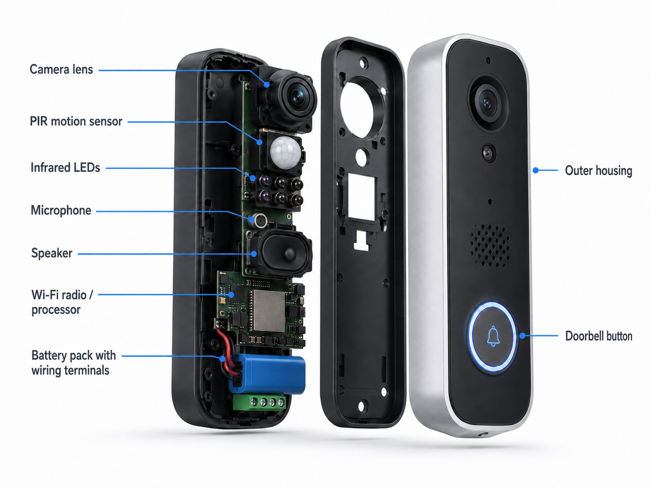
A doorbell camera (sometimes simply called a door camera) is a connected video camera built into, or mounted beside, a doorbell button. It typically uses motion detection to send alerts and begin recording, viewable through a companion smartphone app. Inside the housing, you will generally find a camera module, a motion sensor, a microphone and speaker, a wireless radio, a processor, and a power source.
When the doorbell detects motion, it can begin recording and push a notification, often before anyone presses the button. The button press triggers a separate, near-instant alert and may also sound a compatible mechanical chime, plug-in chime or smart speaker. That’s why a doorbell camera can flag someone standing on the porch who never rings the bell.
How Motion Detection Works
Three underlying approaches show up across current doorbell cameras, and many models now combine more than one.
PIR (Passive Infrared)
PIR sensors detect motion by sensing changes in infrared radiation, often produced by body heat, across their field of view. They’re “passive” because they emit no signal of their own. A small Fresnel lens focuses infrared light onto the sensor and splits its view into zones to register movement between them.
PIR is inexpensive, power-efficient, and generally less affected by visual changes, such as shadows, than camera-only motion detection. There is a limitation, though. It can’t tell what kind of warm object is moving. A person, an animal, or sometimes a warm moving vehicle can all produce a trigger. That’s part of why early motion alerts were notorious for false alarms.
Radar
Radar actively measures reflected radio waves. That lets it provide more information about movement and distance than PIR alone, and depending on the design, it may detect motion under conditions where heat-based sensing works less reliably. Several current doorbells combine radar with PIR. One sensor helps verify activity the other detects, decreasing false triggers that either technology might produce alone. eufy cites a claimed 95% reduction in false alarms from this pairing, but it’s important to note that figure comes from the manufacturer instead of independent testing.
AI-Based Detection
PIR or radar typically triggers the camera to begin recording, especially on battery-powered models where conserving power is crucial. A computer-vision model trained on large image datasets then identifies what is there, such as a person, package, vehicle or animal. That classification turns a generic “motion detected” alert into something more useful, such as “package delivered”.
Where that analysis happens varies. On some models, basic classification runs on the device itself without sending footage to the cloud for analysis. Phone notifications, remote viewing, and app access can still require an Internet connection. More advanced recognition, such as identifying a known face or vehicle, may rely on the manufacturer’s cloud servers and a paid subscription. That distinction affects privacy, cloud dependence, and which parts of the feature remain available during an outage.
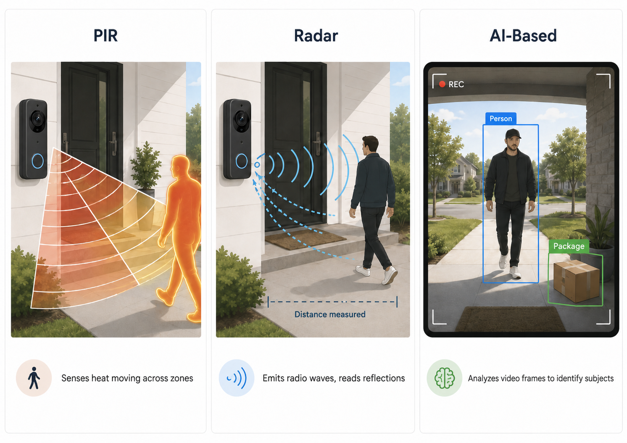
| Detection Type | How It Works | Detection Coverage | Distinguishes Subjects? | Can Detection Run Locally? |
|---|---|---|---|---|
| PIR | Senses heat/infrared changes | Model-dependent, affected by angle and zones | No | Yes |
| Radar | Emits radio waves, reads reflections | Model-dependent, may measure distance | No (on its own) | Yes |
| AI-Based | Computer vision analyzes video frames | Within the usable camera view | Yes | Sometimes, model-dependent |
How Video Is Captured and Transmitted
Once triggered, the image sensor begins capturing frames, which are typically output at a resolution marketed as 1080p, 2K, or increasingly, 4K. Higher resolution can preserve more facial and package detail, though useful identification also hinges on lighting, lens quality, compression and distance. HDR (High Dynamic Range) processing helps balance a backlit visitor against bright daylight. At night, infrared LEDs enable black-and-white night vision, or a small visible-light source enables color night vision at closer range.
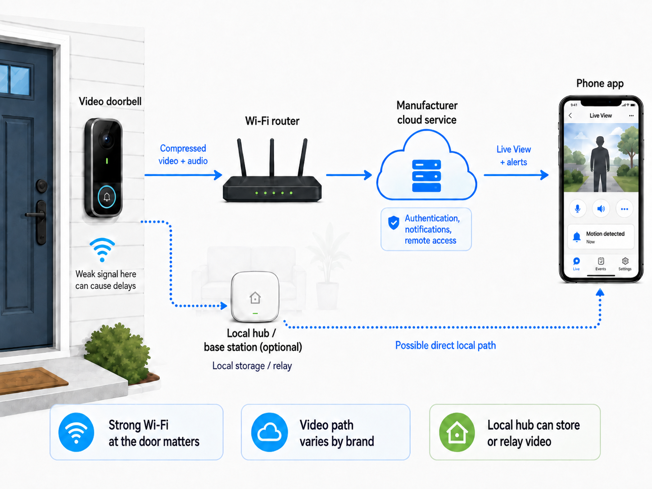
Captured video is compressed, commonly using H.264 or the more compression-efficient H.265, and sent across your home network. The app usually relies on the manufacturer’s cloud service for authentication, notifications and remote access. But the video stream itself doesn’t always follow that same path. A stream may be relayed through cloud infrastructure, connected more directly to your phone, or routed through a local hub. Video is bandwidth-intensive compared to most smart home devices, so a strong Wi-Fi signal at the door makes a real difference. A weak signal can delay notifications, slow Live View, and cause dropped or choppy two-way audio.
How Two-Way Audio Works
Two-way audio relies on the same microphone and speaker built into the housing, paired with your phone’s mic and speaker on the other end. Both stream over the same connection carrying the video. How that audio flows comes down to whether the doorbell uses half-duplex or full-duplex transmission. Half-duplex works like a walkie-talkie. You press and hold to talk, then release to listen. Full-duplex allows both sides to speak and listen simultaneously, closer to a phone call. That requires more processing power and a steadier connection to control echo and feedback. Some budget models use half-duplex, whereas many current mid-range and premium doorbells offer full-duplex. Either way, audio quality still depends heavily on network conditions.
Local vs. Cloud Storage
This is where doorbell cameras diverge most between brands.
Cloud Storage
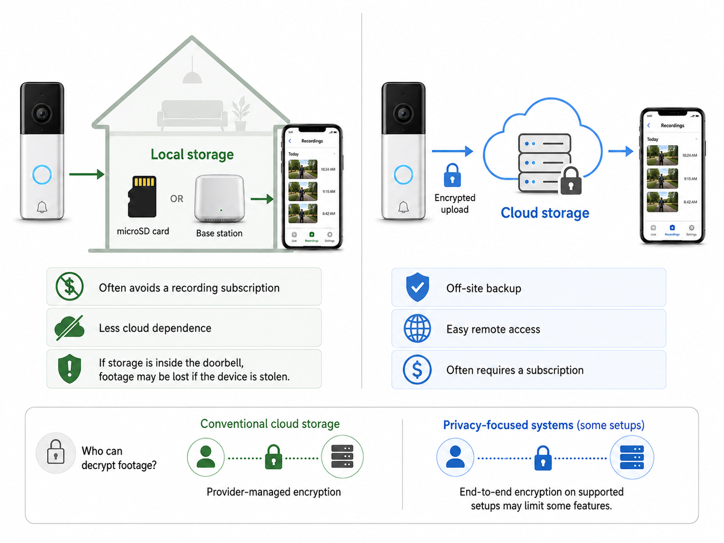
Cloud storage is the default for major brands, such as Ring and Google Nest. Recorded events are uploaded to the manufacturer’s servers, encrypted in transit and at rest. Continuous footage upload is generally only available on continuously powered models.
The trade-off here is usually an ongoing subscription. Entry-level plans commonly unlock saved event history, while higher tiers may add longer retention, multiple cameras, continuous recording, or more advanced recognition. Without an active plan, some cloud-first doorbells save no video history at all, while others provide only a short rolling window of recent events.
Local Storage
Local storage keeps the primary recording on hardware in your home – generally, a microSD card in the doorbell, or a hub-style base station on your network. That often avoids a recording subscription and reduces cloud dependence. That said, notifications, remote access and some AI features may still rely on the manufacturer’s servers in the cloud.
If the doorbell gets stolen, whether you still have the footage or not depends on where it was sitting. A memory card inside the doorbell itself can be lost along with the device if it’s stolen or destroyed. Footage already transferred to an indoor base station avoids that particular weakness. Local hardware still needs its own protection against failure or unauthorized access.
Who Can Decrypt Your Footage
Both options also differ in one more way – who can decrypt the footage. With conventional cloud encryption, the provider manages the service and its encryption infrastructure. This can support server-side functions such as video analysis, account recovery and clip sharing. It also means access ultimately rests on that provider’s technical controls and privacy policies.
Apple’s HomeKit Secure Video is structured differently. Supported recordings are end-to-end encrypted and stored in the user’s iCloud account, so Apple says it cannot view the footage. Ring also offers optional end-to-end encryption on compatible devices. Recordings can then be viewed only on enrolled mobile devices, using protection based on a user-created passphrase, though enabling it currently disables several cloud-assisted features, including shared user access to videos.
Households prioritizing lower ongoing costs and greater control over recordings tend toward local storage. Those prioritizing convenience, straightforward remote access, and off-site storage that can survive theft of the outdoor device tend toward cloud.
How Doorbell Cameras Fit Into a Smart Home
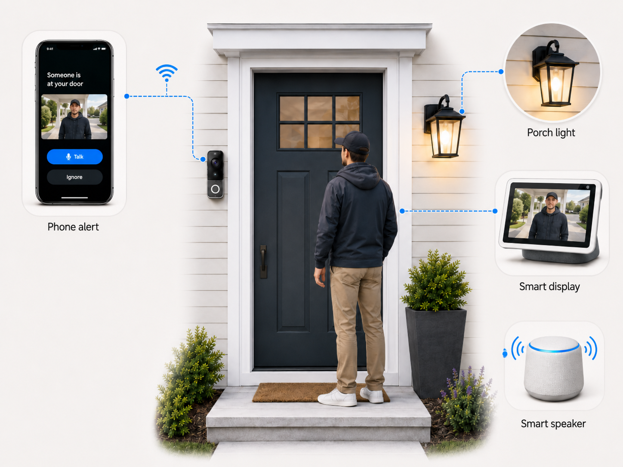
A doorbell camera becomes more useful once connected to the rest of your smart home ecosystem. Depending on the platform, you may be able to view its feed on a smart display, hear visitor announcements through other speakers, or turn on the porch lights when motion is detected after dark. But integration depth varies more here than for devices like smart locks. Ring, for instance, integrates deeply with Alexa, unsurprising since Amazon owns Ring. It doesn’t natively support Apple HomeKit, and it has no official Google Home integration either, only unofficial workarounds via third-party services with limited functionality.
Matter is the cross-platform standard already used by many smart locks and bulbs. It only extended official support to cameras and doorbells with Matter 1.5, finalized in November 2025, years after covering lighting and locks. As of mid-2026, Samsung SmartThings remains furthest ahead with consumer-facing Matter camera support. Apple Home still does not list cameras or doorbells among its supported Matter device types, while Google has begun adding experimental Matter 1.5 camera and doorbell support to its Home APIs. Amazon has not yet added cameras or doorbells to Alexa’s published Matter device categories.
Power Options: Wired vs. Battery
Wired
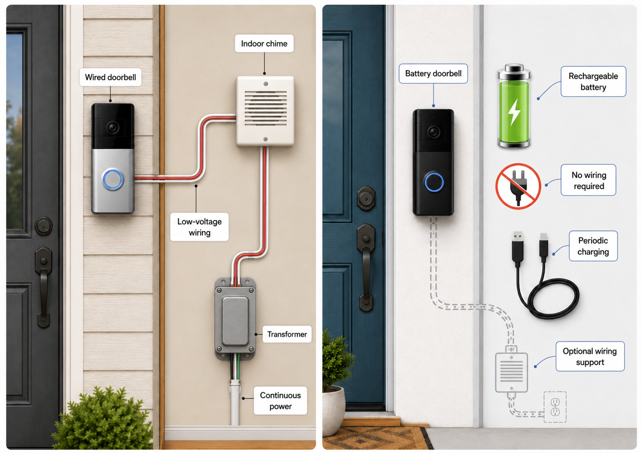
Unlike battery models, a wired doorbell camera never needs charging. It draws continuous power from compatible low-voltage doorbell wiring and its transformer, the same circuit that traditionally powered a mechanical chime, and this is also where installation snags can arise. Traditional US doorbell wiring commonly runs around 16V AC, but voltage and transformer capacity vary by home and by model. A smart video doorbell behaves like a small always-on computer, drawing continuous current for its camera, Wi-Fi radio and processor. A transformer that comfortably ran a mechanical chime may still be undersized for that load.
Check the voltage and VA requirements in your model’s installation guide, and compare them against your existing transformer’s rating. This one step can prevent a wired doorbell from going offline or failing to trigger the chime. The doorbell wiring itself is low voltage, but the transformer plugs into your home’s regular household wiring, so swapping it out may be a job for an electrician.
Battery
Battery-powered doorbell cameras use a rechargeable lithium-ion battery, either removable or built into the unit. That flexibility is useful for renters and homes without existing wiring. Installation still requires a suitable mounting position, a usable network connection, and where applicable, permission to drill. Manufacturers commonly advertise battery life measured in months, but motion frequency, Live View use, network strength and temperature all shape how long a charge actually lasts. Cold weather temporarily saps a lithium-ion battery’s performance. Many models restrict or pause charging below a specified temperature, and that threshold changes from one doorbell to the next. Some battery models can also connect to compatible doorbell wiring to maintain the battery or decrease how often manual charging is needed, while still communicating wirelessly.
What to Consider Before Buying a Doorbell Camera
A few practical questions can narrow the doorbell camera decision down quickly:
- Power source: “Will your transformer handle it?” – Check its voltage and VA rating before assuming a wired model will work, or confirm you’re comfortable with periodic charging if you go battery-powered.
- Storage model: “Subscription or upfront cost?” – Decide whether an ongoing subscription for cloud storage and AI features suits your budget, or whether local storage’s upfront cost and tighter privacy profile are the better fit.
- Ecosystem compatibility: “Does it work with what you already have?” – Doorbell integration is still fragmented, so confirm native support for your preferred smart home platform, displays and speakers.
- Motion detection quality: “Does it combine radar or AI with PIR?” – If your porch faces a busy sidewalk or street, basic PIR detection alone may generate frequent false alerts. Look for a model that pairs PIR with radar or AI-based person detection, and offers configurable activity zones.
Once you’ve worked through those four questions, the shortlist gets much shorter. My best video doorbell guide covers the current picks across every power source, storage model and ecosystem discussed above, with the trade-offs already worked out.
More Than a Ding at the Door
A doorbell camera can make one simple action look effortless – someone approaches, your phone buzzes, and you see who is there. Behind that alert, however, motion sensing, video compression, Wi-Fi, cloud or local processing, storage, power and smart home integration all have to cooperate.
That is why the most useful specification is rarely the biggest number on the box. A 4K camera means little if weak Wi-Fi delays Live View, sophisticated detection loses value if useful alerts sit behind a subscription, and a wired model cannot perform reliably if the transformer feeding it is undersized.
Strip away those specifications and trade-offs, though, and the purpose becomes much simpler. For all the technology packed inside, a doorbell camera still has one very old-fashioned job – make sure you know who came knocking.
Your front door has two jobs – seeing who’s there and keeping them out. If you’re tackling the locking side next, my guide to how smart locks work covers that in the same depth.