
You press a button on your phone and hear the deadbolt slide across from two floors up. No key, no walking to the door, no second-guessing whether you remembered to lock it when you left. Smart locks have become one of the most practical entry points into home automation. They solve a real problem, and they work without rewiring anything or replacing your entire door.
But what’s happening inside the lock when you tap that button? So how do smart locks work, and what should you understand before choosing one?
This guide covers the mechanics from the inside out, including connectivity options, security considerations and automation possibilities that make them genuinely useful.
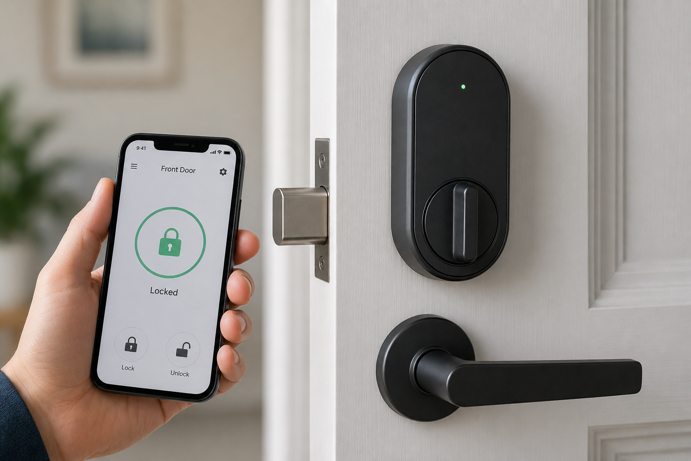
What a Smart Lock Actually Is
A smart lock is an electronic locking system that uses a motorized deadbolt or latch and wireless communication to lock and unlock a door without relying solely on a traditional key. The “smart” part refers to its ability to receive commands from a smartphone app, voice assistant, keypad or automated schedule. In many cases, it can also communicate its status back to you in real time.
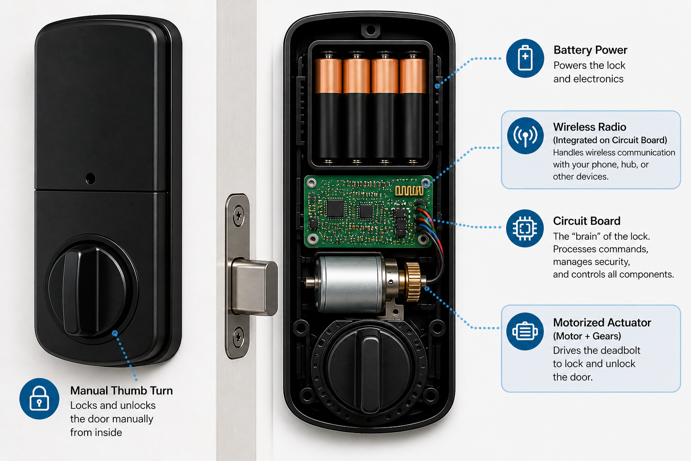
Most smart locks replace only the interior portion of your existing deadbolt, keeping the exterior keyhole and hardware unchanged. This means your door’s existing security hardware stays in place, and you retain a physical key as a backup. Some models replace the entire deadbolt assembly, while others install as a retrofit over the interior thumb turn only.
Most smart locks share the same core components – a motorized actuator that moves the bolt, a circuit board that processes commands, a wireless radio for communication, and a battery power source. When you send a lock or unlock command, the circuit board receives the signal, authenticates it, and instructs the motor to move the bolt.
How Smart Locks Connect to Your Home
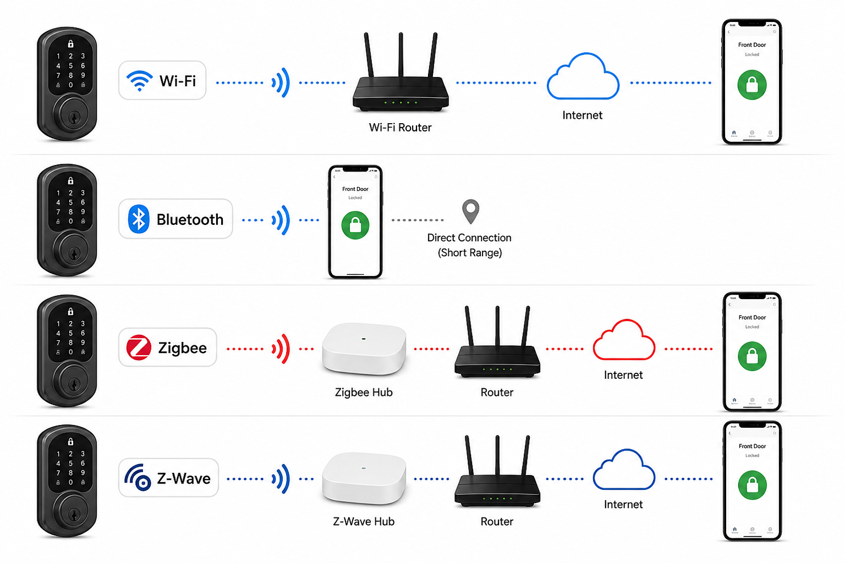
The way a smart lock communicates with your phone, hub or voice assistant depends on the wireless protocol it uses. This choice determines what hub (if any) you need, how reliable the connection will be, and how well the lock integrates with the rest of your smart home ecosystem. It’s one of the most important things to understand before buying.
Wi-Fi
Wi-Fi smart locks connect directly to your home router. You can control them remotely from anywhere without a separate hub. Install the lock, connect it to your Wi-Fi network through the manufacturer’s app, and you’re done. The trade-off is power consumption. Maintaining a constant Wi-Fi connection draws significantly more battery than lower power protocols, which typically means more frequent battery changes. Wi-Fi locks also rely on your router’s signal reaching the door – a factor worth checking for thicker walls or doors far from the router.
Bluetooth
Bluetooth locks communicate directly with your smartphone when you’re within range, usually around 30 feet, though walls and interference can reduce this considerably. They’re more power efficient than Wi-Fi models and tend to respond quickly when you’re nearby. The limitation is remote access. Controlling the lock when you’re away from home requires either a Wi-Fi bridge device or a compatible smart home hub. Some locks combine Bluetooth for close range control with a separate Wi-Fi module for remote access, giving you the best of both worlds.
Zigbee and Z-Wave
Zigbee and Z-Wave are low power mesh networking protocols designed specifically for smart home devices. These locks communicate with a compatible hub instead of connecting directly to your router. The hub then handles the connection to the wider network and the Internet. Z-Wave operates below 1 GHz and avoids Wi-Fi interference entirely. Zigbee most commonly uses the 2.4 GHz band and uses different channels to minimize overlap with Wi-Fi, though interference is still possible in dense wireless environments. Both support mesh networking, meaning each powered device in the network can relay signals and extend range.
Z-Wave has historically dominated the smart lock market because of its consistent interoperability standards and strong security certification requirements. Z-Wave’s sub-GHz operation also means it works reliably in apartment buildings or dense neighborhoods where the 2.4 GHz band is heavily congested. Zigbee offers a broader device ecosystem overall but has a narrower selection of locks. Both protocols require a compatible hub, which adds cost and setup complexity. The payoff is local control. The lock can continue responding to automations even if your Internet connection goes down.
For a deeper look at how these protocols compare across all smart home device types, check out this IoT protocols guide.
Matter and Thread
Matter is a newer interoperability standard that allows smart home devices to work across different ecosystems without manufacturer-specific bridges. That includes Apple Home, Google Home and Amazon Alexa. Any Matter-compatible platform can pair with a Matter lock through a standardized setup process. Thread is the underlying network protocol that many Matter devices use. It operates as a low power mesh similar to Zigbee and Z-Wave. Matter-over-Thread locks require a Thread Border Router, which is built into several current smart home hubs and speakers.
Protocol Comparison at a Glance
| Protocol | Hub Required | Remote Access | Battery Impact | Wi-Fi Interference | Best For |
|---|---|---|---|---|---|
| Wi-Fi | No | Built-in | Higher drain | Yes – depends on router signal and congestion | Simple setups, no hub |
| Bluetooth | No (local only) | Needs bridge or hub | Low drain | Minimal | Close range convenience |
| Zigbee | Yes | Via hub | Low drain | Possible (shares 2.4 GHz) | Existing Zigbee ecosystems |
| Z-Wave | Yes | Via hub | Low drain | None (sub-1 GHz) | Reliability-first setups |
| Matter/Thread | Thread Border Router required | Via Matter controller / Thread Border Router | Low drain | Possible (Thread uses 2.4 GHz) | Multi-ecosystem flexibility |
Ways to Unlock a Smart Lock
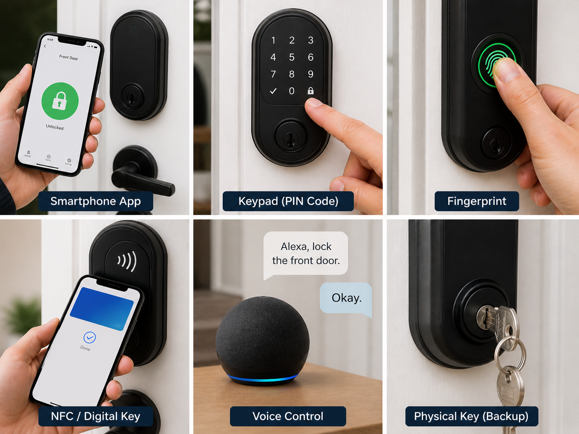
One of the practical advantages of smart locks is the range of entry methods available, which can be mixed and matched depending on who needs access and how they prefer to enter.
Smartphone App
Every smart lock comes with a companion app that lets you lock and unlock remotely, view access history, and manage other users. Remote unlock requires either a Wi-Fi connection on the lock itself or a hub acting as the intermediary. The app is also typically where you create and manage access codes, set auto-lock schedules, and receive notifications when the lock is used.
Keypad
Most smart locks include a physical keypad on the exterior, allowing entry via a PIN code without a phone or key. Keypads work locally without any network connection, making them a reliable backup if the app or connectivity isn’t available. Many smart locks support multiple unique codes (sometimes dozens or hundreds), so household members, guests and service providers can each have their own. Some models support time-limited codes that expire automatically, removing the need to manually revoke access afterward.
Fingerprint
Some smart locks include a biometric fingerprint scanner that recognizes registered prints and unlocks the door in under a second. On most reputable models, fingerprint data is stored locally on the lock itself rather than in the cloud. This addresses one of the common privacy concerns around biometric systems. A practical limitation is that scanners can struggle with wet, dirty or heavily calloused fingers. Most locks with fingerprint readers also offer keypad or app entry as alternatives.
NFC and Digital Keys
A compatible smartphone or key fob unlocks NFC-enabled smart locks with a simple tap, similar to a contactless payment. Apple Home Key is a special implementation of this that stores a digital key in Apple Wallet, allowing tap-to-unlock with an iPhone or Apple Watch. The interaction is fast and does not require an app to be open, making it a convenient option for regular use.
Voice Control
Smart locks that integrate with Alexa, Google Assistant or Siri respond to voice commands. Most voice assistants require a spoken PIN to confirm unlock commands. Locking is typically permitted without a PIN, but unlocking requires the spoken code to prevent unauthorized access. Some platforms, including Apple HomeKit, require device authentication before unlocking and may restrict voice unlocking entirely on certain devices. Voice control is convenient for hands-free locking when leaving the house, and for unlocking when your hands are full.
Physical Key
Most smart locks retain a physical keyhole on the exterior as a backup entry method. This is intentional. It ensures you always have a mechanical fallback if batteries die, the app fails, or connectivity is unavailable. The physical key operates the deadbolt directly, bypassing all electronic components.
Do Smart Locks Need Wi-Fi or Internet?
Not necessarily, though it depends on what you want the lock to do. The physical locking and unlocking mechanism (the motor moving the bolt) operates locally and doesn’t require any network connection. Keypad entry, fingerprint recognition and physical key access all work without Wi-Fi or Bluetooth.
Remote access is where connectivity becomes necessary. To lock or unlock from outside the home, receive notifications, or manage access codes remotely, the lock needs some form of network connection – either direct Wi-Fi, a Bluetooth bridge, or a smart home hub. Automations that trigger based on location, time or other device states also require network connectivity.
Zigbee and Z-Wave locks connected to a local hub can continue executing automations during an Internet outage, because the hub processes commands locally. Many Wi-Fi locks rely on manufacturer cloud servers and may lose remote access and automation functionality during outages, though keypad and physical key entry remain unaffected.
How Smart Locks Fit Into a Smart Home
A smart lock on its own is useful. A smart lock connected to the rest of your home automation system is considerably more capable. The smart home hub is often what makes multi-device automation possible, acting as the central coordinator that can trigger one device based on the state of another.
Common smart lock automations include setting the thermostat to away mode when the door locks, turning on lights when you unlock after dark, and auto-locking the deadbolt after a set number of minutes. Location-based automations can lock the door when your phone leaves a defined area. When you return, the door unlocks automatically. Locked before you’ve pulled out of the driveway, ready to open by the time you get back.
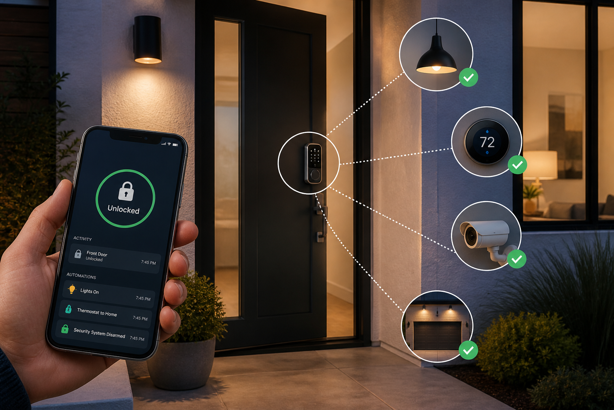
For households using Apple HomeKit, smart lock integration sits within the Home app alongside lights, thermostats and other devices. Alexa and Google Home offer similar centralized control with their respective ecosystems. Users who prioritize local control and complex automation tend to gravitate toward platforms like Hubitat or Home Assistant, which can process lock commands without any cloud dependency.
Smart Lock Security: What You Need to Know
Security concerns about smart locks typically fall into two categories – physical security and digital security. Both are important, and understanding them helps put the technology in perspective.
Physical Security Ratings
Smart locks are rated by ANSI/BHMA (American National Standards Institute / Builders Hardware Manufacturers Association) on a three-tier grading system. Grade 1 is the highest residential and light commercial rating, covering cycle life, strength, and forced entry resistance. Grade 2 represents standard residential performance, and Grade 3 is entry-level. The smart features of a lock are entirely separate from this physical rating. A lock with sophisticated app integration but a Grade 3 cylinder offers less physical protection than a simpler Grade 1 lock.
Encryption and Authentication
Reputable smart locks encrypt commands sent between the app and the lock, often using AES-128 or AES-256 encryption. Z-Wave S2 and Zigbee’s security layer both implement AES-128 for device-to-hub communication. This makes a replay attack (intercepting a wireless signal and replaying it to unlock the door) significantly harder on modern locks than on earlier generations of wireless security devices.
Manufacturer cloud security is a separate consideration. When commands route through a manufacturer’s servers, the security of those servers becomes part of your lock’s overall security posture. Locks that support local control through a hub reduce this exposure by keeping commands within your home network.
Practical Security Practices
A few straightforward practices meaningfully improve smart lock security in daily use. Using unique access codes for each person, instead of a shared household code, means you can revoke one person’s access without changing everyone’s. Enabling auto-lock ensures the door is never accidentally left unlocked. Keeping firmware updated patches known vulnerabilities as manufacturers identify them. Enabling two-factor authentication on the manufacturer’s app account adds a further layer of protection against unauthorized remote access.
It’s also worth remembering that most successful home intrusions involve forced entry through doors or windows, not by circumventing electronic security. The physical strength of your door frame, strike plate, and door itself is just as critical as the security grade of the lock. A Grade 1 smart lock installed in a door with a weak frame offers less real world protection than it might suggest.
Smart Locks and Battery Life
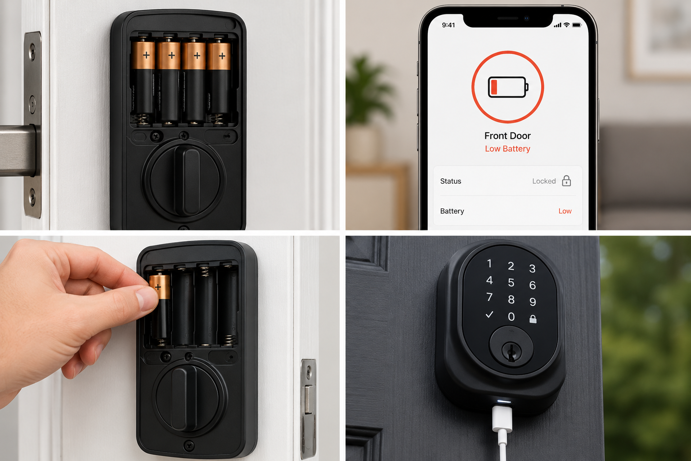
Because smart locks are installed on exterior doors and need to operate reliably in all conditions, wired power connections are impractical for most installations. Battery power is standard, and battery life varies considerably depending on the protocol, usage frequency, and features in use.
Zigbee and Z-Wave locks tend to be more power efficient than Wi-Fi models because their radios consume less power maintaining a connection. Bluetooth-only locks are similarly efficient. Wi-Fi locks draw more current and usually need battery changes more frequently, though the exact interval depends on how often someone uses the lock and what features are running.
Most smart locks provide low battery warnings through the app well before power runs out. Many also include a mechanical backup (either a physical keyhole or an external charging port) in case the battery becomes completely depleted. Check the manufacturer’s guidance on emergency power access before installing, as the method will differ based on model.
What to Consider Before Buying a Smart Lock
Understanding how smart locks work makes the purchasing decision considerably more straightforward. A few practical questions will help narrow this down quickly.
The first is ecosystem compatibility. Which voice assistant or smart home platform does your household already use? Choose a lock that integrates natively with it, whether that’s Alexa, Google Home, Apple HomeKit, or a hub like SmartThings. Locks with Matter support offer the most flexibility, as they can work across multiple ecosystems from a single device.
The second is hub dependency. To avoid adding a separate hub, a Wi-Fi lock with built-in remote access is the simpler choice. If you already have a smart home hub or are building a larger automation system, a Zigbee or Z-Wave lock offers better integration and local control. For a full breakdown of hub options and protocol compatibility, check out my smart home hub guide.
The third is installation compatibility. Most smart locks are designed for standard US door prep – a 2⅛ inch cross bore with a standard backset. Non-standard doors, doors without a deadbolt, or doors with unusual hardware may require additional work or different product choices altogether. Checking the manufacturer’s door compatibility requirements before purchasing will avoid most installation surprises.
Finally, consider who needs access and how. A household where everyone uses iPhones may prioritize Apple Home Key tap-to-unlock. A rental property where temporary guest codes are frequently created and revoked calls for robust code management features and reliable remote access. A household with older adults may prioritize a large, clearly lit keypad and simple physical operation. The access methods a lock supports should match the actual patterns of the people using it.
The Real Key Is Compatibility
Smart locks combine a motorized deadbolt, wireless communication and software controls into a system that can manage access far more flexibly than a traditional lock. The technology itself has improved considerably over the past decade. Modern locks from established manufacturers are generally reliable when matched correctly to the protocol, hub and ecosystem they’re designed for.
The biggest differences between smart locks rarely come down to the lock mechanism itself. What matters more is how the lock fits into your home – whether it relies on Wi-Fi or a hub, how it handles remote access, which platforms it integrates with, and how well it matches the way your household actually enters and leaves the house each day.
A well chosen smart lock quickly fades into the background. The door locks when it should, trusted people get access when they need it, and the entire system feels effortless instead of technical. Choose compatibility first, and convenience will inevitably follow.
If you’re building out the rest of your smart home security setup, the smart home devices guide for older adults covers accessible lock options in a full home context. The Zigbee smart locks guide goes deeper on protocol-native options for existing Zigbee households.