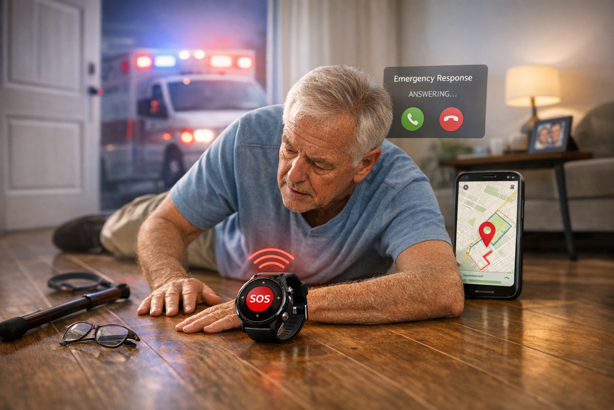
The best smartwatches for seniors (sometimes called medical alert watches or senior smartwatches) can detect a fall, summon emergency help and share location from the wrist – with some models working independently and others relying on a paired phone. For older adults living independently, that could be the difference between lying on the floor for hours and getting help in seconds.
But the wrong smartwatch creates its own problems. Features designed for athletes or tech enthusiasts can frustrate someone who just needs a reliable emergency button. This guide breaks down what actually matters, reviews the top options across both dedicated medical alert devices and consumer smartwatches, and helps you find the right fit.
Featured Top Picks
💰 Best Budget Option: SOS Smartwatch – $199 + $39.95/mo
Essential safety features, simple interface, no smartphone needed
🎤 Best for Voice Control: Kanega Watch – $299 + from $64.95/mo (annual plan)
Hands-free operation, 24-36 hour battery with swappable batteries
🏆 Best for Emergency Response: MGMove Smartwatch – from $199.95 + from $38.95/mo (annual plan)
Among the fastest responding medical alert watches in third-party testing, comprehensive caregiver tools
📱 Best for iPhone Users: Apple Watch SE 3 – $219-$329
Always-On display, S10 chip, fall detection, comprehensive health tracking
⌚ Best Android Option: Samsung Galaxy Watch 8 Classic – $369-$549
Physical rotating bezel, fall detection, advanced health monitoring
🛰️ Best Safety Feature Set: Google Pixel Watch 4 – $289-$499
Fall detection, satellite SOS, loss of pulse detection
Who This Guide Is For
This guide fits if you: Want a wearable that can call for help automatically after a fall, need GPS location tracking for a family member with dementia or memory concerns, want 24/7 professional monitoring without a traditional panic button pendant, or are looking for a mainstream smartwatch that doubles as a safety device for a relatively active senior.
Consider a different approach if: The senior in question firmly refuses to wear anything on their wrist, you need professional monitoring for someone with complex medical needs beyond emergency response, or a home based medical alert system would better suit someone who rarely leaves the house.
30 Second Selector: Find the Right Watch
What matters most?
- Fastest emergency response → MGMove Smartwatch
- No buttons, just voice → Kanega Watch
- Lowest ongoing cost → SOS Smartwatch
- Already has an iPhone → Apple Watch SE 3
- Uses an Android phone, wants a classic watch look → Galaxy Watch 8 Classic
- Uses an Android phone, safety features are the priority → Google Pixel Watch 4
What’s the tech comfort level?
- Not comfortable with technology → Kanega Watch (voice) or SOS Smartwatch (one button)
- Familiar with smartphones → Apple Watch SE 3 or Pixel Watch 4
- Somewhere in between → MGMove Smartwatch
What’s the realistic first year budget?
- Under $700 → SOS Smartwatch (~$679 (base)) or Apple Watch SE 3 (from ~$219)
- $700-$1000 → MGMove Smartwatch (~$667 annual base / ~$967 fully loaded)
- $1,000-$1,300 → Kanega Watch (~$1,078 (annual plan))
- No monthly monitoring fee → Galaxy Watch 8 Classic or Pixel Watch 4
Quick Comparison
Medical Alert Watches
| Feature | SOS Smartwatch | Kanega Watch | MGMove Smartwatch |
|---|---|---|---|
| Device Price | $199 | $299 | $199.95 |
| Monthly Fee | $39.95 (base) / $49.95 (with fall detection) | From $64.95/mo (annual plan) | From $38.95/mo (annual plan) |
| First Year Cost* | ~$679 (base) / ~$799 (with fall detection) | ~$1,078 (annual plan) | ~$667 (annual plan, base) / ~$967 (fully loaded) |
| Fall Detection | Separate plan tier ($49.95/mo) | Yes (included) | Optional (+$10/mo) |
| Battery Life | 6-8 hours | 24-36 hours (swappable) | ~20-24 hours |
| Response Time | Fast (varies by test, typically well under 30 seconds in independent reviews) | 30-60 seconds (varies by test, voice activation adds verification steps) | Among fastest tested (varies by reviewer) |
| Voice Control | No | Yes (primary feature) | No |
| Needs Smartphone | No | No | No |
| Best For | Budget, simplicity | Voice control, 24/7 wear | Fastest response, caregiver tools |
Specs and prices current as of March 2026.
Consumer Smartwatches
| Feature | Apple Watch SE 3 | Galaxy Watch 8 Classic | Google Pixel Watch 4 |
|---|---|---|---|
| Typical Price Range | $219-$329 | $369-$549 | $289-$499 |
| Fall Detection | Yes | Yes | Yes |
| Emergency SOS | 911 direct (GPS + Cellular model), requires iPhone or Wi-Fi Calling on GPS-only model | Emergency SOS calling (LTE model independent, Bluetooth model needs paired phone) | 911 direct + Satellite SOS (LTE) |
| Monthly Fee | None (cellular optional) | None (cellular optional) | None (cellular optional) |
| Battery Life | ~18 hours | ~30-40 hours | Up to 40 hours (45mm) |
| Requires Smartphone | iPhone | Android (Samsung Galaxy phone required for ECG) | Android 11.0+ |
| Physical Navigation | Digital Crown + side button | Rotating bezel + crown | Crown + app button |
| Best For | iPhone users | Android users, traditional look | Android users, safety priority |
Specs and prices current as of March 2026. May vary by model and seller.
Jump To:
- Quick Picks
- Medical Alert Smartwatches – SOS | Kanega | MGMove
- Consumer Smartwatches – Apple SE 3 | Galaxy Watch 8 Classic | Pixel Watch 4
- FAQ
What Makes a Great Smartwatch for Seniors?
Before reviewing specific models, here’s what separates a useful senior smartwatch from an expensive wrist ornament.
Fall Detection
Fall detection uses accelerometers and gyroscopes to identify the characteristic signature of a fall – sudden acceleration, hard impact, then prolonged stillness. When Apple added this to the Series 4 Watch in 2018, it moved safety technology from dedicated medical pendants into everyday wearables. According to the CDC, falls are the leading cause of injury-related deaths among adults 65 and older – which is why this feature matters so much for anyone living alone.
No system catches every fall, and false positives do happen. That’s why the best implementations combine automatic detection with a manual SOS button as backup.
Emergency Response
There are two distinct approaches, and choosing between them is probably the single most important decision in this guide.
Professional Monitoring (Medical Alert Watches): A trained operator answers every alert, assesses the situation through two-way audio, and dispatches the right level of help – whether that’s a family member, a neighbor or emergency services. They know the wearer’s name, emergency contacts and medical notes. A monthly subscription is required, usually around $40-$85/month.
Direct 911 Dialing (Consumer Smartwatches): The watch calls 911 directly. No monthly fee, but no professional triage either. 911 dispatchers don’t have prior context about the person calling, and minor emergencies that a monitoring center could resolve with a phone call escalate to an ambulance by default.
Health Monitoring
Modern smartwatches track heart rate continuously, analyze sleep patterns, and in some models detect atrial fibrillation through an ECG app. The Pixel Watch 4 adds loss of pulse detection, a genuinely new category that goes beyond fall detection. Many also track heart rate variability (HRV), which captures stress levels and nervous system health beyond what simple heart rate monitoring reveals.
GPS Tracking
GPS serves two very different purposes depending on the user. For active seniors, it tracks outdoor walks and routes. For families managing a loved one with dementia or Alzheimer’s, it’s a location lifeline. This is part of a broader trend in adaptive IoT technology that uses connected devices to support independence without removing it. If a loved one wanders, GPS means locating them in minutes rather than hours.
Simple Interface
A feature-packed watch is only useful if the person actually wears it and knows how to use it. Large icons, voice control, physical buttons and simplified modes all reduce the friction that leads to the watch ending up in a drawer. The Kanega Watch’s voice-first design and the Galaxy Watch 8 Classic’s physical rotating bezel both address this in different ways.
Battery Life
A safety device that’s dead when you need it isn’t really a safety device. Short battery life is a genuine risk, not just an inconvenience. The medical alert watches below vary from 6-8 hours (SOS Smartwatch) to effectively unlimited with swappable batteries (Kanega Watch). Consumer watches range from 18 hours (Apple Watch SE 3) to 40 hours (Pixel Watch 4, 45mm). Establishing a daily charging routine is crucial for any watch in the shorter range.
Already know what you’re looking for?
Jump to: Medical Alert Watches | Consumer Smartwatches
Best Medical Alert Smartwatches for Seniors
These purpose-built watches connect to 24/7 professional monitoring centers staffed by trained operators. Each requires a monthly subscription. None require a smartphone to function.
SOS Smartwatch by Bay Alarm Medical
Best Budget Option | $199 device + $39.95/mo | View at Bay Alarm Medical
Rating: 4.3/5
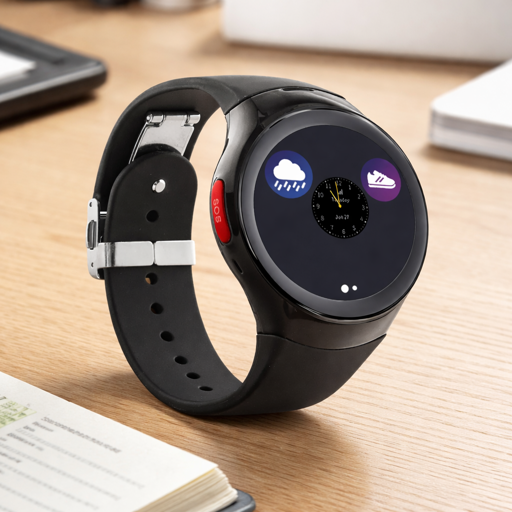
Bay Alarm Medical has been in the emergency monitoring business since 1946. The SOS Smartwatch is their wrist-worn entry point – a standalone cellular device that looks like a regular smartwatch, works without a smartphone, and connects to their US based monitoring center the moment you press the SOS button.
Key Specs
- Dedicated SOS button for one-press emergency connection
- Two-way communication directly through the watch
- GPS location tracking sent to monitoring center
- Step counting and weather app
- Caregiver location tracking via Bay Alarm Medical app
- Standalone cellular on AT&T LTE (no smartphone required)
- Battery life: 6-8 hours (charges overnight)
Worth Knowing
The 6-8 hour battery is the significant limitation here and deserves an honest flag. This watch needs to charge every night without fail. If the person wearing it has an unpredictable routine, or if overnight charging isn’t guaranteed, the Kanega Watch’s swappable battery system is a safer choice. Unlike the consumer watches in this guide, the SOS Smartwatch’s sole purpose is safety, which makes the overnight charging gap more consequential here than for a general purpose smartwatch. Fall detection comes as a separate plan tier at $49.95/month rather than being included in the base plan. This is one thing worth budgeting for from the start, given how central it is to the safety use case.
Best For
Budget conscious families who want professional monitoring without complexity. First time smartwatch users who need a simple, no smartphone required device. Active seniors who are reliably home by evening to charge.
Kanega Watch by UnaliWear
Best for Voice Control | $299 device + from $64.95/mo (annual plan) | View at UnaliWear
Rating: 4.2/5
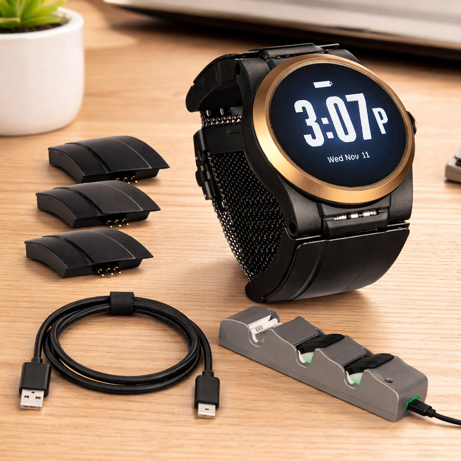
Pricing note: The annual plan works out to $64.95/month paid upfront ($1,078.40 first year including device). Month-to-month is $84.95/month ($1,318.40 first year including device). Purchasing direct from UnaliWear is recommended. The company pre-programs the watch before shipping, so it works straight out of the box.
The Kanega Watch is built on a simple premise – the person who most needs to call for help is often least able to press a button. Voice activation eliminates that barrier. Speak naturally (“I need help”, “Call my daughter”, “What time is it?”) and the watch responds. The monitoring center is five-diamond certified and can bypass 911 to dispatch help directly, or simply contact a neighbor for a minor emergency.
Key Specs
- Three ways to trigger an alert: voice, button press or automatic fall detection
- RealFall automatic fall detection included with no extra fee
- Patented swappable battery system: 24-36 hour battery per pair, swap without removing the watch
- Connects via home Wi-Fi AND Verizon cellular (critical for areas with weak cell signal indoors)
- Medication reminders via voice
- GPS location tracking
- No smartphone required
- Arrives pre-programmed with wearer’s details (no setup required)
Worth Knowing
The monthly fee is genuinely higher than competitors – nearly double the SOS Smartwatch base plan. That premium buys two things that matter – fall detection included at no extra charge, and the swappable battery system that means the watch never needs to come off. For someone at high risk of falls during the night (when many devices are charging), that 24/7 coverage has real value. There is a learning curve with voice commands. Expect a few days discovering which phrases work most naturally. The watch is also chunkier than typical consumer smartwatches due to the battery system.
Best For
Seniors with arthritis, tremors, limited dexterity or vision challenges where pressing a button reliably is difficult. Anyone at particular risk of nighttime falls who needs 24/7 protection without daily charging. Those who want a genuinely hands-free emergency system.
MGMove Smartwatch by Medical Guardian
Best for Rapid Emergency Response | from $199.95 + from $38.95/mo (annual plan) | View at Medical Guardian
Rating: 4.3/5
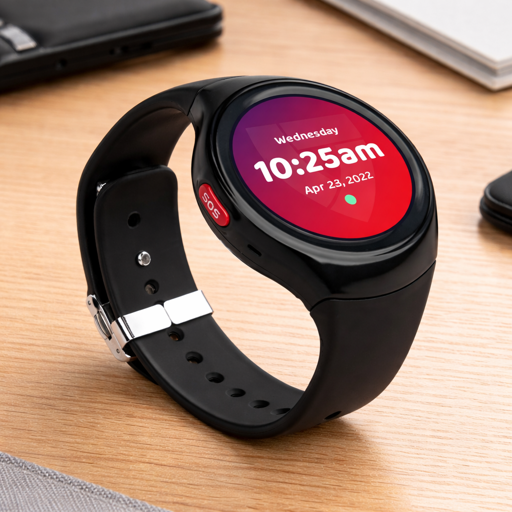
When every second counts, the MGMove delivers. In third-party testing, it has consistently ranked among the fastest-responding medical alert watches available, though exact times vary by reviewer and conditions. The watch is purpose-built around one core mission – connecting you to a trained operator as fast as possible. The MyGuardian caregiver platform adds a layer of family oversight that the other medical alert devices here don’t match.
Key Specs
- 24/7 monitoring with trained operators
- MyGuardian web portal and mobile app for caregivers
- Caregiver tools: send texts, set medication reminders, view real-time location, review call history
- Weather alerts and step counting
- Battery: ~20-24 hours
- No smartphone required
Worth Knowing
Fall detection is an add-on ($10/month), as are Support Circle Apps (messaging and reminder tools for caregivers at $5/month), OnGuard Alerts (real-time contact notifications at $2.99/month), and a Protection Plan covering equipment replacement ($6.99/month). Budgeting in fall detection from the start is worth doing, as the watch becomes considerably more protective with it enabled. The caregiver connectivity is especially valuable for adult children monitoring a parent from a distance (check activity levels, send a reminder, verify they got home from their walk). The annual plan works out to $38.95/month ($467.40 upfront). Confirm current rates with Medical Guardian directly as plans vary.
Best For
Families who want both the fastest professional emergency response and comprehensive remote oversight. Seniors with medical conditions where response speed is especially critical.
Best Consumer Smartwatches for Seniors
Important: These are mainstream consumer smartwatches with health and safety features built in, not dedicated medical alert devices. They connect to emergency services directly rather than a monitoring center, require a paired smartphone for full functionality, and have more complex interfaces. Emergency calling capability varies by model. Cellular versions can operate independently, while GPS-only or Wi-Fi models require a nearby paired phone. They are best suited to tech-comfortable, relatively active seniors who want advanced health tracking alongside emergency capabilities, without a monthly monitoring fee.
Apple Watch SE 3 (3rd Generation)
Best for iPhone Users | $219-$329 | View on Amazon
Rating: 4.4/5
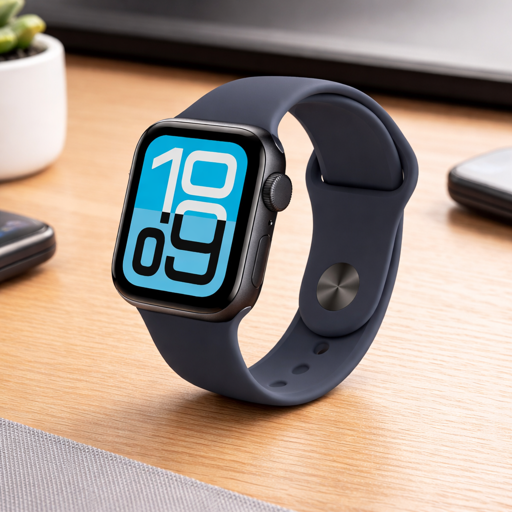
Price range: $219-$279 (GPS) / $249-$329 (GPS + Cellular) • Requires iPhone
Emergency calling note: How independently the SE 3 can reach 911 depends on which model you choose. The GPS + Cellular model can call emergency services without the iPhone nearby. The GPS-only model relies on a paired iPhone or Wi-Fi Calling being available. It cannot independently place an emergency call when out of range of both. For true standalone emergency capability, choose GPS + Cellular.
Released September 2025, the Apple Watch SE 3 is Apple’s current entry-level model, sitting below the Series 11 and Ultra 3 in the line-up, and shares Apple’s S10 chip with the higher end models. For an iPhone-owning senior, this is the easiest smartwatch to live with. It works seamlessly with existing Apple ID, shares health data to the iPhone Health app, and leverages Siri for voice control without any learning curve.
Key Specs
- Fall detection with automatic 911 calling if unresponsive
- Emergency SOS via side button
- Crash Detection (severe car accidents)
- Always-On display: time visible without raising wrist (new in SE 3)
- S10 chip with on-device Siri and double-tap gesture control
- Wrist temperature sensing, sleep score, sleep apnea notifications
- Continuous heart rate monitoring with irregular rhythm detection
- GPS + Cellular model can call emergency services independently, without the iPhone nearby
Worth Knowing
The ~18 hour battery means daily charging is non-negotiable. For most people this means overnight on the charger, but that creates a gap in fall detection during the hours when many falls actually happen (nighttime trips to the bathroom, for example). If that’s a concern, the Kanega Watch’s swappable battery system is a better choice. The SE 3 connects to 911 directly rather than a monitoring center, so a 911 dispatcher answers rather than someone who knows the wearer’s name and medical history. Bear that in mind if professional triage is important for your situation. ECG and blood oxygen sensors are not included on the SE 3.
Best For
iPhone users already comfortable with Apple products who want safety features alongside health tracking, without a monthly monitoring fee. Families who want to share health data and location through the Apple ecosystem.
Samsung Galaxy Watch 8 Classic
Best Android Option for Seniors | $369-$549 | View on Amazon
Rating: 4.3/5
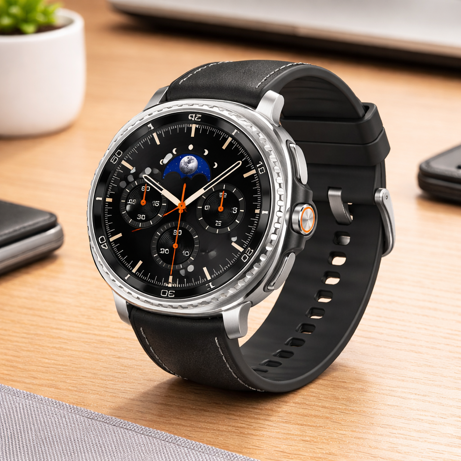
Price range: $369-$499 (Bluetooth) / $549 (LTE) • Emergency SOS calling (LTE model can call 911 independently) • Best experience with Samsung Galaxy phones • Works with most Android phones for core features
Released July 2025, the Galaxy Watch 8 Classic marks the return of Samsung’s physical rotating bezel after it was absent from the Watch 7 generation. That’s not just a cosmetic detail in this context. For seniors, a tactile ring that scrolls through menus without touching the screen is genuinely easier to operate than swipe gestures, particularly for those with arthritic fingers or unsteady hands. The stainless steel build and 46mm case give it more of a traditional watch look than most smartwatches.
Key Specs
- Fall detection with automatic SOS to emergency contacts
- Physical rotating bezel for touchscreen-free navigation
- ECG for heart rhythm analysis (requires Samsung Galaxy phone, not available on all Android phones)
- Blood oxygen measurement and continuous heart rate monitoring
- Advanced sleep coaching with bedtime guidance
- Super AMOLED always-on display, 3,000 nits, legible in direct sunlight
- Stainless steel case, 5ATM + IP68 + MIL-STD-810H rated
- Google Gemini on Wear OS 6
- Battery life: ~30-40 hours
Worth Knowing
The ECG feature is tied to Samsung Galaxy phones specifically and won’t function with other Android phones. For general use and fall detection, any Android phone running Android 11 or newer will work. The MSRP is $499, but the Watch 8 Classic has been regularly available for $370-$400 at major retailers. LTE models add around $50. At the higher end of the price range among consumer watches here, but the rotating bezel and longer battery life are meaningful differentiators.
Best For
Android users, particularly Samsung phone owners, who want a comprehensive health monitoring smartwatch with a traditional watch aesthetic. Seniors who find touchscreen-only navigation frustrating (the rotating bezel lowers the interaction barrier).
Google Pixel Watch 4
Best Safety Feature Set | $289-$499 | View on Amazon
Rating: 4.4/5
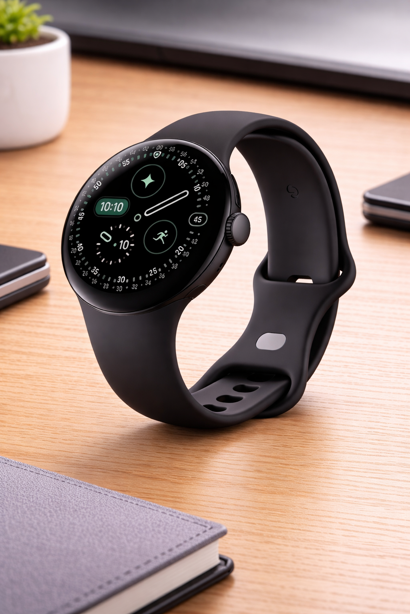
Price range: $289-$399 (Wi-Fi, 41mm/45mm) / $389-$499 (LTE) • Calls 911 directly • Requires Android 11.0+
Released October 2025, the Pixel Watch 4 carries one of the most comprehensive safety feature sets of any mainstream consumer smartwatch currently available. The headline addition is Satellite SOS on LTE models – the ability to reach emergency services via satellite even without cellular coverage or Wi-Fi. No other mainstream consumer smartwatch sold in the US offered this at launch. For families where a senior walks in areas with patchy signal, or where a remote medical event is a real concern, that’s an important consideration.
Key Specs
- Fall detection with automatic emergency calling if unresponsive
- Emergency SOS via crown press (5x)
- Satellite SOS (LTE model): reach emergency services via satellite when off the cellular grid (free for two years after activation)
- Loss of Pulse Detection: detects loss of pulse and automatically prompts a call to emergency services
- Car crash detection with automatic emergency calling
- Safety Check: share location if you don’t check in during activities
- ECG app, irregular heart rhythm detection, blood oxygen measurement
- Sleep and stress tracking (Fitbit integration)
- Battery life: up to 40 hours (45mm) / up to 30 hours (41mm)
- Fast charging: 15 minutes provides ~15 hours of battery
- Works with most Android phones (Android 11+)
Worth Knowing
Satellite SOS requires the LTE model and user interaction to initiate. It won’t trigger automatically from an undetected fall. It’s designed for remote emergencies where you’re conscious but out of signal range, not as a passive background safety net. Some early 2026 reports and user feedback flagged Fitbit-related tracking bugs affecting step and calorie accuracy. Google is actively working on a fix, and this doesn’t affect the safety features. Some advanced health coaching features require a Fitbit Premium subscription. The 45mm model is the better choice for battery life if size permits.
Best For
Android users who want the broadest possible safety feature coverage without a monthly monitoring subscription. Active seniors who hike, walk in rural areas or spend time where cellular coverage is unreliable. Any family where the Pixel Watch 4’s combination of fall detection, loss of pulse detection and satellite SOS represents better risk coverage than alternatives at a similar price.
How to Choose the Right Smartwatch for Seniors
The choice is more straightforward than the number of options suggests. Two questions do most of the work.
1. Does this person need professional monitoring, or is direct 911 access enough?
If the senior lives alone, has a medical history that warrants it, or if the family wants someone trained to assess situations before dispatching help, choose a medical alert watch. The monthly fee pays for a human judgment layer that a 911 dispatcher cannot often provide. If the senior is relatively healthy, tech-comfortable, and simply wants safety features woven into an everyday smartwatch, a consumer device is appropriate.
2. What phone do they already use?
For consumer watches, this is non-negotiable. Apple Watch SE 3 requires an iPhone. Galaxy Watch 8 Classic and Pixel Watch 4 require Android. Pairing cross-platform creates setup difficulty and results in lost key features. Worth noting for the Galaxy Watch 8 Classic specifically – core features including fall detection work with any modern Android phone, but ECG is restricted to Samsung Galaxy phones. The medical alert watches (SOS Smartwatch, Kanega, MGMove) require no smartphone at all.
More Things Worth Checking
- What is the first year cost (not just device price)? A $249 Apple Watch costs $249 total if you don’t add a cellular plan. A $199 SOS Smartwatch costs ~$679 in year one once monitoring is included. Calculate the real number before deciding.
- Who handles support? Consumer watches require someone comfortable with software updates and occasional troubleshooting. Medical alert watches tend to have dedicated customer service lines and setup support built into the service. If no one in the family has the bandwidth for tech support, lean toward a dedicated medical alert device.
- Consider trial periods: Bay Alarm Medical offers a 15-day return window. Many companies offer money-back guarantees. Test the watch in real daily use before committing. This includes wearing it, charging it, and pressing the button in a non-emergency test call before fully committing.
Making It Work: Setup and Success Tips
The watch that ends up in a drawer saves no one. These habits drastically improve the chances of consistent daily wear:
- Set it up together: Walk through the setup as a team, explaining each feature as you go. Confidence comes from understanding, not just instruction.
- Start with two features, not twenty: Get comfortable with telling the time and pressing the emergency button. Add step counting, health tracking and notifications later.
- Do a test call on day one: Press the button, tell the operator it’s a test, and talk through it together. Knowing it works builds real confidence rather than theoretical reassurance.
- Write a quick reference card: Laminated, large print, kept near the charging station. List how to check the battery, how to call for help, how to call a family member.
- Anchor charging to an existing habit: Same time, same spot every day, ideally tied to something they already do reliably, like going to bed or having lunch. A phone reminder works for some people, a physical charging dock visible on the bedside table works for most.
- Check in for the first two weeks: Ask daily how the watch is feeling, what’s confusing, what they’ve noticed. Small friction points that get addressed early don’t become reasons to stop wearing it.
Frequently Asked Questions
Medical Disclaimer: This guide is informational only and does not constitute medical advice. Consult your healthcare provider for personal health decisions and device recommendations.
What’s the real difference between a medical alert watch and a consumer smartwatch for emergencies?
The critical difference is who answers the call. A medical alert watch connects to a trained operator who knows the wearer’s name, emergency contacts, medical notes and home address. They can dispatch exactly the right level of help – a neighbor for a minor fall, an ambulance for something serious. A consumer smartwatch calls 911, where a dispatcher has none of that context. For a confused senior or someone with a complex medical history, that human triage layer has real value. For a healthy, tech-comfortable senior, direct 911 access may be perfectly adequate (and cheaper).
How accurate is fall detection, and what happens if the watch misses a fall?
Modern fall detection is sophisticated. Accelerometers and gyroscopes work together to identify the characteristic pattern of a fall, but no system catches every event. Slow slides to the floor, falls onto soft surfaces, or very gradual collapses may not trigger detection. False positives also happen. A sudden sit-down or dropped arm can occasionally register as a fall. This is why every watch on this list pairs automatic detection with a manual SOS button. The two work together – automatic detection handles the unconscious or disoriented scenario, the manual button covers anything the sensor misses.
Can these watches work without a Wi-Fi connection at home?
The medical alert watches (SOS Smartwatch, Kanega, MGMove) use cellular networks and function entirely without home Wi-Fi. The Kanega Watch additionally connects via home Wi-Fi, which is especially useful in homes with thick walls or weak cell signal indoors.
Consumer watches are more nuanced. GPS-only models of the Apple Watch SE 3 and Pixel Watch 4 require a paired phone or Wi-Fi Calling to place emergency calls, while their cellular models operate independently of the phone. The Galaxy Watch 8 Classic cellular model also functions independently. If standalone emergency calling is a priority, cellular models are the right choice, and worth the extra $50 over GPS-only versions.
Will Medicare or insurance cover any of these?
Traditional Medicare (Parts A and B) does not cover medical alert devices or consumer smartwatches because they are not classified as durable medical equipment (DME). Some Medicare Advantage (Part C) plans may offer allowances or discounts for personal safety devices, so it’s worth checking your specific plan. Long term care insurance policies sometimes include medical alert coverage.
Smartwatch reimbursement under FSA or HSA is not automatic. Eligibility varies by plan and often requires a Letter of Medical Necessity from a healthcare provider. Check with your plan administrator before assuming it qualifies. Medical Guardian also offers guidance on insurance questions for the MGMove.
What if the person refuses to wear a smartwatch at all?
Resistance usually comes from one of three places – aesthetics (“it looks like a medical device”), pride (“I don’t need one of those”) or unfamiliarity (“I don’t know how to use it”). Aesthetic concerns respond well to the consumer watches – a Samsung Galaxy Watch 8 Classic looks like an expensive traditional watch, not a medical pendant. Pride often softens when the framing shifts from “emergency device” to “you’ll worry us less if you have this”. Unfamiliarity responds to involvement. Letting the person choose the style, color and features converts it from something being imposed to something they own. Starting with just an outdoor walk, rather than all day wear, also lowers the initial barrier.
Is the Pixel Watch 4’s Satellite SOS actually useful for seniors, or is it overkill?
It depends on lifestyle. For a senior who walks in suburban or urban areas with reliable cell coverage, satellite SOS adds relatively little over standard Emergency SOS. For someone who hikes, lives rurally, or spends time in areas with patchy signal, it’s a genuine capability gap filler that no other mainstream consumer smartwatch offers. It’s worth noting that Satellite SOS requires user interaction, and it doesn’t trigger automatically from fall detection. If the concern is an unconscious fall in a remote area, the standard fall detection and LTE Emergency SOS remain the primary safety net. Satellite is a supplemental escalation path for when cellular isn’t available at all.
Wrist Assured
Choosing well here has less to do with chasing the longest feature list and more to do with matching the watch to real life. A device can look impressive in a comparison table and still be the wrong fit if it feels confusing, gets left on the charger, or never becomes part of a daily routine.
That is why the final decision should come back to four practical questions: Will they wear it consistently? Can they use it confidently? Will it still protect them in the situations you are most concerned about? And can the family realistically support it, whether that means charging it, troubleshooting it, or paying the ongoing cost?
For some people, the right answer will be a dedicated medical alert watch with professional monitoring and a simpler path to help. For others, it will be a consumer smartwatch that folds safety into a device they would happily wear anyway. The best choice is the one that fits the person, not just the spec sheet.
Get that match right, and the watch becomes more than a piece of technology. It becomes part of the safety net around everyday life – quiet when everything is fine, ready the moment it is not.