
A regular power strip gives you more outlets. A single smart plug gives you remote control of one device. A smart power strip does both. On models with individually controlled outlets, each one switches on its own from your phone, a schedule or a voice command, and some models report each outlet’s energy use too.
Picture a home office strip powering a monitor, desk lamp, speakers and printer. You can schedule the lamp to come on before work, cut the speakers overnight and check whether the printer draws power while idle, without reaching behind the desk. This guide covers four standout options currently available in the US and what separates them.

Quick Picks
🏆 Best Overall: Tapo P316M – $50-60 | Matter certified, per-outlet energy monitoring, 6 smart outlets
🏠 Best for Home Assistant: Kasa HS300 – $50-60 | Per-outlet energy data, officially supported local integration
🍎 Best for Apple Home: meross Smart Power Strip – $40-50 | Native HomeKit, switchable USB ports
💰 Best Value for Alexa and Google: Geeni Smart Power Strip – $40 | 6 smart outlets, USB-C, 1200-joule surge protection
30-Second Selector
What’s your priority?
- Works with major smart home platforms through Matter, with per-outlet energy tracking in the Tapo app → Tapo P316M
- Runs Home Assistant and wants local, per-outlet power data → Kasa HS300
- Lives in Apple Home → meross Smart Power Strip
- Uses Alexa or Google and wants USB-C at the lowest price → Geeni Smart Power Strip
Quick Comparison
| Model | Price Range | Smart Outlets | USB Ports | Energy Monitoring | Works With |
|---|---|---|---|---|---|
| Tapo P316M | $50-60 | 6 | 3 USB-A (always on) | ✅ Per outlet | Alexa, Google Home, Apple Home, SmartThings (via Matter) |
| Kasa HS300 | $50-60 | 6 | 3 (always on) | ✅ Per outlet | Alexa, Google Assistant, Home Assistant |
| meross Smart Power Strip | $40-50 | 4 | 4 (switchable as a group) | ❌ | Apple Home, Alexa, Google Home, SmartThings |
| Geeni Smart Power Strip | $40 | 6 | 1 USB-A, 1 USB-C | ❌ | Alexa, Google Assistant |
Jump To:
- Tapo P316M (Best Overall)
- Kasa HS300 (Best for Home Assistant)
- meross Smart Power Strip (Best for Apple Home)
- Geeni Smart Power Strip (Best Value for Alexa and Google)
- Before You Buy: What to Check
Best Smart Power Strips for 2026
Each pick below solves a different priority – cross-platform Matter control, Home Assistant integration, native Apple HomeKit support and the most outlets for the money. Ratings weigh outlet control, energy monitoring, surge protection, smart home compatibility and value.
Tapo P316M Smart Wi-Fi Power Strip
Best Overall | $50-60 | View on Amazon
Rating: 4.6/5
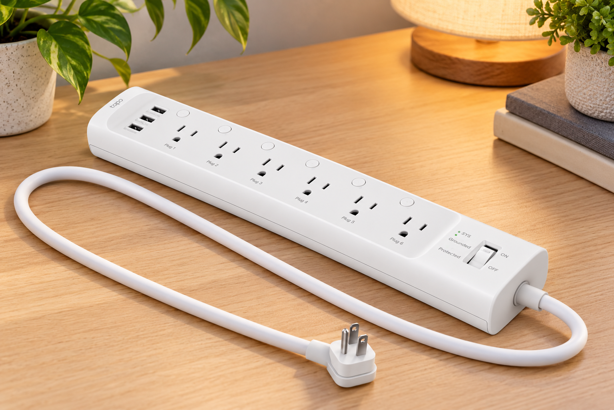
The P316M is the only strip here that combines Matter certification with per-outlet energy monitoring. Matter lets it pair directly with Alexa, Google Home, Apple Home and SmartThings, and each of its six outlets reports its own power use in the Tapo app. This way, you can see exactly which device is drawing power, not just the strip as a whole.
Each outlet also has its own physical on/off button, and TP-Link says the strip can still be controlled over your local network through the Tapo app during an Internet outage.
Key Specs
- Outlets: 6 individually controlled, each with a manual on/off button
- USB: 3 always-on USB-A ports (5V/2.4A per port)
- Energy monitoring: Per outlet, via the Tapo app
- Surge protection: ETL certified, Type 3 SPD
- Max load: 15A / 1875W total
- Works with: Alexa, Google Home, Apple Home and SmartThings via Matter
- Cord: 3 ft, flush-fitting plug
Worth Knowing
The 3-foot cord is short for a power strip, so measure the distance to your outlet first. As with Matter smart plugs, don’t expect the Tapo app’s full energy history to appear in Apple Home or SmartThings.
Best For
Anyone who wants a strip that works across major smart home platforms and helps track how much electricity each connected device uses.
Kasa HS300 Smart Power Strip
Best for Home Assistant | $50-60 | View on Amazon
Rating: 4.4/5
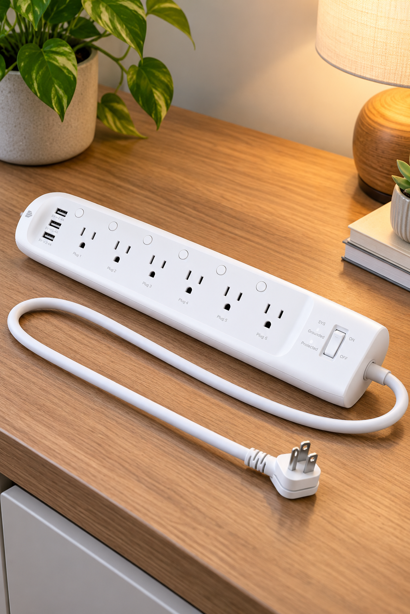
The HS300 matches the P316M on core hardware – six individually controlled outlets with per-outlet energy monitoring – but trades Matter for a long-established place in Home Assistant. It’s listed as a supported power strip in Home Assistant’s official TP-Link integration, which connects to devices locally instead of through TP-Link’s cloud. Each outlet appears with its own switch and energy readings.
Unlike newer Kasa and Tapo models, it isn’t flagged in that documentation as needing your TP-Link account credentials to connect, though Home Assistant notes that firmware updates can add that requirement. Outside Home Assistant, it works with Alexa and Google Assistant.
Key Specs
- Outlets: 6 individually controlled
- USB: 3 always-on ports (5V/2.4A per port)
- Energy monitoring: Per outlet, via the Kasa app or Home Assistant
- Surge protection: ETL certified, Type 3 SPD
- Max load: 15A / 1875W total
- Works with: Alexa, Google Assistant, Home Assistant
Worth Knowing
There’s no Matter support, so this model won’t appear in Apple Home. Home Assistant’s documentation notes that energy readings for each outlet on Kasa power strips only update every 60 seconds – fine for tracking usage, less so for live automations.
Best For
Home Assistant users who want per-outlet power data on a local, officially supported integration.
meross Smart Power Strip (MSS425FHK)
Best for Apple Home | $40-50 | View on Amazon
Rating: 4.2/5
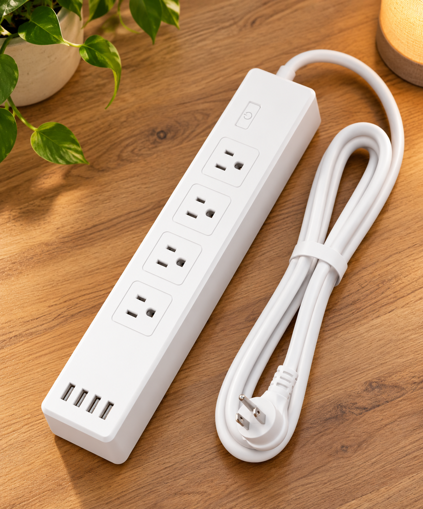
The HomeKit version of meross’s strip supports Apple HomeKit natively, so it adds straight to the Home app and works with Siri without a bridge. It’s also the only pick here where the USB ports can be switched off. All four are controlled together as one group, alongside four individually controlled outlets.
Schedules include sunrise and sunset triggers, and the strip also works with Alexa, Google Home and SmartThings.
Key Specs
- Outlets: 4 individually controlled
- USB: 4 ports, switchable as a group (up to 4.0A combined)
- Safety: ETL and FCC certified, flame-retardant housing
- Max load: 15A
- Works with: Apple Home, Alexa, Google Home, SmartThings
- Cord: 6 ft
Worth Knowing
There’s no energy monitoring and no Matter support. Controlling it through HomeKit away from home needs an Apple home hub, such as a HomePod or Apple TV. Its four USB ports share 4.0A between them, and meross’s specifications don’t include USB-C. If you need USB-C, the Geeni is the only pick here that has it. Select the “HomeKit Power Strip” style on Amazon.
Best For
Apple Home households who want native HomeKit control of several outlets, plus USB ports they can switch off.
Geeni Smart Power Strip (GN-SW009)
Best Value for Alexa and Google | $40 | View on Amazon
Rating: 4.1/5
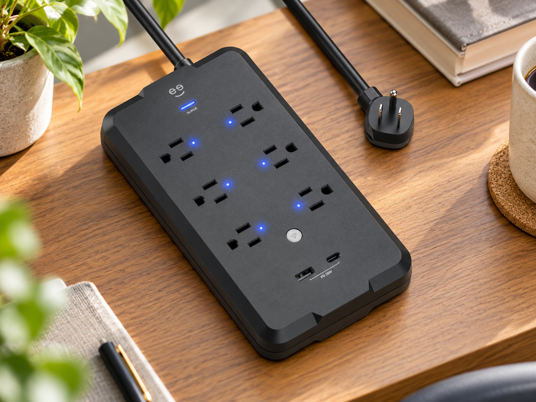
The Geeni combines six individually controlled outlets with one of the lowest prices in this roundup, and it’s the only pick with a USB-C port. Its 1200-joule surge protection and 6-foot cord round out a solid spec sheet for the money, and two mounting holes on the back let you fix it to a wall or under a desk.
It’s controlled through the Geeni app, with voice control through Alexa and Google Assistant. The model is ETL Listed. I confirmed this in Intertek’s ETL directory under the manufacturer, Ningbo Diya Electric, which lists Geeni as a trade name.
Key Specs
- Outlets: 6 individually controlled
- USB: 1 USB-A, 1 USB-C
- Surge protection: 1200 joules
- Safety: ETL Listed (UL 1363)
- Max load: 15A
- Works with: Alexa, Google Assistant
- Cord: 6 ft
Worth Knowing
There’s no Matter, Apple Home or energy monitoring support. Its ETL listing covers UL 1363, the safety standard for power strips, and Geeni doesn’t publish a voltage protection rating, so its surge spec isn’t directly comparable to the TP-Link strips. The Amazon listing also includes an 8-outlet model, so select the “6 Outlets / 2 USB” style.
Best For
Alexa and Google households that want the most smart outlets for the money, plus a USB-C port.
Smart Power Strip vs. Regular Power Strip vs. Smart Plug
| Regular Power Strip | Single Smart Plug | Smart Power Strip | |
|---|---|---|---|
| Outlets | Several | One | Several |
| App and voice control | No | Yes, one device | Yes, each outlet separately |
| Schedules | No | Yes | Yes, per outlet |
| Energy monitoring | No | On some models | On some models, per outlet |
| Best for | Extra outlets only | One lamp, fan or appliance | Desks, media cabinets, charging stations |
The trade-off is that every outlet on a strip shares one load rating. Six outlets don’t mean six times the capacity. All four picks are rated for a maximum combined load of 15A, however many outlets are in use. What’s actually available also depends on your household circuit and whatever else is running on it.
Smart Power Strips vs. Advanced Power Strips
If you’ve seen power strips sold through your utility company, those are usually advanced power strips, a different product built to cut standby power automatically, with no app involved. The Department of Energy’s Building America Solution Center describes two tiers. A Tier 1 strip has one “control” outlet for your main device, like a TV or computer. When you switch that device off, the strip cuts power to the accessories plugged in alongside it, such as speakers or a game console. A Tier 2 strip goes further and can shut everything off, including the main device, when it senses no one has used it for a while.
An advanced power strip suits you if you want standby savings with zero setup. A smart power strip suits you if you want control – schedules, voice commands, remote access, and on some models, per-outlet energy data. Some utility programs offer rebates on advanced power strips, so check yours before buying one.
Before You Buy: What to Check
Load and Safety
Total load rating: Check the wattage on each device you plan to plug in and add them up. A strip’s rating applies to all of its outlets combined (15A, or roughly 1800W on a standard 120V outlet, for all four picks here), so high-draw appliances like space heaters and window air conditioners belong on their own wall outlet, following the appliance maker’s instructions.
Safety and surge protection: Look for a safety listing from a recognized testing lab such as UL Solutions or Intertek (ETL), but know that a power strip safety listing (UL 1363) isn’t the same as surge protector testing (UL 1449). Joule ratings describe how much surge energy a strip can absorb. A voltage protection rating (VPR), assigned under UL 1449, describes how much voltage gets through during standardized testing – lower is better. Manufacturers publish one, both or neither, so the numbers aren’t always comparable across brands.
No daisy-chaining: Plug the strip directly into a wall outlet. Manufacturers like TP-Link warn against plugging a power strip into another power strip or an extension cord.
Outlets, Monitoring and USB
Which ports are actually smart: All four picks control each AC outlet individually, but USB ports are usually always on. Only the meross lets you switch its USB ports, and only as a group.
Per-outlet energy monitoring: Only the Tapo and Kasa strips measure each outlet separately. It’s useful for finding standby draw and comparing devices, but readings can lag and drift on variable loads. My guide to how a smart plug works explains why.
USB-A vs. USB-C: Think about the cables you already use. USB-A ports work with USB-A to USB-C charging cables, while a USB-C port accepts the USB-C to USB-C cables supplied with many newer devices. Of the picks here, only the Geeni has a USB-C port.
Connectivity
Matter vs. Wi-Fi only: A Matter-certified strip like the Tapo P316M pairs with every major platform and moves with you if you switch ecosystems. Wi-Fi-only strips depend on the specific integrations their maker supports.
2.4GHz Wi-Fi: Most smart power strips connect over 2.4GHz Wi-Fi. Networks that combine both bands under one name usually work, but some devices struggle during setup. If pairing fails, make sure 2.4GHz is enabled and follow the manufacturer’s setup guidance.
Frequently Asked Questions
Does a smart power strip save energy on its own?
No. The strip uses a little electricity itself to stay connected to Wi-Fi. Any savings come from how you use it – switching outlets off overnight on a schedule, cutting power to devices that draw electricity while idle, and on strips with energy monitoring, seeing which devices use the most. Keep expectations realistic, though. A device drawing 5 watts around the clock costs roughly $8 a year to run at the average US electricity rate.
Will a smart power strip work during an Internet outage?
It depends on the model and how you control it. Buttons on the strip itself work without an Internet connection, as long as the strip has power. TP-Link says the Tapo P316M can still be controlled over your local network through the Tapo app, and Home Assistant controls the Kasa HS300 locally. Remote access from outside your home needs the Internet on every model.
Strip Down to What Matters
Before buying, think about the devices you want to control. A smart power strip earns its place when those devices need different schedules, when standby power is worth tracking, or when several plugs are awkward to reach. Otherwise, a regular strip or a single smart plug may do the job for less.
Choose one that works with your existing smart home platform, check its total load rating, and be realistic about potential energy savings. The biggest benefit often comes from convenience rather than a lower electricity bill.
More outlets, fewer headaches. Now that’s a power move.
Want reassurance before you plug anything in? My guide to whether smart plugs are safe covers UL and ETL certification, amperage limits, and the actual fire risk data behind the question.