
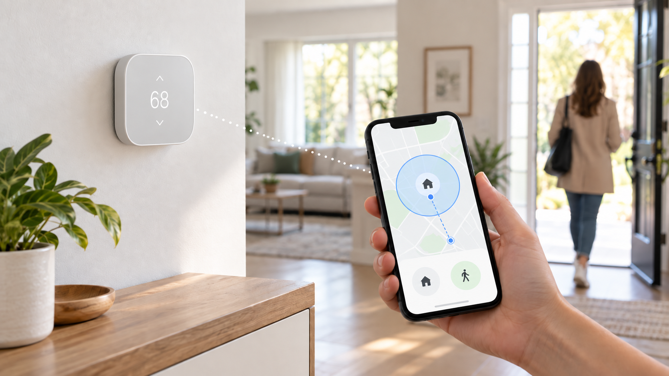
Your thermostat can’t see you leave the house. What it can do is ask your phone. That’s the entire premise behind geofencing – a virtual boundary drawn around your home. Your phone reports when you cross it, and the thermostat uses that to switch between home and away settings automatically.
It’s a feature I touched on briefly in my guide to whether a smart thermostat is worth it, as one of several things that separates a smart model from a programmable one. The guide you’re reading now goes deeper. It covers how geofencing works at a technical level, how Nest, Ecobee and Honeywell each implement it differently, where it tends to fall short, and what it means for your location privacy.
What Is Geofencing?
A geofence is a virtual perimeter tied to a set of coordinates, usually drawn as a circle around your home’s location. Your phone’s operating system, not the thermostat itself, detects whether you’ve moved inside or outside that boundary.
That distinction matters more than it sounds. The thermostat itself has no idea where you are. When your phone’s location services detect that you’ve crossed the boundary, that event gets relayed to the thermostat’s app or cloud service. The app or service can then switch the system between home and away settings. It’s not a live tracker pinging your location every few seconds. It is a threshold trigger that fires only when you cross the boundary.
GPS, Wi-Fi, Cellular and Bluetooth: How Your Phone Actually Knows Where You Are
In practice, you don’t need to understand which signal your phone is using at any given moment. But knowing why that signal changes explains why a geofence can trigger cleanly one day and noticeably late the next.
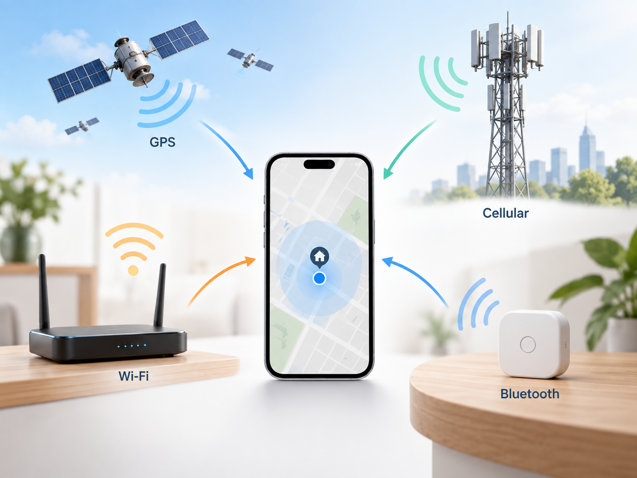
Phones don’t have a single “location chip” that reports a precise coordinate on demand. Instead, they blend signals from whichever positioning systems are available at the time. That mix directly affects how reliably a geofence trigger fires.
The Four Signal Types
GPS uses satellite signals and is the most accurate outdoors, typically within 3-10 meters in open sky. It’s also the slowest to lock onto your location and the most demanding on battery. That’s why most thermostat apps don’t rely on it continuously.
Wi-Fi positioning estimates location using known wireless access points nearby. It’s faster than GPS and holds up better indoors or in dense neighborhoods. Accuracy does depend on how current the access point database is.
Cellular positioning uses signal strength and timing from nearby cell towers. Cellular coverage is widespread, but precision is generally weaker than GPS or Wi-Fi positioning. It can be off by hundreds of meters depending on tower density in your area.
Bluetooth can offer room-level precision, but it needs dedicated beacon hardware to work that way. For home geofencing, it’s rarely the primary signal. There’s no equivalent of a retail store’s Bluetooth beacon network sitting around a house.
Most smart thermostat apps don’t pick just one of these. Google’s documentation for Nest presence sensing confirms that phone location can draw on a combination of cellular data, Wi-Fi and GPS to determine when a phone has left or returned. It doesn’t depend on any single source. That layered approach is also why geofencing can feel inconsistent from one day to the next. The signal that dominates depends on where you are and what your phone can see.
What the Accuracy Numbers Mean
| Technology | Approximate Accuracy | Works Well Indoors | Battery Impact |
|---|---|---|---|
| GPS | A few meters outdoors under good conditions | No | High |
| Wi-Fi positioning | Often tens of meters | Yes | Low |
| Cellular positioning | Tens to hundreds of meters, or more | Yes | Low |
| Bluetooth (beacon-based) | Potentially room-level at short range | Yes | Low, but needs dedicated hardware |
Modern phones blend several of these signals into a single fused location estimate. The accuracy you get depends on the combination available at that moment, not just one radio in isolation.
One practical takeaway here is that geofencing doesn’t require constant GPS tracking, whatever the permission prompt on your phone might imply. Google is explicit that Home/Away Assist doesn’t continuously record your exact location the way a turn-by-turn navigation app does. It only needs to know two things – whether you’ve left, and whether you’ve come back. It can combine lower-power signals like Wi-Fi and cellular positioning with GPS when a more precise fix is needed.
How Nest, Ecobee and Honeywell Each Implement It
The general concept is the same across brands, but the execution differs enough that it’s worth understanding. Don’t assume your experience with one thermostat will match a review you read about another.
Google Nest: Home/Away Assist
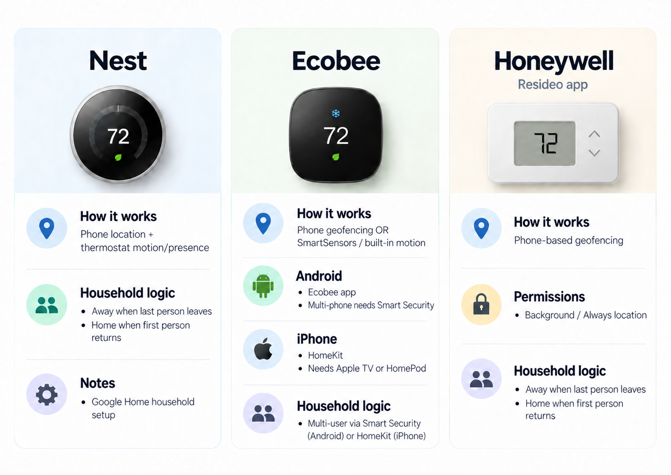
Nest doesn’t rely on phone location alone. Presence sensing combines your phone’s location relative to the geofence with activity detected by other supported devices in your home. That includes motion picked up by compatible Nest thermostats. Google is explicit that Nest cameras and doorbells don’t factor into this Home/Away switching. So a camera catching movement in the driveway won’t override your phone leaving the geofence.
Nest also handles multi-person households more gracefully than most competitors, though it requires a bit of setup. In a Google Home household, each member opts in with their own account and their own phone, rather than sharing one login. Once participating household members have enabled presence sensing on their phones, the home switches to away mode only after the last participating person leaves. It switches back to home the moment the first one returns. This solves one of the most common geofencing complaints – a thermostat that goes into away mode the instant one family member steps out, even though someone else is still home.
Ecobee: Geofence or Sensor-Based Presence Detection
Ecobee combines two related but distinct approaches. Its Smart Home & Away feature can draw on occupancy sensing from the thermostat’s built-in motion sensor and any remote SmartSensors placed around the home. It infers presence from movement instead of phone location. Separately, phone-based geofencing reacts specifically to your phone crossing the boundary.
Which app handles that geofencing depends on your phone’s platform. On Android, Ecobee’s own app handles it, but multi-device tracking requires a paid Smart Security subscription and its Autopilot feature. Without that subscription, the native Android toggle only tracks one phone. On iPhone, geofencing runs through Apple’s HomeKit instead, which requires a HomeKit hub such as an Apple TV or HomePod (iPad is no longer supported as a home hub under Apple’s current architecture). Ecobee’s own documentation confirms iOS households can track multiple devices this way without any subscription.
Honeywell: Geofencing on the Resideo App
Honeywell Home thermostats run their geofencing through the Resideo app, which relies on the phone’s location services on an ongoing basis. Resideo’s current setup guidance asks iPhone users to set Location Services to “Always” and Android users to grant precise location access. It also notes the app needs to keep running in the background so it can detect boundary crossings even when it isn’t open.
Honeywell’s own support documentation is candid that the exact spot where a crossing gets detected can vary, and warns that battery optimization apps ending Honeywell Home’s background activity can cause inconsistent geofence reporting. That’s a useful admission, because it explains why a geofence boundary that looks precise on a map doesn’t always translate to a precise real-world trigger point. On the multi-person front, Resideo handles this well. With multiple users on separate accounts, the geofence triggers away mode when the last person leaves and home mode when the first person returns. That’s the same first-arrives, last-leaves logic Nest uses.
Accuracy and Reliability: Where This Breaks Down
Geofencing is convenient when it works and mildly maddening when it doesn’t, and the failure points tend to repeat across brands.
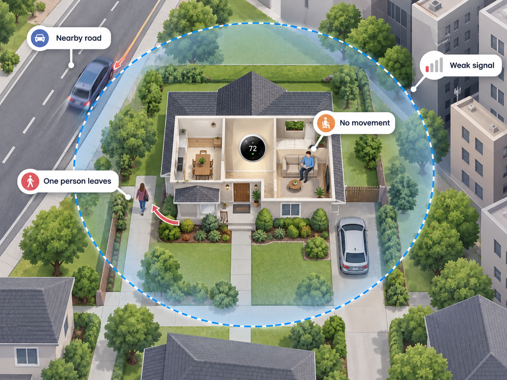
The boundary is an approximation, not a hard line: Honeywell’s own setup guidance acknowledges that the radius shown in the app is approximate and that real-world boundaries shift based on GPS accuracy. Their advice, worth repeating here, is to keep your geofence away from roads or routes you regularly travel that don’t necessarily mean you’re heading home. A nearby highway can trigger a false crossing.
Single-phone geofencing breaks in multi-person households: Any geofence tied to one phone and one account will treat “that phone left” as “everyone left”, which is wrong the moment more than one person lives in the house. The fix is household-aware presence logic, where the system needs to wait until the last tracked person leaves, not react the moment any one phone does. Nest and Honeywell’s Resideo app both support this natively once every household member enrolls their own phone. Ecobee’s split is more unusual. iPhone households get multi-device tracking through HomeKit at no extra cost. Ecobee’s native Android geofencing is limited to one phone, while multi-member tracking through Ecobee’s Smart Security/Autopilot features requires a subscription.
Stationary-but-home periods can confuse motion-based systems: This isn’t a geofencing issue exactly, but it’s closely related. Thermostats that lean on occupancy sensors rather than phone location can misread a nap, a quiet work-from-home afternoon, or anyone sitting still for long enough as an empty house.
Signal quality varies by location and hardware: A phone with a weak GPS antenna, a rural area with sparse cell towers, or a dense urban block with buildings that obstruct or reflect GPS signals will all produce less consistent trigger timing than a suburban home with clear sky view and strong Wi-Fi coverage nearby.
Privacy: What’s Being Collected
Geofencing requires location permission, and it’s reasonable to want to know what that permission grants access to.
How Google Uses Location for Presence Sensing
Google states plainly that location data used for presence sensing and geofencing is used only to determine when you’ve arrived or left, for the purposes you’ve given permission for. That’s a narrower claim than “we collect your location”. It’s consistent with the technical reality described above. Geofencing doesn’t necessarily require the app to continually record your exact location, just boundary-crossing events.
What I’d avoid is treating any one brand’s privacy language as representative of the whole category. Data handling practices differ by manufacturer, and they change over time as apps get updated and privacy policies get revised. If this is important to you, check the current privacy policy for your thermostat model. Don’t assume it matches what a competitor does, or what an older article said.
One thing worth knowing regardless of brand – location permission is specifically what gates the geofencing feature. Turning off location sharing simply disables the automatic home/away switching. You can still control the thermostat remotely or run a schedule. You just lose the part that reacts to whether your phone has left or returned.
It’s also a documented concern. Copeland, the parent company behind Sensi thermostats, surveyed 2,000 US homeowners for its 2026 Smart Home Data Privacy Study. It found 55% had little or no understanding of how manufacturers use their smart thermostat data, while 70% said they’d consider switching to a more privacy-focused thermostat if one were available. Copeland has an obvious commercial interest in that framing, but the underlying numbers are a useful signal that this uncertainty is widespread. It’s a fair reason to read the privacy policy for whichever thermostat you’re considering.
Location, Location, Automation
Geofencing can be genuinely useful, but the important question is how well your thermostat handles your household. A single occupant with one phone has very different needs from a family juggling multiple devices, irregular schedules and different mobile platforms. Before relying on it, check the multi-user rules, background location requirements and any subscription costs tied to the feature.
When geofencing works well, the thermostat adapts to the household instead of the household adapting to the thermostat.
Geofencing is just one piece of a bigger decision. If you’re still weighing whether a smart thermostat is worth the cost at all, my Is a Smart Thermostat Worth It? guide covers the broader case.