Your Zigbee motion sensor typically pairs in seconds. Your smart bulbs usually respond quickly. Door sensors fire automations reliably. This is Zigbee working as designed – but smart locks are different. Unlike sensors that just report status, locks need rock solid reliability because they control physical security. Choose the wrong Zigbee lock and you’ll find yourself locked out when batteries die unexpectedly, struggling with hub compatibility issues, or dealing with a device that simply won’t pair. This guide covers the best Zigbee smart locks available in 2026, from ecosystem-specific options to universal compatibility models, so you can add reliable smart lock control without the usual integration headaches.
Who this guide is for: If you’re already running Zigbee devices and want a lock that integrates seamlessly, start with the Yale Assure Lock for SmartThings, or the Kwikset Convert if you have an existing compatible deadbolt. If you’re committed to Aqara’s ecosystem or use Apple HomeKit extensively, the U100 or U50 deliver excellent fingerprint and keypad access. If you’re unsure which category fits your setup, the comparison table below will help you narrow down the right choice quickly.
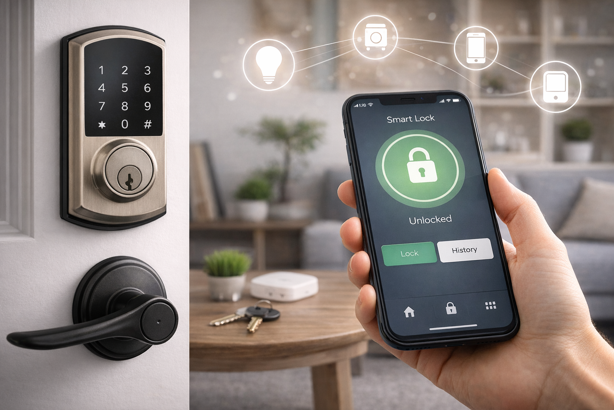
Quick Picks: Best Zigbee Smart Locks at a Glance
🏆 Best for SmartThings: Yale Assure Lock with Zigbee – $200-355 | Established brand, 250 PIN codes, reliable SmartThings integration
🔐 Best for Fingerprint Access: Aqara Smart Lock U100 – $190-200 | 50 fingerprints, HomeKit support, requires Aqara hub
💰 Best Budget Option: Aqara Smart Lock U50 – $125-135 | No fingerprint sensor, solid build quality, Aqara ecosystem
🔧 Best Conversion Kit: Kwikset Convert Zigbee – $85-135 | Keeps existing exterior hardware, works with multiple hubs
Zigbee Smart Lock Comparison Overview
| Lock Model | Price Range | Key Features | Hub Compatibility | Best For |
|---|---|---|---|---|
| Yale Assure (Zigbee) | $200-355 | 250 PIN codes, touchscreen, physical key backup | SmartThings (best), Home Assistant, Hubitat | Established brand reliability |
| Aqara U100 | $190-200 | Fingerprint (50 prints), PIN, NFC, Apple Home Key | Via Aqara hub: HomeKit, Google, Alexa | Fingerprint access, Aqara ecosystem users |
| Aqara U50 | $125-135 | PIN, NFC, Apple Home Key, weatherproof panel | Via Aqara hub: HomeKit, Google, Alexa | Budget Aqara ecosystem lock |
| Kwikset Convert | $85-135 | Converts existing deadbolt, keeps exterior hardware | SmartThings, Hubitat, Home Assistant | Compatible deadbolt owners |
What Makes a Good Zigbee Smart Lock?
Not all Zigbee locks work the same way. The Zigbee smart lock market is genuinely limited compared to Z-Wave or Wi-Fi alternatives. Where Z-Wave offers dozens of lock options from major manufacturers, Zigbee presents a handful of viable choices. But for users already invested in Zigbee ecosystems, the available options deliver solid performance when properly matched to your hub setup.
Before spending money on a Zigbee lock, four things matter most. These are:
- Hub compatibility: Some locks work universally, others require specific ecosystems
- Battery life: Replacing batteries in outdoor deadbolts during winter gets old fast
- Local control capability: Ideally, your lock should keep core functions working during Internet outages, though this depends on hub and ecosystem
- Physical installation requirements: Standard door prep makes installation straightforward, non-standard doors may add complications
Why Choose Zigbee for Smart Locks?
Zigbee’s mesh networking creates natural advantages for door locks. Each powered device acts as a signal repeater, extending range and creating redundant paths. Your lock doesn’t need direct hub access, as long as it can reach the nearest powered device, which relays through the mesh. The network automatically re-routes around failed devices or interference.
Zigbee is also relatively power-efficient, which can help smart locks deliver solid battery life. In practice, though, battery performance still depends heavily on usage frequency, door alignment, temperature and how hard the motor has to work to fully throw the deadbolt.
Local control is a huge factor for security devices. Many Zigbee hubs can process lock commands locally rather than routing through manufacturer servers in the cloud, which can help locks continue responding to automations and keypads even when Internet drops. Knowing the door locked automatically after your kids left delivers the invisible but much needed reassurance that makes smart locks truly useful. For detail on how Zigbee’s protocol stack enables this reliability, see my complete Zigbee protocol guide.
Hub Requirements for Zigbee Locks
Zigbee smart locks require a compatible hub. Unlike Wi-Fi locks that connect directly to your router, Zigbee devices need a central coordinator managing the mesh network. Consumer friendly options include Echo devices with built-in Zigbee and SmartThings hubs, which handle basic to intermediate automation through accessible apps. Advanced users prioritizing local control and complex automation gravitate toward Hubitat or Home Assistant, which process everything locally but require technical knowledge to set up.
For complete hub comparisons with hands-on testing and detailed feature breakdowns, see my best Zigbee hubs guide.
Jump To:
- Quick Picks
- Yale Assure Lock (Best for SmartThings)
- Aqara U100 (Best for Fingerprint Access)
- Aqara U50 (Best Budget Option)
- Kwikset Convert (Best Conversion Kit)
- FAQ
Best Zigbee Smart Locks for 2026
Here’s what’s currently available in the Zigbee lock market, starting with the most established option.
Yale Assure Lock with Zigbee Module
Best for SmartThings | $200-355 | View on Amazon
Rating: 4.3/5
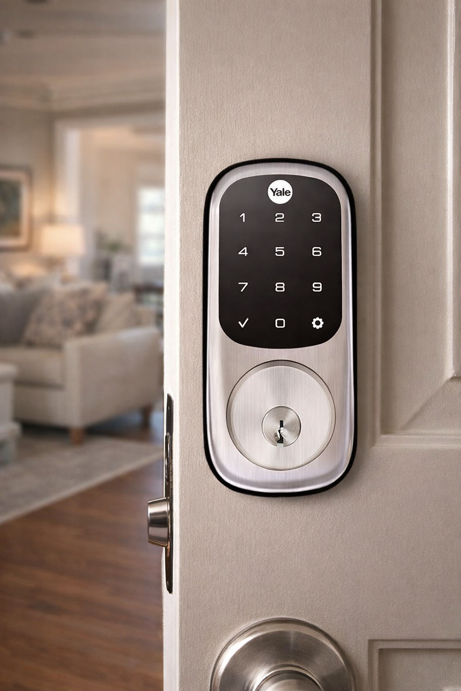
At a Glance: 250 PIN codes | Touchscreen keypad | Physical key backup | Zigbee module for SmartThings | Variable third-party hub compatibility
The Yale Assure Lock represents the most established Zigbee option from a major lock manufacturer. The touchscreen deadbolt handles up to 250 unique PIN codes, features a physical key override and supports remote control through compatible Zigbee hubs. Build quality matches Yale’s traditional locksmith reputation, with solid metal construction and reliable mechanical components.
Key Specs
- 250 unique PIN codes
- Touchscreen keypad with backlight
- Physical key backup
- Standard deadbolt installation
- Four AA batteries
- Zigbee 3.0 module
What Customers Love
SmartThings users consistently highlight reliable pairing and stable automation performance. Reviewers note the Yale’s superior build quality, with solid metal construction that feels more durable than plastic alternatives. The physical key backup receives frequent praise from users who’ve experienced battery failures with other locks. Long term owners report the mechanical components hold up well over years of daily use, with Yale’s locksmith reputation translating to real world reliability.
Worth Knowing
Third-party hub compatibility varies. SmartThings works reliably out of the box, while Home Assistant and Hubitat users report successful pairing but may need custom handlers for full features. Echo devices typically recognize the lock for basic commands but may not expose full functionality.
Best For
SmartThings users wanting a proven lock from an established manufacturer, users prioritizing build quality and reliability over cutting-edge features, anyone needing a Zigbee lock that still includes physical key backup.
Aqara Smart Lock U100
Best for Fingerprint Access | $190-200 | View on Amazon
Rating: 4.4/5
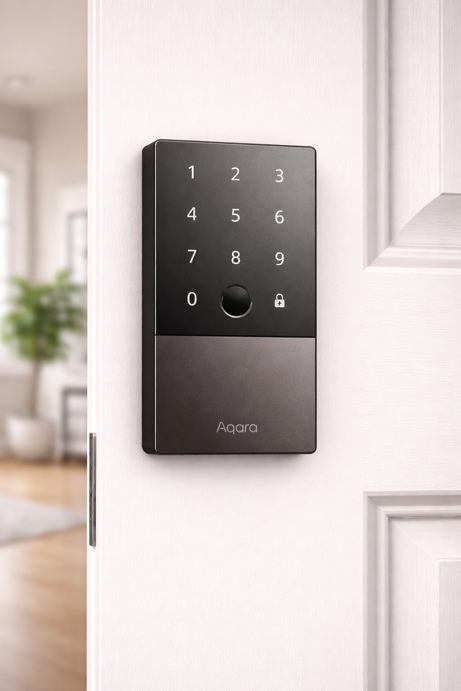
At a Glance: 50 fingerprints | PIN codes | NFC cards | Apple Home Key | Requires Aqara hub | Multi-platform integration via hub
The Aqara U100 combines Zigbee connectivity with fingerprint recognition, supporting multiple unlock methods including fingerprint, PIN code, NFC card, physical key and remote commands. The fingerprint sensor handles up to 50 prints, practical for families preferring biometric access over remembering a code. The IP65 weatherproof rating (outdoor panel only) makes the U100 suitable for exterior doors.
The U100 requires an Aqara Zigbee 3.0 hub for smart functionality. Through the hub, the lock integrates with Apple HomeKit, Google Home, Amazon Alexa and IFTTT. Advanced features like fingerprint management happen exclusively through Aqara’s app.
Key Specs
- Fingerprint sensor (50 prints)
- PIN codes, NFC cards, physical key, Apple Home Key
- Requires Aqara Zigbee 3.0 hub for smart features
- IP65 weatherproof rating (outdoor panel only)
- Four AA batteries
- USB-C emergency charging port
What Customers Love
Users consistently praise the fingerprint sensor’s speed and accuracy, with recognition typically under one second even with wet or dirty fingers. Families with multiple members highlight the convenience of eliminating PIN memorization entirely. Apple HomeKit users particularly value the tight integration and Apple Home Key support. The weatherproof outdoor panel performs reliably through rain and snow exposure. Many reviewers mention the USB-C emergency charging as a practical failsafe that prevents complete lockouts during unexpected battery depletion.
Worth Knowing
The lock requires purchasing an Aqara Zigbee 3.0 hub (roughly $55-60 additional cost) if you don’t already own one, adding to the total investment. Fingerprint management happens exclusively through the Aqara app rather than your primary smart home platform interface. The IP65 weatherproof rating applies only to the outdoor panel (the indoor battery compartment is not waterproof). The lock is not compatible with Home Assistant.
Best For
Users willing to invest in Aqara’s hub ecosystem for multi-platform integration, Apple HomeKit users who want fingerprint access, households with multiple family members who prefer biometric access over code memorization.
Aqara Smart Lock U50
Best Budget Option | $125-135 | View on Amazon
Rating: 4.0/5
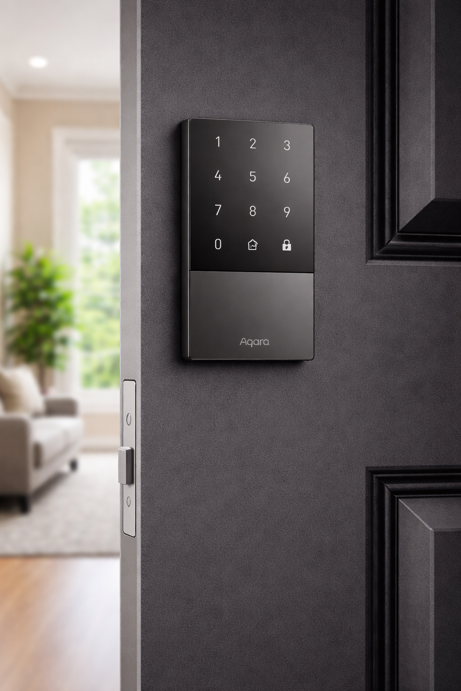
At a Glance: PIN codes | NFC cards | Apple Home Key | Requires Aqara hub | Budget friendly Aqara option
The U50 serves as Aqara’s budget entry point, removing the U100’s fingerprint sensor while maintaining PIN code access, NFC card support, physical key backup and smart home integration. The simplified approach reduces cost while delivering core functionality, including remote lock control, access logging and Zigbee automation integration.
Like the U100, the U50 requires an Aqara hub for smart functionality, integrating with Apple HomeKit, Google Home, Amazon Alexa and IFTTT through that intermediary.
Key Specs
- PIN codes, NFC cards, physical key, Apple Home Key
- Requires Aqara hub for smart features
- Weatherproof outdoor panel (indoor side not waterproof)
- Four AA batteries
- USB-C emergency charging port
What Customers Love
Budget conscious buyers appreciate Aqara’s solid build quality and multi-platform integration. Apple HomeKit users value the Home Key support at this price point. The simplified feature set makes setup and daily use straightforward without sacrificing smart home functionality.
Worth Knowing
Like the U100, the U50 requires an Aqara hub purchase (same $55-60 ecosystem requirement), which affects the total cost calculation. Without the fingerprint sensor, access is limited to PIN codes, NFC cards, physical key or smartphone control. The indoor battery compartment is not waterproof despite the outdoor panel’s weather resistance. The lock is not compatible with Home Assistant.
Best For
Users willing to add Aqara hub hardware for multi-platform integration, budget conscious buyers who don’t need fingerprint access, Apple HomeKit users wanting lower cost smart lock access.
Kwikset Convert Zigbee Conversion Kit
Best Conversion Kit | $85-135 | View on Amazon
Rating: 4.2/5
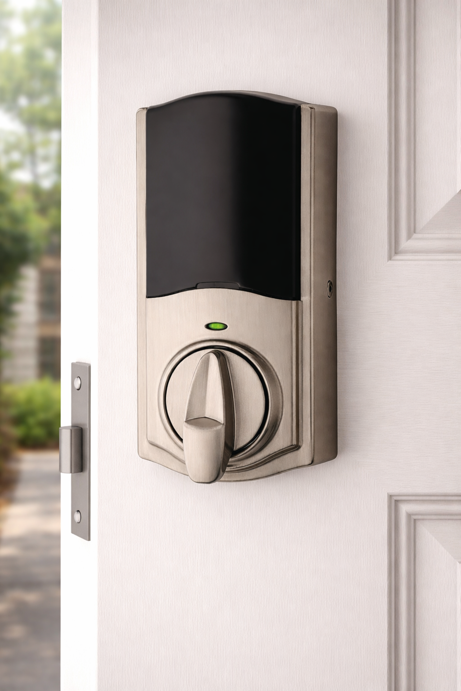
At a Glance: Converts existing compatible deadbolts | Keeps exterior hardware | Works with SmartThings, Hubitat, Home Assistant
The Kwikset Convert transforms existing compatible deadbolts into Zigbee-connected smart locks. If you already own a compatible deadbolt from Kwikset, Weiser, Schlage or Baldwin, the Convert kit replaces the interior assembly with a motorized mechanism while keeping exterior hardware, key cylinder and existing keys unchanged. This approach preserves exterior appearance and costs considerably less than buying a complete new smart lock.
Key Specs
- Conversion kit for existing compatible deadbolts
- Keeps exterior hardware and existing keys
- Zigbee 3.0 support
- Works with SmartThings, Hubitat, Home Assistant
- Four AA batteries
What Customers Love
Owners of compatible deadbolts consistently praise the conversion kit approach – adding smart functionality while keeping their existing exterior hardware, finish and keys unchanged. Installation usually takes 15-30 minutes with basic tools. Users report reliable performance across SmartThings, Hubitat and Home Assistant platforms.
Worth Knowing
Compatibility is critical. The Convert kit works with most standard single-cylinder deadbolts from Kwikset, Weiser, Schlage and Baldwin. Verify your existing lock’s compatibility on Kwikset’s website before purchasing. Price varies significantly by finish and retailer across the $85-135 range.
Best For
Users with existing compatible deadbolts, anyone wanting to maintain exterior door aesthetics while adding smart functionality, budget conscious buyers who don’t need a completely new lock.
Installation and Setup Considerations
Installation follows standard deadbolt procedures for most models – standard door prep (2-1/8″ cross bore, 1″ latch bore), basic screwdriver, 20-40 minutes. Pairing follows Zigbee’s standard sequence – hub into pairing mode, activate lock’s pairing function (usually holding a button until LED flashes). Bring your hub close during initial pairing for best results. Once paired, add Zigbee router devices (plugs, bulbs, switches) between hub and lock to strengthen mesh. For mesh building recommendations, see my best Zigbee smart home devices guide.
Zigbee vs Z-Wave for Smart Locks
Z-Wave dominates the smart lock market with broader manufacturer support and more product options. If you’re building from scratch with locks as a priority, Z-Wave deserves consideration. Yale, Schlage, Kwikset and August offer extensive ranges covering different price points and features.
Zigbee makes sense when you’ve already invested in Zigbee infrastructure. The integration advantages of keeping everything on one protocol include simplified hub requirements, consistent automation platform and unified mesh network. These sometimes outweigh Z-Wave’s broader selection. The final decision often comes down to what you already own.
Frequently Asked Questions
Do Zigbee smart locks work without Internet?
It depends on your hub and lock ecosystem. Hubs like Hubitat and Home Assistant can process lock commands locally with no Internet dependency, though actual behavior varies by lock and integration. SmartThings supports local processing for some routines and devices, but the exact offline behavior also varies by device and integration. Echo devices may maintain basic local device control during outages, but voice commands and most cloud-dependent routines require connectivity. For users where offline reliability is critical, Hubitat or Home Assistant offer the most local-first architectures, however you should check your specific lock model’s offline capabilities.
Are Zigbee smart locks secure?
Zigbee encryption provides reasonable protection against wireless eavesdropping during normal operation. The protocol uses AES-128 encryption for communication between devices and the coordinator. However, physical security is still more important than digital security for most residential scenarios, where lock picking, door breaching and window entry remain easier attack vectors than hacking Zigbee encryption. A smart lock on a door with weak framing or old strike plate offers minimal security benefit compared to reinforcing the physical installation.
Can I use Aqara locks with Home Assistant?
No, Aqara U100 and U50 locks are not compatible with Home Assistant. While some Aqara devices can work with Home Assistant through the Aqara integration, the lock models featured in this guide do not support this. If Home Assistant compatibility is crucial for your setup, consider the Yale Assure Lock or Kwikset Convert instead, both of which work with Home Assistant’s Zigbee integration.
What happens when the battery dies in a Zigbee smart lock?
Most smart locks include physical key backups for battery failure scenarios. Yale Assure and Kwikset Convert both have physical key overrides. Aqara locks provide USB-C emergency charging ports, so you can power the lock temporarily with a power bank to unlock, then replace batteries. Most locks provide low battery warnings weeks before complete depletion, giving adequate time to replace batteries before lockouts occur.
Why are there so few Zigbee smart locks compared to Z-Wave?
Z-Wave established early dominance in the smart lock market before Zigbee gained traction for home automation. Major lock manufacturers invested in Z-Wave development and certification, creating extensive product lines. Zigbee focused on sensors, bulbs and switches where its advantages (lower power, mesh networking) delivered clearer benefits. The result is a mature Z-Wave lock ecosystem with dozens of options versus a handful of Zigbee alternatives. For users already running Zigbee infrastructure, the limited selection is manageable. For users starting fresh, Z-Wave’s broader choice remains a valid consideration.
Locking In the Right Choice
The strongest Zigbee smart lock choice comes down to fit. Not just door fit, but ecosystem fit, fallback options and day-to-day reliability. A feature-packed lock that clashes with your hub or adds friction will feel like a downgrade fast.
That is why the smartest move is to choose based on how you actually plan to live with it. Yale makes the most sense for proven SmartThings integration. Aqara stands out for households that want fingerprint or Apple-focused access and are comfortable building around its hub. Kwikset Convert remains the practical value pick for anyone with a compatible deadbolt already in place.
Get that match right, and a smart lock becomes something better than impressive tech. It becomes one less thing to think about every time you leave the house, go to bed, or wonder whether the door is secure. That quiet confidence is the real upgrade.