
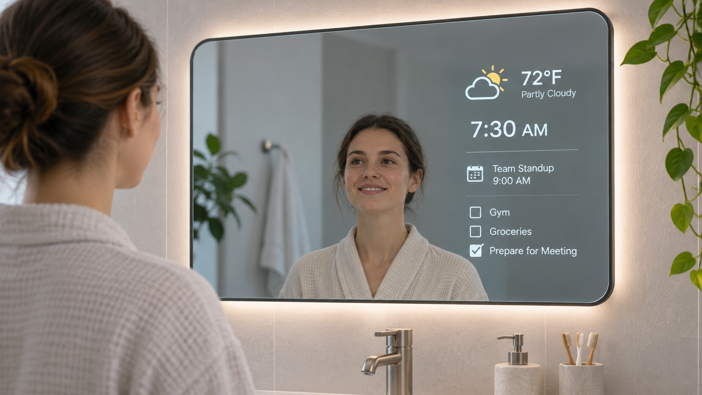
A smart mirror works by placing a digital display behind partially reflective glass. When the screen is dark, you see your reflection. When it lights up, text and images show through the glass. Sensors and a small computer add interactive features, and Wi-Fi connects supported models to online services and your smart home.
The glass itself doesn’t change. Its optical properties are fixed. What decides whether you see a mirror or a screen is the balance of light – the room on one side, the display on the other.
I covered what smart mirrors can do and what they cost in my broader smart mirror guide. Here, I go deeper, from the physics of the glass to how a mirror connects to Alexa or Google. I’m focusing on mirrors with a screen behind the glass, not lighted mirrors that only offer audio and defogging.
What’s Inside a Smart Mirror?
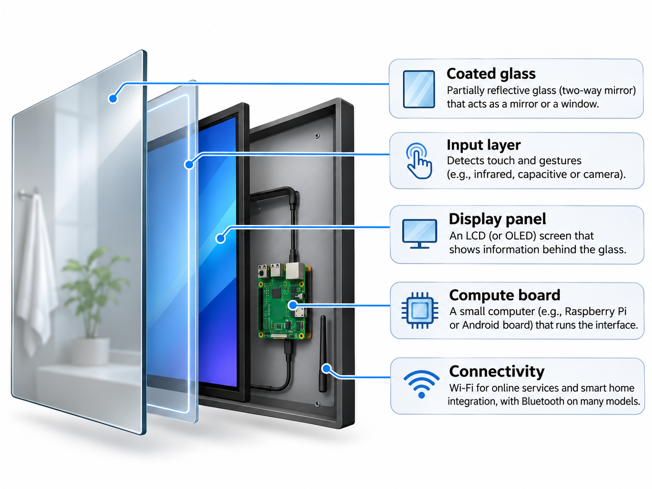
A full-featured smart mirror can be understood as five main components, although not every model includes all five.
Coated glass is the front surface. A partially reflective coating lets it act as a mirror or a window, depending on lighting.
The input layer handles touch and gestures. Depending on the design, that’s an infrared frame, a capacitive sensor or a camera and motion sensor. Simpler mirrors may have no interactive controls at all.
The display panel is mounted behind the glass. It’s usually an LCD, occasionally an OLED.
The compute board runs the interface. It’s typically a single-board computer or an Android system-on-chip.
Connectivity usually comes from Wi-Fi, with Bluetooth available on many models.
How Two-Way Mirror Glass Works
The glass is where most of a smart mirror’s compromises get decided.
Beam Splitter Glass: Reflecting Some Light, Passing the Rest
An ordinary mirror has an opaque metal backing that reflects nearly all the light hitting it. A smart mirror uses a much thinner coating instead. It reflects part of the light and lets the rest pass straight through. In optics, that’s called a beam splitter.
Optical beam splitters are made to a set split ratio. Edmund Optics sells standard plate beamsplitters in ratios ranging from 20% reflection and 80% transmission up to 80% reflection and 20% transmission. Those are small laboratory components, not architectural glass, and the actual ratio depends on the coating, the wavelength of light and the angle it hits the surface. Smart mirror glass works on the same principle, just at a much larger scale.
The coating doesn’t have to go on glass, either. DIY builds often use acrylic two-way mirror sheets, which are lighter and cheaper. Raspberry Pi’s own smart mirror tutorial uses a 3 mm acrylic two-way mirror instead of glass.
Why the “One-Way” Effect Is Really About Brightness
The coating doesn’t know which side is which. It passes light equally in both directions. What makes it look like a mirror from one side and a window from the other is the difference in brightness between the two sides.
In a bright bathroom, room light bounces off the coating back at you. The cavity behind the glass is dark, so almost nothing comes through from that side. Your reflection wins. Wherever the display is lit, its light overpowers the reflection in that spot. Where the screen stays dark, the surface is still a mirror.
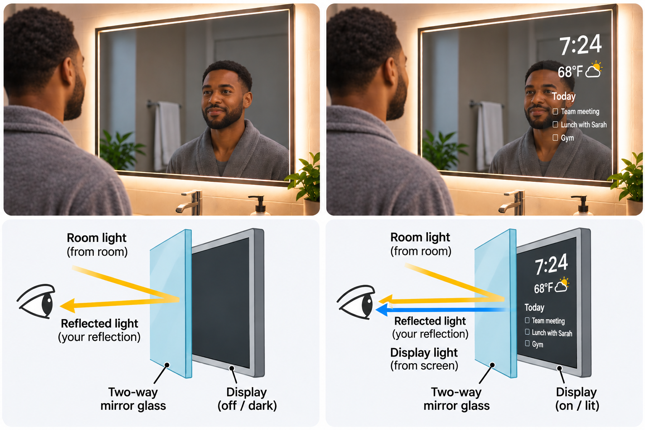
Picture checking the weather while brushing your teeth. You still see your reflection, but the temperature and forecast appear in one corner. The display shows bright information against a black background, leaving the rest of the surface looking like an ordinary mirror.
It’s the same principle as interrogation room glass. Turn the lights on in the observation room and the illusion collapses.
Metallic vs. Dielectric Coatings
Metallic coatings use an ultra-thin metal layer. They’re the traditional approach, but the metal absorbs some light along the way.
Dielectric coatings use stacked non-metallic layers that reflect light through optical interference, wasting less of it.
Whichever coating is used, the same rule applies. The more light the glass reflects, the less it lets through. Every smart mirror sits somewhere on that spectrum, trading a convincing reflection against a bright screen.
How the Display Shows Through the Glass
Once the glass is chosen, the display has to be matched to it.
Why Smart Mirrors Need Bright Displays
The display is mounted close behind the glass to keep the image crisp. Everything around it is kept dark so no stray light spoils the mirror effect.
Because the glass only lets part of the display’s light through, much of the screen’s brightness never reaches your eyes. What does get through has to compete with reflected room light. So the panel has to start out brighter than a normal monitor.
That’s why mirror TV makers lean on high-brightness panels. One mirror TV patent describes pairing the glass with a TV in the 500 to 2,000 nit range. The glass itself plays a part too. Electric Mirror describes its Spectrum glass as its most reflective mirror surface. Its Iris glass is slightly darker than a typical mirror but has the highest light transmission of any of its mirror TVs.
Why Smart Mirror Interfaces Are Mostly Black
Smart mirror interfaces are mostly black with white text for a reason. Black pixels send little or no light through the coating, so those areas stay mirror.
This is where LCD and OLED part ways. An LCD makes black by blocking an always-on backlight, so some light leaks through. An OLED switches black pixels off completely, which gives deeper blacks and a cleaner mirror. It doesn’t change the glass, though, so an OLED still faces the same brightness limits and room reflections as any other panel.
Ambient Light Sensors and Auto-Brightness
On models equipped with one, an ambient light sensor matches screen brightness to the room. It goes brighter to beat reflections during the day and dimmer at night so the panel doesn’t glow.
How Touch and Gesture Controls Work on a Mirror
A smart mirror often can’t use the same touch technology as your phone. The glass in front of the display is thicker and coated, so manufacturers take one of three approaches.
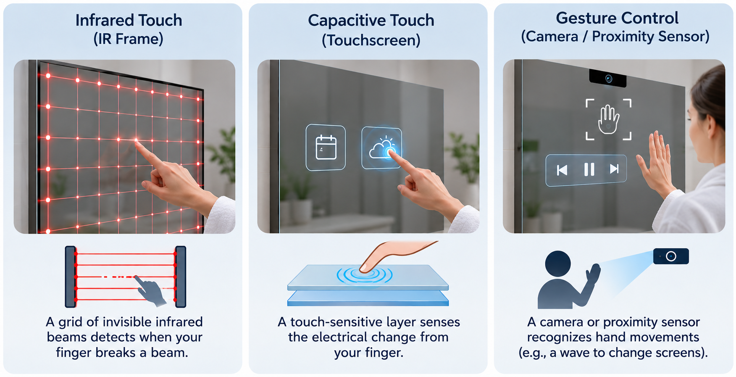
Infrared touch frames don’t sense through the glass at all. Touchscreen maker Elo explains how infrared touch works. LEDs and photoreceptors sit on opposite sides of a frame around the display, and the controller pulses the LEDs to create a grid of invisible infrared beams. When your finger breaks the beams, the controller calculates its X and Y position.
Capacitive touch detects the small change in electrical charge when your finger nears a sensor grid. On a phone, that grid sits under thin cover glass. On a mirror, it has to work through the full mirror glass, which weakens the signal, so manufacturers use higher-sensitivity sensors. Vercon’s Grace smart bathroom mirror, a commercial model built for hotels and developers, lists 10-point capacitive touch alongside 5 mm mirror glass.
Motion, proximity and camera sensors skip touch entirely. A passive infrared (PIR) motion sensor can wake the mirror when you walk in, while proximity or time-of-flight sensors detect a hand wave. More advanced mirrors use a camera to recognize gestures. A camera mounted behind the glass loses light through the coating, just like the display does.
The Computer Inside a Smart Mirror
Behind the glass, most smart mirrors are a small computer with a big screen.
DIY Builds: Raspberry Pi and MagicMirror²
The most popular DIY route pairs a Raspberry Pi with MagicMirror², an open source smart mirror platform. Its documentation says it’s developed on the Raspberry Pi, with its Electron app supporting the Pi 2, 3, 4 and 5. The Electron app also needs a version of Raspberry Pi OS with a desktop, not the Lite version.
MagicMirror²’s interface is essentially a fullscreen web page. Each feature is a module drawing white text on a black background, which is exactly what the glass needs.
Commercial Mirrors: Embedded Android and Linux Boards
Commercial smart mirrors usually run on embedded boards similar to those in smart displays and tablets, so they can run familiar apps. The Grace smart bathroom mirror mentioned above lists Android 11 or 13 with a Full HD IPS touchscreen in its technical specifications. Most manufacturers don’t publish which processor they use.
Bathroom-Specific Engineering
Bathroom smart mirrors need to protect their electronics from humidity and splashes while managing the heat those electronics produce. Some models advertise an IP rating. The Grace’s spec sheet lists IP44 for the front panel, which means protection against splashing water from any direction, but not water jets or immersion. A front panel rating doesn’t necessarily cover the whole unit, so installation should follow the manufacturer’s instructions and local electrical code.
Fogging is another potential issue. Lighted mirrors traditionally use a heating pad behind the glass. Vercon claims the Grace skips the pad and channels heat from its processor to the mirror surface instead.
How Smart Mirrors Connect to Your Smart Home
Connectivity is what takes a smart mirror beyond just displaying information and lets it interact with other devices and services.
Wi-Fi and Bluetooth: The Default Radios
Most connected smart mirrors use Wi-Fi to pull in weather, calendars and news, and to reach cloud services. Band support affects range, especially in a bathroom where the signal passes through walls and tile. Bluetooth typically handles audio streaming and is sometimes used during initial setup.
Built-In Voice Assistants vs. “Works With”
When a mirror advertises Alexa or Google support, don’t assume two mirrors with the same logo on the box work the same way.
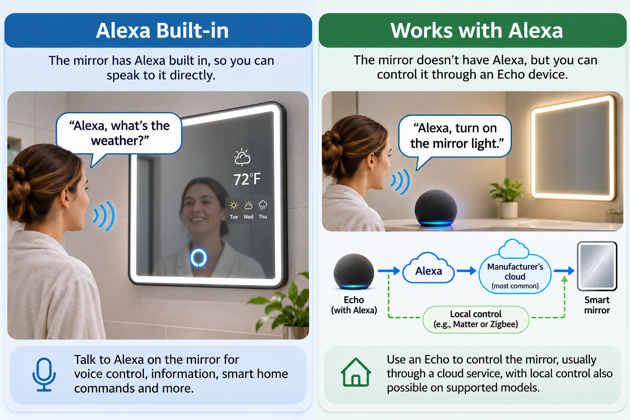
With Alexa Built-in, the mirror is the voice assistant. Amazon’s documentation explains that these devices run the Alexa Voice Service, which processes what you say into the device and sends it to Alexa. They also have to meet Amazon’s security requirements and pass certification testing to earn the Alexa Built-in badge.
With a “works with” integration, the mirror is just another device that Alexa or Google controls. The most common route is cloud-based. With an Alexa smart home skill, Alexa alerts the manufacturer’s skill when you ask, and the manufacturer’s cloud sends the instruction to the mirror over the Internet. Google’s equivalent is a cloud-to-cloud integration. But cloud isn’t the only option. Amazon’s Works with Alexa requirements also cover local connections through Matter, Zigbee, Bluetooth mesh or a compatible hub.
In practice, a mirror with Alexa Built-in lets you speak to the mirror directly. A mirror that works with Alexa is controlled through another Alexa-enabled device, such as an Echo speaker or your phone. Depending on the integration, commands may pass through the manufacturer’s cloud or use a supported local connection.
Zigbee, Thread and Matter in a Mirror Form Factor
Zigbee is rarer in mirrors than you might expect. The majority of smart mirrors I researched rely entirely on Wi-Fi and cloud integrations. Where Zigbee does appear, it’s mainly an optional module in commercial hardware, not a standard feature in retail models. Vercon lists dual-band Wi-Fi and Bluetooth 5.0 as standard on the Grace, with Zigbee as an option.
Having a Zigbee radio doesn’t automatically make a mirror a hub. With the right software and Zigbee coordinator support, a mirror could control compatible lights and sensors locally. Without them, the radio alone doesn’t guarantee that. Adding Zigbee also means another radio and antenna inside a coated, enclosed unit.
Matter could eventually offer another path, since it runs over Wi-Fi, which many smart mirrors already have. But Wi-Fi hardware alone doesn’t make a device Matter-compatible. Google’s Matter developer overview notes that a device also needs enough memory and processing to run the Matter software, and that not every device type is supported yet.
Matter supports a defined, expanding set of device types, including lights, plugs and sensors, but there’s no dedicated smart mirror category. A manufacturer could expose supported features, such as the mirror’s built-in lighting, as compatible Matter device types and certify those functions. That wouldn’t automatically make the mirror’s display or other features controllable through Matter.
Reflecting on It All
Perhaps the most interesting thing about smart mirrors is how much engineering goes into making your reflection look perfectly ordinary. The display needs to be bright enough to show through the glass, yet discreet enough to disappear when you’re done with it. Getting that balance right is arguably the most impressive trick a smart mirror has to pull off.
If there’s one thing worth remembering when comparing smart mirrors, it’s that software can improve over time, but the glass and display you’re buying today will largely determine what you see every morning. That’s where I’d pay the closest attention before spending the money.
Now that you know what goes on behind the glass, the next question is whether a smart mirror deserves a place in your home. My What Is a Smart Mirror? Everything You Need to Know guide will help you decide.