
You bought a Z-Wave smart lock. You open the app on your phone. Nothing happens. The device won’t pair, won’t respond, won’t even show up. The lock isn’t the problem here. It’s the missing piece between Z-Wave devices and your phone – the hub.
So what is a Z-Wave hub and why do you need one?
A Z-Wave hub coordinates communication between Z-Wave sensors, switches, locks and other hardware. Without one, your Z-Wave devices can’t connect to your home network, be controlled from your phone or participate in automations.
This guide covers compatibility, setup and when Z-Wave still makes sense in a Matter-first smart home landscape.
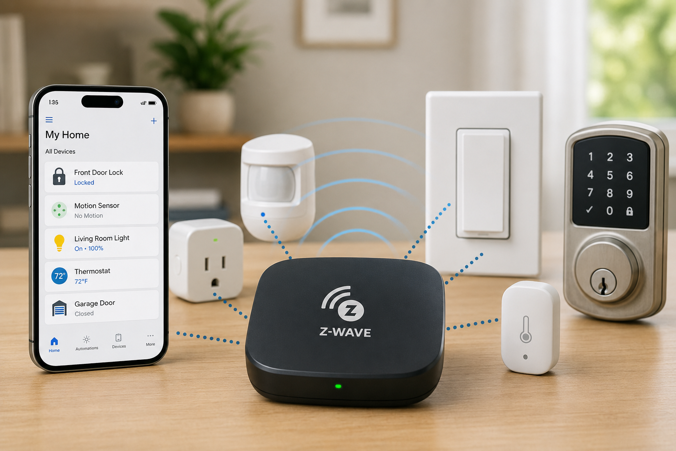
What Is a Z-Wave Hub?
A Z-Wave hub connects and controls Z-Wave smart home devices, letting them communicate with your phone, automations and voice assistants.
Unlike Wi-Fi devices that connect directly to your router, Z-Wave operates on sub-GHz frequencies (around 908 MHz in the US and around 868 MHz in Europe). This avoids interference from the crowded 2.4 GHz band, but means Z-Wave devices need a compatible hub to translate between Z-Wave protocol and your home network.
How Z-Wave Hubs Work With Mesh Networks
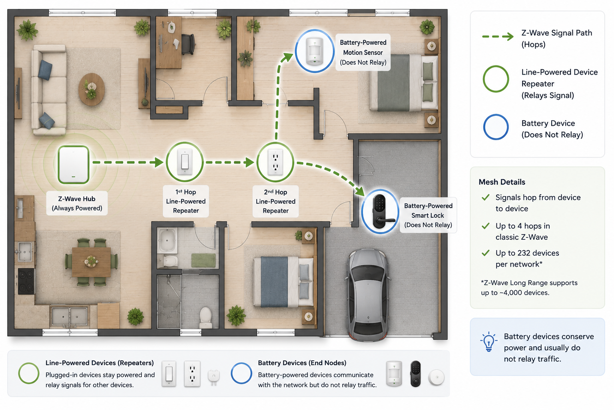
Z-Wave uses mesh networking where each line-powered device acts as a signal repeater. Commands hop through intermediate devices to reach distant targets. Battery powered devices don’t repeat signals in order to preserve battery life.
The hub helps establish routing paths while devices relay messages across the mesh. Z-Wave networks support up to 232 devices per hub with commands hopping through up to four devices. Z-Wave Long Range extends this significantly.
Do You Need a Z-Wave Hub?
Not necessarily. The answer depends on your devices and needs.
| Your Situation | Need a Z-Wave Hub? |
|---|---|
| Using Z-Wave devices (locks, sensors, switches) | Yes |
| Using only Wi-Fi smart home devices | No |
| Using only Zigbee or Thread devices | No |
| Running Home Assistant with USB Z-Wave stick | Yes (the stick acts as the Z-Wave controller) |
| Want to control Z-Wave devices remotely | Yes |
Many modern smart home hubs include Z-Wave alongside other protocols like Zigbee, Thread and Matter, eliminating the need for separate controllers for each protocol.
Dedicated Z-Wave controllers like the Zooz ZST39 USB stick exist for platforms that don’t include Z-Wave natively (typically paired with Home Assistant). This offers maximum flexibility but requires more technical knowledge.
Most mainstream voice assistant hubs no longer include Z-Wave. Some Amazon Echo devices support Zigbee and Thread, but Echo devices do not support Z-Wave. Google Nest and Apple HomePod focus on Thread and Matter. For Z-Wave support, you need a dedicated controller or a multi-protocol hub that explicitly lists Z-Wave.
Z-Wave Hub vs. Z-Wave Bridge vs. Z-Wave Gateway
These terms appear frequently in product descriptions, often used interchangeably. They all refer to the same function – a device that controls Z-Wave networks and translates between Z-Wave and IP networks. Key considerations include which Z-Wave version the device supports, whether it offers local processing and which automation platforms it integrates with.
Checking Z-Wave Device Compatibility
The Z-Wave Alliance maintains strict certification standards. Any certified Z-Wave device should offer basic compatibility with any certified Z-Wave hub regardless of manufacturer. Z-Wave certification produces more consistent cross-brand compatibility than Zigbee, though basic compatibility doesn’t guarantee full feature support. It’s always best to check manufacturer documentation before purchasing.
Regional frequency differences should also be taken into account. US devices operate on around 908 MHz while European devices use around 868 MHz. A US hub won’t communicate with European devices.
Z-Wave Generations and Long Range Support
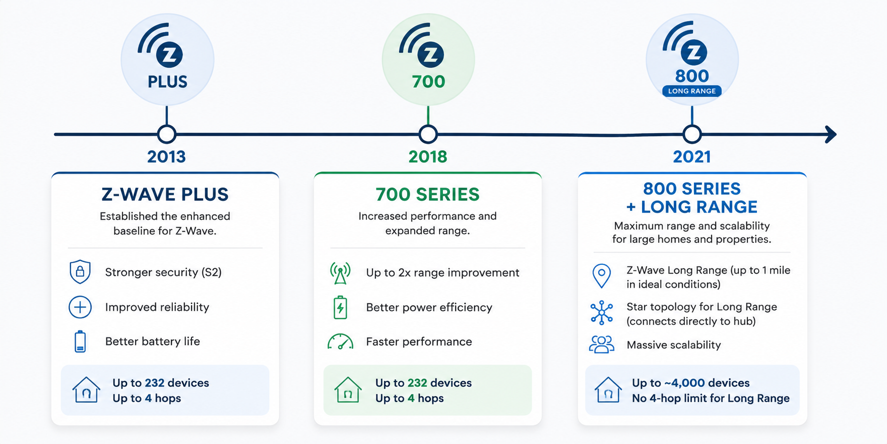
Z-Wave has evolved through several generations. Z-Wave Plus (around 2013) became the baseline standard. The 700 series chipset (2018) extended range and improved power efficiency. The 800 series (2021) introduced Z-Wave Long Range.
Z-Wave Long Range extends communication range up to a mile in ideal conditions and increases the maximum node count from 232 devices to approximately 4,000. Unlike classic Z-Wave mesh, Long Range uses a star topology, with devices connecting directly to the hub instead of hopping through repeaters. If you’re purchasing a new hub today, prioritize 700 series minimum or 800 series if Long Range capability is important to you.
When Z-Wave Makes Sense (And When It Doesn’t)
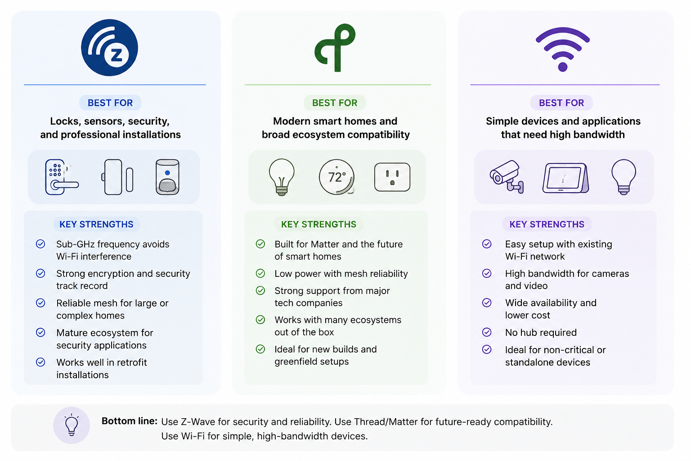
Z-Wave remains strongest for security-focused applications. Smart locks, sensors for security systems and alarm integrations often use Z-Wave because the protocol’s dedicated frequency avoids Wi-Fi interference and its encryption standards are well established. For retrofit installations in homes with poor Wi-Fi coverage, Z-Wave’s sub-GHz operation and mesh networking provide more consistent performance than 2.4 GHz alternatives.
Where Z-Wave struggles is in new product support. Matter has industry backing from Apple, Google, Amazon and Samsung. New consumer products increasingly target Matter first, while Z-Wave remains widely used in security systems and professional installations. Z-Wave device costs also run higher than comparable Zigbee or Wi-Fi alternatives due to licensing fees.
If you already own Z-Wave devices, a compatible hub makes sense. If you’re starting fresh and security isn’t the primary driver, Matter-over-Thread offers a more forward-looking foundation. Z-Wave remains strong for security-critical applications but is no longer the default recommendation for general consumer smart home builds.
Local Control vs. Cloud Dependency
One often overlooked advantage of Z-Wave hubs is the potential for local control. Because Z-Wave communication happens entirely within your home network on a dedicated frequency, hubs that process automations locally can continue functioning during Internet outages. Not all Z-Wave hubs offer this, though. Many consumer-focused hubs route commands through cloud services. The Hubitat Elevation line specifically emphasizes local automation as a core feature, processing rules entirely on-device without cloud dependency.
Setting Up Your First Z-Wave Network
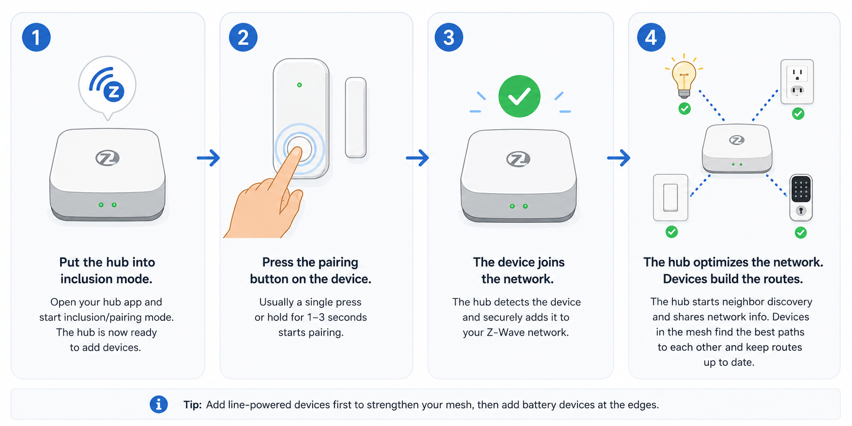
Z-Wave device pairing follows a consistent process. The hub enters inclusion mode, you trigger the pairing sequence on your Z-Wave device (usually a button press), and the hub adds it to your network. The process often takes under a minute per device.
Build your mesh strategically by adding line-powered devices first. Start with devices closest to your hub and work outward, adding switches and outlets that will serve as repeaters before pairing battery powered sensors at the network edges. Many hubs include a network health or topology viewer showing which devices communicate with which neighbors. Check this after adding several devices to identify weak links that might need additional repeaters.
Making Waves With the Right Hub
A Z-Wave hub does more than connect devices. It determines how reliable your automations feel six months later, how responsive your locks and sensors remain at the edge of your home, and whether your smart home keeps working when the Internet doesn’t. The right hub turns individual devices into a coordinated system instead of a collection of disconnected gadgets.
Z-Wave may no longer dominate consumer smart home conversations, but it still earns its place where reliability, range and local control matter most. If you’re building around security devices, retrofitting an older home, or simply want dependable automation without fighting Wi-Fi congestion, a well designed Z-Wave network still holds its own in 2026.
For most users, multi-protocol hubs offer better flexibility. The US version of the Hubitat Elevation C-8 Pro combines Z-Wave 800 series with Long Range support, Zigbee and Matter in a single device with complete local processing. It’s one of the strongest options for anyone serious about Z-Wave while maintaining compatibility with newer protocols.