
Your Matter smart lock works flawlessly for months on a single battery charge. Your Thread sensors route messages through walls and around obstacles without you thinking about it. The network heals itself when devices go offline. It feels like magic but it’s Thread, the IPv6 mesh networking protocol doing exactly what it was designed to do.
Thread operates as the invisible infrastructure beneath Matter, handling the actual transmission of data between your devices while sipping power slowly and building resilient mesh networks. Understanding Thread helps you make smarter decisions about which Matter devices to buy and how to build a reliable smart home network.
What is Thread?
Thread is an IPv6 based, low power wireless mesh networking protocol built on the IEEE 802.15.4 radio standard. Released in 2014 by the Thread Group, a member driven industry alliance, it was designed to address limitations common in earlier smart home protocols. In particular, the lack of native IP networking and fragmented interoperability that affected protocols like Zigbee and Z-Wave.
Unlike proprietary mesh protocols, Thread brings true IP networking to low power devices. Every Thread device has its own IPv6 address within the local Thread network, which means it can communicate using standard Internet protocols once connected through a Thread Border Router. This native IP support is what makes Thread the ideal foundation for Matter, which requires IP connectivity to deliver its cross-platform promise.
Why Matter Needs Thread
Matter is an application layer standard that defines how smart home devices communicate, but it needs an underlying network to carry those messages. Matter runs over three transports – Wi-Fi, Ethernet and Thread.
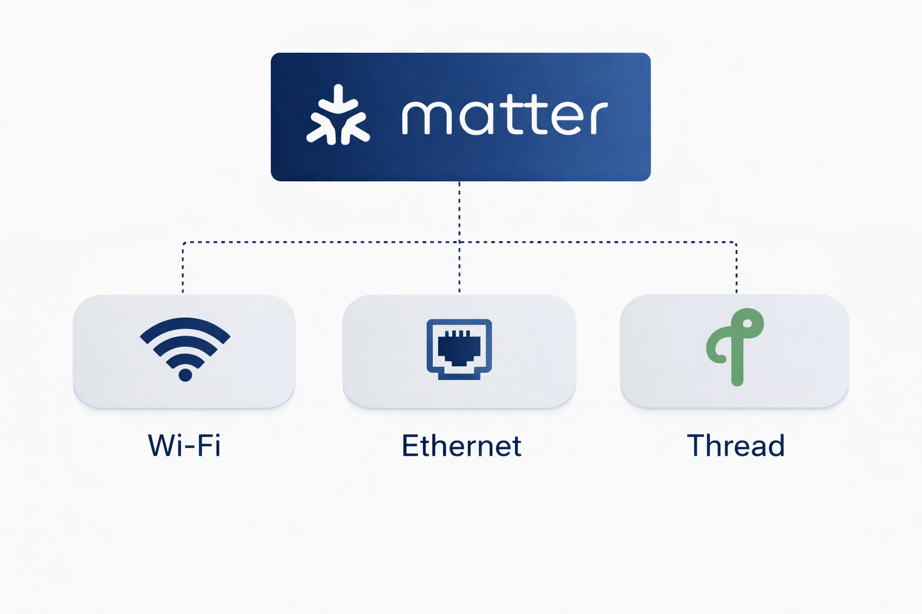
Wi-Fi works great for powered devices like cameras and smart displays that need high bandwidth, but it’s overkill for a door sensor that sends tiny messages once or twice a day. Wi-Fi radios consume too much power for battery devices to last years on a coin cell.
Thread fills this gap, delivering low power mesh networking while maintaining the IP connectivity Matter requires. When you buy a Matter-over-Thread door sensor, Thread handles efficient wireless communication while Matter ensures the sensor works with your Apple, Google or Amazon ecosystem.
How Thread’s Mesh Network Works
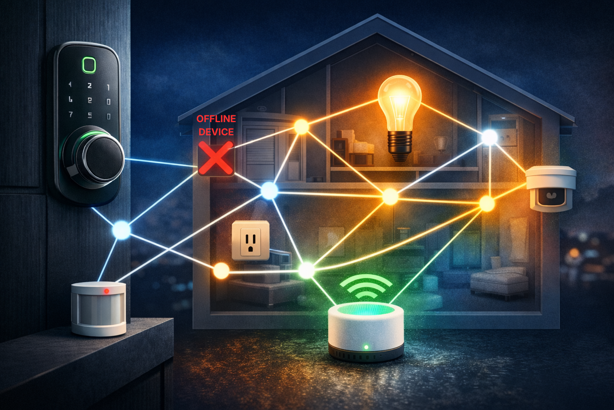
Thread creates self-healing mesh networks where devices relay messages for each other, extending range and improving reliability. Unlike Wi-Fi where every device connects directly to your router, Thread devices form a web of connections.
When your phone sends a command to lock your front door, the message might hop through your hallway light switch and living room outlet before reaching the lock. If that hallway switch loses power, the network automatically re-routes through your bedroom motion sensor instead. You never notice the change because Thread handles it transparently.
Device Roles in Thread Networks
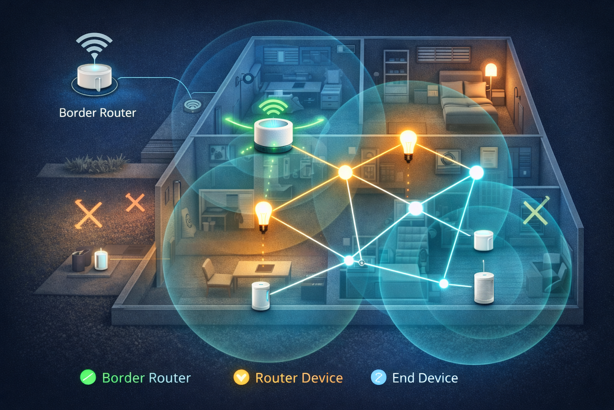
End Devices are typically battery powered sensors and controls that sleep most of the time to conserve power. They connect to a single parent router and don’t relay messages for other devices. Your door sensors, motion detectors and wireless buttons are end devices.
Router Devices are always plugged in and form the mesh network backbone. They relay messages between devices and can have child end devices attached. Smart plugs, light bulbs and powered sensors usually act as routers, strengthening your mesh with each addition.
Border Routers bridge your Thread network to your home’s IP network (Wi-Fi/Ethernet). They’re essential for Matter because they enable your phone or voice assistant to communicate with Thread devices. Modern smart home hubs like Apple HomePod mini, Google Nest Hub 2nd gen and Amazon Echo 4th gen all include Thread Border Router capability.
Leader devices are routers that take on additional network management responsibilities. The Thread network automatically elects a leader and seamlessly transitions to a new one if the current leader goes offline, ensuring network stability without user intervention.
Thread vs Zigbee
Thread and Zigbee share common foundations. Both use IEEE 802.15.4 radios, operate on 2.4 GHz, create mesh networks and target low power devices. The critical difference is Thread’s native IPv6 networking versus Zigbee’s proprietary network layer.
| Aspect | Thread | Zigbee |
|---|---|---|
| Network Layer | IPv6 native | Proprietary |
| Internet Connectivity | Through Border Router | Through gateway/hub |
| Primary Use | Matter foundation | Standalone smart home protocol |
| Ecosystem Maturity | Growing (2014+) | Very mature (2003+) |
| Device Selection | Expanding rapidly | Extensive |
| Interoperability | Excellent (when used with Matter) | Vendor dependent, improving with Zigbee 3.0 |
Thread’s IPv6 foundation provides cleaner integration with modern IP based ecosystems, which is why it became Matter’s preferred low power transport. Zigbee remains excellent for standalone systems, especially if you already own Zigbee devices.
The Border Router Requirement
Thread networks require a Border Router to connect to your broader home network and the Internet. Without a Border Router, your Thread devices form a local mesh but can’t communicate with your phone, voice assistants or cloud services.
The good news is you might already have one. Devices with built-in Thread Border Routers include Apple HomePod mini (2020+), HomePod 2nd gen and Apple TV 4K (2021+), Google Nest Hub 2nd gen, Nest Hub Max (with updates) and Nest Wifi Pro, Amazon Echo 4th gen, Echo Show 10 (3rd gen) and eero Pro 6 series, plus Samsung SmartThings Station and Hub v3 (with updates).
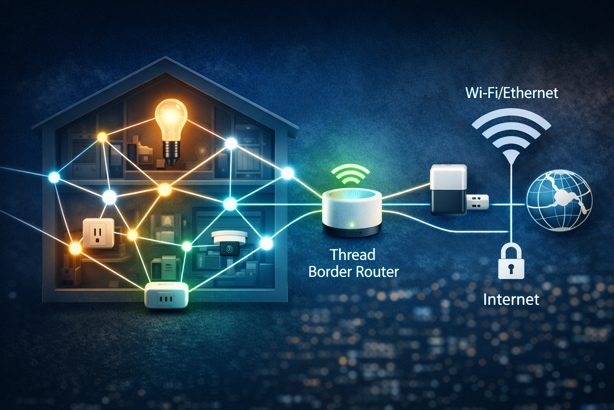
Multiple Border Routers actually improve reliability. Thread networks support multiple simultaneous Border Routers, providing redundancy and better coverage. If you have both a HomePod mini in the living room and an Echo in the bedroom, both can serve as Border Routers for the same Thread network.
Thread vs Wi-Fi for Matter Devices
Matter supports both Thread and Wi-Fi, so you’ll often face this choice when buying devices.
Choose Thread devices when:
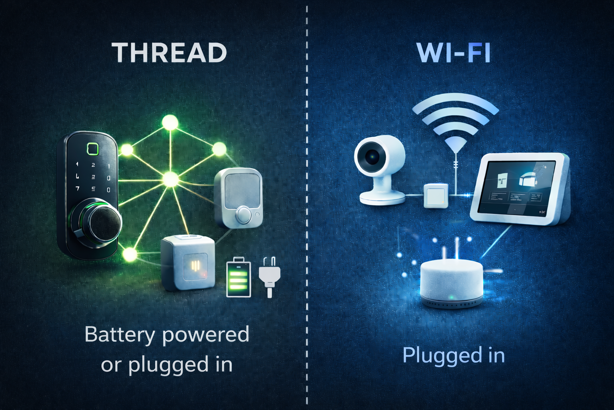
- The device runs on batteries (sensors, buttons, locks)
- You want to build a self-healing mesh network
- You need extended range through multi-hop routing
- Power efficiency is a priority
- You’re adding many devices and don’t want to overload the Wi-Fi
Choose Wi-Fi devices when:
- The device stays plugged in (cameras, displays, smart plugs)
- You need higher bandwidth (video streaming, large data transfers)
- You want to avoid Border Router dependency
- Your Wi-Fi coverage is excellent throughout your home
- You prefer simpler network architecture
Many households benefit from a mix of both. Use Wi-Fi for bandwidth hungry devices like cameras and displays, while Thread handles your sensors, locks and battery powered controls. Matter ensures they all work together smoothly regardless of underlying transport.
For specific product recommendations showing this Wi-Fi/Thread split in practice, check out my guide on Matter smart plugs with energy monitoring.
Power Efficiency Explained
Thread achieves exceptional power efficiency through mechanisms that extend battery life to multiple years for sensor devices.
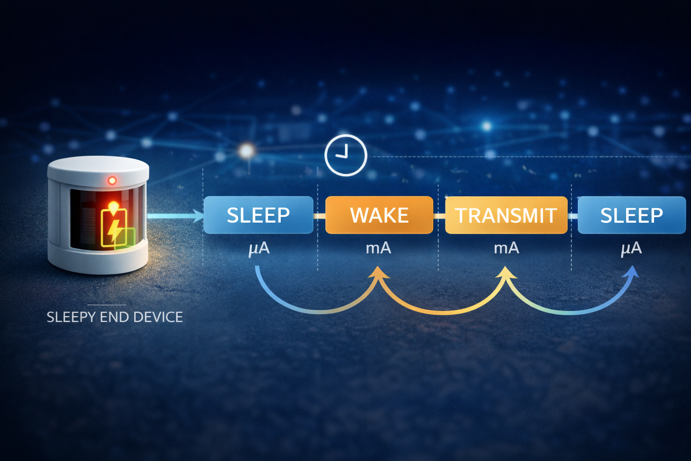
Sleepy End Devices (SEDs) spend most of their time in deep sleep mode, waking only when they have data to send or periodically to check for messages. A door sensor might sleep for 30 seconds between check-ins, consuming microamps in sleep mode versus milliamps when actively transmitting.
Parent routers buffer messages for sleeping children, so when the door sensor wakes up, any pending messages are immediately delivered. This store-and-forward capability means SEDs don’t need to maintain constant radio connections.
Thread’s mesh architecture also contributes to efficiency. Messages take the most efficient route through the network, minimizing transmission power and retries. If a direct path would require high transmission power, Thread automatically routes through intermediate devices at lower power levels.
Security in Thread Networks
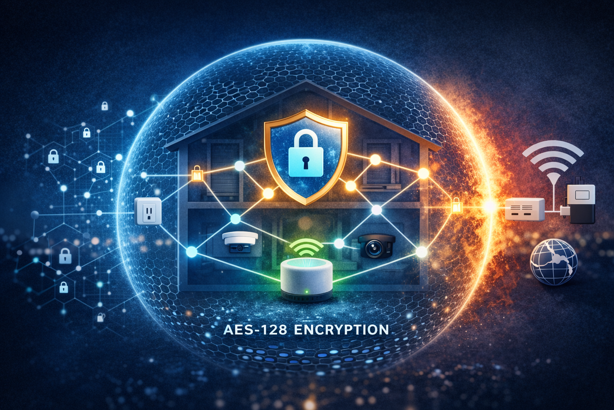
Thread implements security at multiple layers to protect your smart home network.
All Thread traffic is encrypted using AES-128 encryption with regularly rotated network keys. Device commissioning uses out-of-band authentication, normally through scanning a QR code or entering a setup code, preventing rogue devices from joining your network simply by being in radio range.
Border Routers implement firewall functionality, controlling which Thread traffic can reach your broader IP network and Internet. This isolation protects your Thread devices from direct Internet exposure while enabling necessary cloud connectivity for Matter features.
Building a Reliable Thread Network
Creating a solid Thread network follows similar principles to building any mesh network.
Start with your Border Router: Position it centrally or near your main Internet router. Many Border Router devices need Wi-Fi or Ethernet connectivity anyway, so their placement is often pre-determined.
Add plugged-in router devices early: Smart plugs and powered sensors strengthen the mesh before you add battery devices. Aim for router spacing of 15-30 feet for typical home construction. Concrete walls or metal structures may require closer spacing.
Place battery devices strategically: End devices connect to the nearest suitable parent router. If you add a door sensor before establishing router coverage in that area, it may struggle to maintain connection or drain its battery trying.
Monitor network health: Do this through your Matter controller app. Apple Home, Google Home and Amazon Alexa all provide connection status for Thread devices. Consistent connectivity issues usually indicate insufficient router coverage in that area.
Thread’s Growing Adoption
Thread’s adoption is accelerating as Matter gains traction. Major manufacturers now ship Thread enabled devices across categories previously dominated by Zigbee or proprietary protocols. Eve Systems, Nanoleaf, Aqara and others have committed to Thread as their primary wireless technology for battery powered devices.
The Thread specification continues evolving. Recent updates have improved commissioning reliability, enhanced power management for battery devices and expanded capabilities in the specification (with most consumer Thread devices still using 2.4 GHz today).
Perhaps most importantly, Thread offers a stable foundation for Matter’s long term vision. As Matter adds new device types and capabilities, Thread’s IP-native architecture accommodates these expansions without fundamental protocol changes. This positions Thread as infrastructure that grows with your smart home rather than requiring eventual replacement.
The Thread That Connects
Thread isn’t the flashy part of your smart home. It doesn’t have a user interface or appear in your app’s device list. But it’s doing the heavy lifting of reliably connecting your devices while preserving battery life and building resilient mesh networks.
Understanding Thread helps you make better decisions about which Matter devices to buy, where to place them and how to build a network that actually delivers on the promise of a unified smart home. As Matter adoption grows, Thread’s role as the preferred low power transport becomes increasingly important.
For battery powered sensors, locks and controls in your Matter ecosystem, Thread provides the technical foundation that makes years of reliable operation possible. It’s infrastructure worth understanding, even if you never directly interact with it.
The magic, it turns out, is just good engineering.