You’re clicking through a ceiling fan remote, hunting for the right speed that’s cool enough without turning your bedroom into a wind tunnel. There’s got to be a better way – smart ceiling fans promise exactly that. Voice control, automated schedules, smartphone adjustments from your couch. But beyond the marketing, are you actually getting $400 worth of convenience or just a fan with a Wi-Fi chip? Do these devices save energy? And are you paying a premium for features you’ll genuinely use?
This guide examines how smart ceiling fans work, what differentiates them from traditional models and whether the investment makes sense for your home. We’ll cover the technology, real energy savings data and practical considerations reviews often gloss over.
Smart vs Traditional vs RF Remote Ceiling Fans: At a Glance
| Feature | Traditional Fan | RF Remote Fan | Smart Fan |
|---|---|---|---|
| Control | Wall switch/pull chain | Handheld remote | App, voice, automation |
| Motor Type | AC motor | AC or DC motor | Often DC motor |
| Speed Settings | 3 speeds | 3-6 speeds | 6-8 speeds |
| Energy Use | 30-75W (varies by size) | 30-75W (AC) / 10-35W (DC) | 10-35W (DC models) |
| Average Price Range | $80-150 | $120-250 | $200-500 |
| Installation | Simple wiring | Simple wiring + receiver | Network setup required |
| Best For | Budget conscious, simplicity | Convenience without smart home | Smart home integration, automation |
What Makes a Ceiling Fan “Smart”?
Traditional ceiling fans operate through wall switches or pull chains. Smart ceiling fans add wireless connectivity that enables remote operation and automation through built-in communication modules in the motor housing.
These modules connect your fan to your home network via Wi-Fi, Zigbee, Z-Wave or Bluetooth. Once connected, the fan communicates with smartphone apps, voice assistants or smart home hubs for control from anywhere in your home (well, technically anywhere with Internet access, though adjusting your bedroom fan from across town has limited practical use).
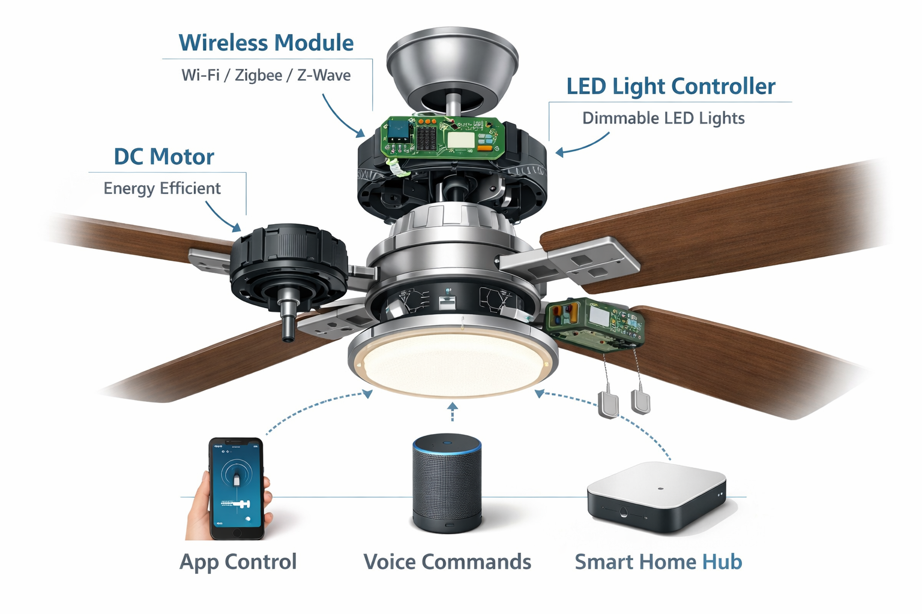
Most smart ceiling fans include variable speed control (6-8 speeds versus traditional 3), reversible motor direction, integrated LED lighting with dimming, and scheduling functions. The integrated lighting is particularly useful because it eliminates the need for separate smart bulbs or switches, consolidating control in one interface.
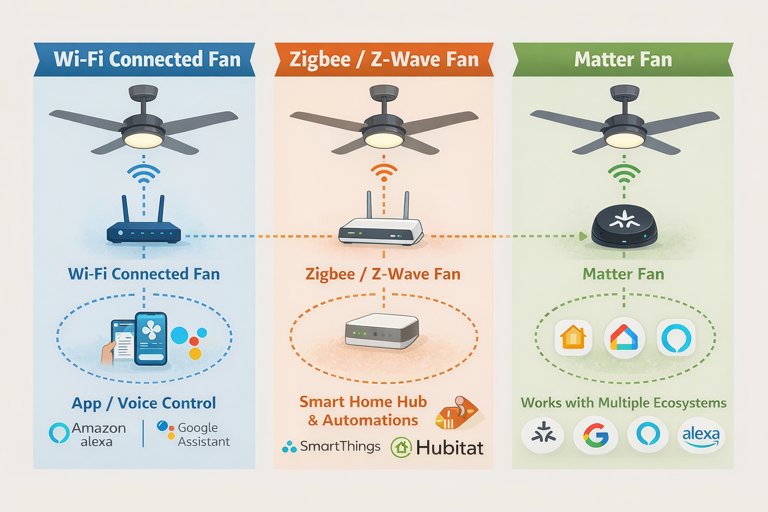
Technology breakdown: Wi-Fi models connect directly to your 2.4 GHz network without requiring a hub. Zigbee or Z-Wave fans need a compatible smart home hub like SmartThings, Hubitat or Home Assistant. Some manufacturers use RF remote controls supplemented with Wi-Fi bridges, delivering smart functionality without complete rewiring when retrofitting existing fans.
How Smart Ceiling Fans Work
A smart ceiling fan contains three primary components – the motor assembly, wireless communication module and control interface.
Modern smart fans increasingly use DC (direct current) motors rather than traditional AC motors. DC motors generally consume about 50-70% less energy than equivalent AC motors while providing more precise speed control and quieter operation. The trade-off is $100-200 higher upfront cost.
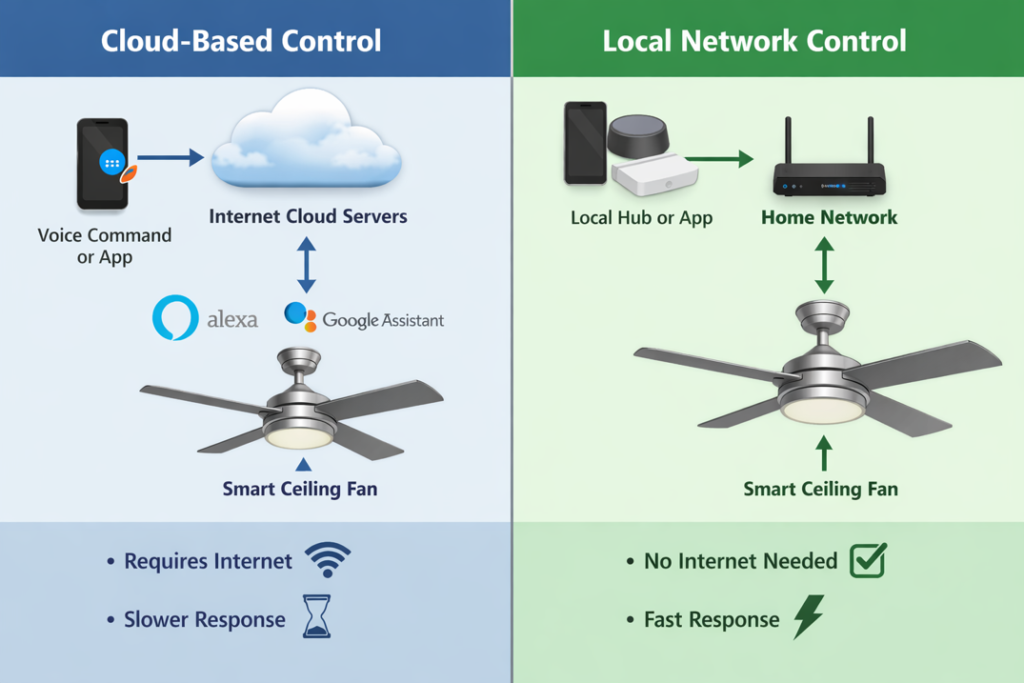
When you adjust speed through an app, the command travels from your phone through your Wi-Fi router to the fan’s module, which translates the digital signal into voltage changes controlling motor speed. This happens nearly instantaneously, with maybe a half second delay compared to physical switches.
Voice assistant integration happens through the cloud. Your command goes to Amazon or Google servers, which communicate with the fan manufacturer’s servers, which then send the command to your fan. This cloud dependency explains why some smart fans become unresponsive during Internet outages, even when your phone and fan share the same local network.
Local control: Some smart ceiling fans support local network control, responding to commands without Internet connectivity through a local hub (like Home Assistant) or Matter certification. If maintaining control during outages matters, verify local control capability before purchasing.
Reverse motor direction (pushing warm air down from the ceiling in winter) normally requires a physical switch on traditional fans. Smart fans handle this through apps or voice commands, making seasonal adjustments genuinely convenient.
Do Smart Ceiling Fans Actually Save Money?
Smart ceiling fan manufacturers highlight energy savings, but actual impact depends heavily on usage patterns and what you’re comparing against.
Ceiling fans don’t cool air. They create air movement that increases evaporative cooling on your skin, making you feel approximately 4-6°F cooler. This means you can set your air conditioner to a warmer temperature while still feeling comfortable. For example, if you normally keep your AC at 72°F, the fan’s airflow lets you raise the setting to 76°F without sacrificing comfort. Your AC uses less energy maintaining that warmer temperature and you still feel cool thanks to the fan.
A typical smart ceiling fan with DC motor consumes 15-30 watts on medium speed. Compare this to central air conditioning consuming 3,000-5,000 watts. The fan uses about 1% of the energy. If the fan allows raising your thermostat by 4°F (from 72°F to 76°F), your AC runs significantly less to maintain that warmer temperature while you still feel comfortable. The fan uses minimal energy while reducing how often your AC cycles on.
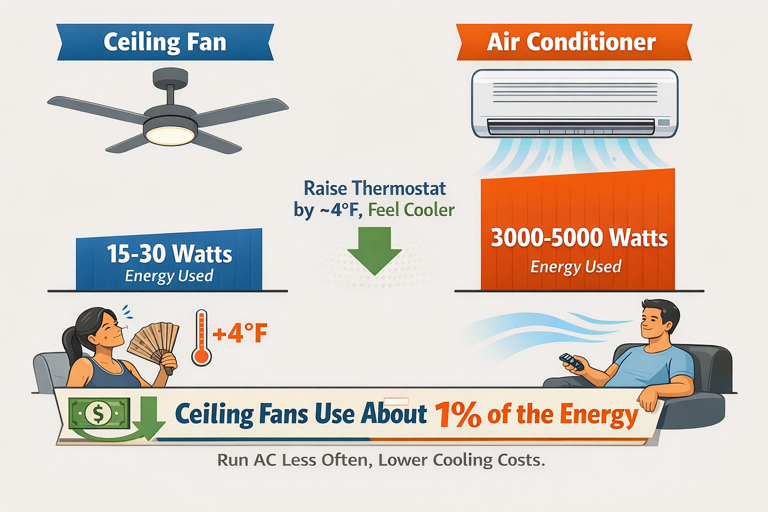
In practice, households report annual savings of $30-60 per fan when actively used during cooling season. That’s modest but measurable.
The DC motor premium: Smart fans with DC motors cost $200-500 versus $80-150 for basic AC motor ceiling fans. With $50 annual savings, the payback period for the DC motor premium alone spans 3-5 years. Factor in smart features (another $50-100) and you’re looking at 4-7 years to break even purely on energy savings.
This doesn’t mean smart ceiling fans aren’t worthwhile. Convenience, comfort control and integration benefits matter. But if someone’s selling massive energy savings, the reality is likely more modest.
CFM ratings reality: Manufacturers advertise CFM (cubic feet per minute) ratings from laboratory testing at maximum speed with no obstructions. Real world airflow will be 20-30% lower due to ceiling height, blade pitch angles and room configuration.
Smart Control Options and Compatibility
Wi-Fi connected fans work independently without hubs, connecting directly to your 2.4 GHz network through the manufacturer’s app with Alexa and Google Assistant integration. Popular brands like Hunter, Modern Forms and Big Ass Fans use this approach. The benefit is simplicity. No additional hardware. The downside is cloud dependency and another device on the network competing for bandwidth.
Zigbee and Z-Wave fans require compatible hubs but integrate deeply with automation platforms. These communicate on dedicated frequencies (Zigbee uses 2.4 GHz on different channels, Z-Wave uses 908 MHz in the US), creating mesh networks where each powered device extends range. For existing SmartThings or Hubitat users with multiple Zigbee sensors, adding a Zigbee fan makes sense. For those without smart home infrastructure, it’s additional complexity and cost.
Matter-certified fans represent the newest option, with availability expanding throughout 2025-2026. Matter runs over Wi-Fi, Ethernet or Thread, delivering cross-platform compatibility. A Matter fan works with Apple Home, Google Home, Amazon Alexa and other Matter controllers without separate integrations. Local control (working without Internet) is built into Matter specifications.
Bond Bridge retrofit: If you have existing fans with RF remotes, the Bond Bridge ($129) can make them “smart” by learning remote signals and exposing them to Wi-Fi control. This works well for rentals where replacing entire fans isn’t practical, though you won’t get DC motor efficiency or granular speed control.
Installation Considerations You Should Know
Installing a smart ceiling fan isn’t all that different from traditional fans, but several factors complicate the process.
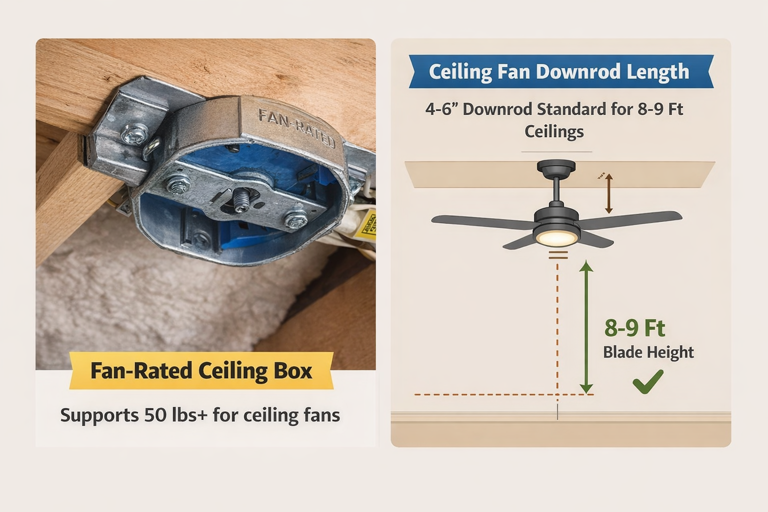
Most homes have ceiling fan boxes rated for 50-70 pounds. Smart fans with integrated lighting and metal construction weigh 30-50 pounds, well within limits. However, older homes might have junction boxes not rated for fan support, requiring an upgrade before installation.
Wiring requirements: Traditional fans use hot wire, neutral wire and ground, sometimes with separate hot wire for lighting. Smart fans with dimming and multiple functions might require a neutral wire at the switch location. Homes built before the 2010s often lack neutral wires at switch locations, which can limit smart switch installation (though the fan itself typically works with just hot, neutral and ground at the ceiling box).
Replacing an existing fan can take around 1-2 hours for someone comfortable with basic electrical work. Adding a fan where none existed requires running new wiring, installing a ceiling box and potentially cutting drywall – realistically a professional electrician job costing $200-400.
Blade balancing: Smart features don’t change the laws of physics. Unbalanced fans wobble regardless of Wi-Fi sophistication. Quality smart fans include balancing kits, but ceiling irregularities or blade warping can cause issues. The advantage of 6-8 speed settings is finding a speed where resonance induced wobble is minimized, though proper balancing beats working around structural issues.
Downrod length: For optimal airflow, fan blades should sit 8-9 feet from the floor and 10-12 inches from the ceiling. Standard downrods (4-6 inches) suit 8-9 foot ceilings. Vaulted ceilings require longer downrods (12-36 inches), typically sold separately. Smart features don’t change these physical requirements. A hugger mount fan on a 12 foot ceiling moves air poorly regardless of app features.
When Smart Ceiling Fans Make Sense (and When They Don’t)
Strong Use Cases
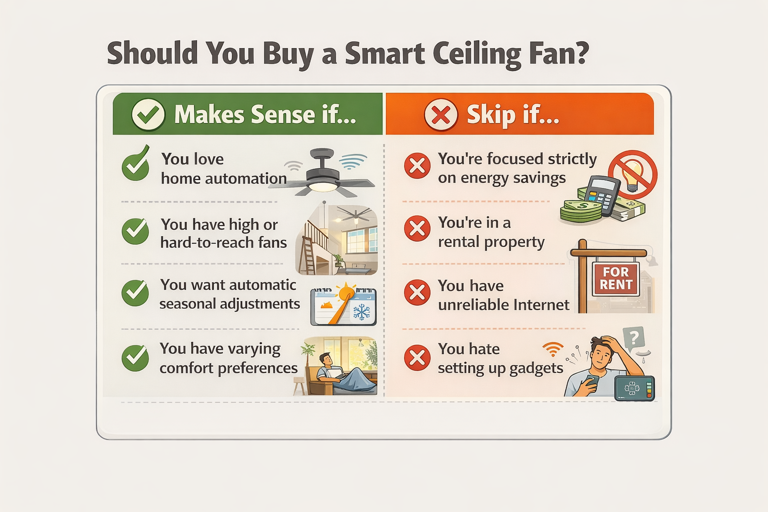
- Existing smart home ecosystem: If you run routines like “goodnight” that locks doors, turns off lights and adjusts thermostats, adding ceiling fan control feels natural. The fan becomes another automation node rather than standalone gadget.
- High or hard-to-reach fans: Adjusting fans in great rooms with 16 foot ceilings typically requires ladders. Voice control or smartphone adjustment is genuinely useful, not just convenient.
- Seasonal automation: Setting schedules that automatically reverse fan direction in October and April eliminates ladder climbing and manual switches. For multiple fans throughout a home, this adds up.
- Varying comfort preferences: If you prefer stronger airflow while sleeping but gentler circulation during the day, scheduling these changes or voice triggering them as you enter the room provides real comfort improvements.
Weak Use Cases
- Purely for energy savings: The 4-7 year payback period assumes active feature use. If energy cost reduction is the primary goal, better air sealing, insulation or programmable thermostats will often provide faster ROI.
- Rental properties: While Bond Bridge retrofit exists, you’re limited to existing fan capabilities and investing in hardware you might not take when moving.
- Unreliable Internet: Cloud dependent smart fans become frustrating when requiring router resets or app updates to function. Traditional fans with wall switches just work.
- Plug-and-play simplicity: Smart fans require app setup, network configuration, potential hub integration and occasional firmware updates. If troubleshooting Wi-Fi connection issues sounds annoying rather than engaging, traditional fans with remotes provide 80% of the convenience with 20% of setup hassle.
Practical Limitations and Frustrations
Smart ceiling fans work well when they work, but several recurring issues appear in long term use that marketing sometimes fails to mention.
App quality varies dramatically: Major brands like Hunter and Modern Forms maintain polished apps with regular updates. Lesser known manufacturers often use white label apps built on platforms like Tuya Smart – functional but generic, occasionally losing connection and requiring fan re-addition.
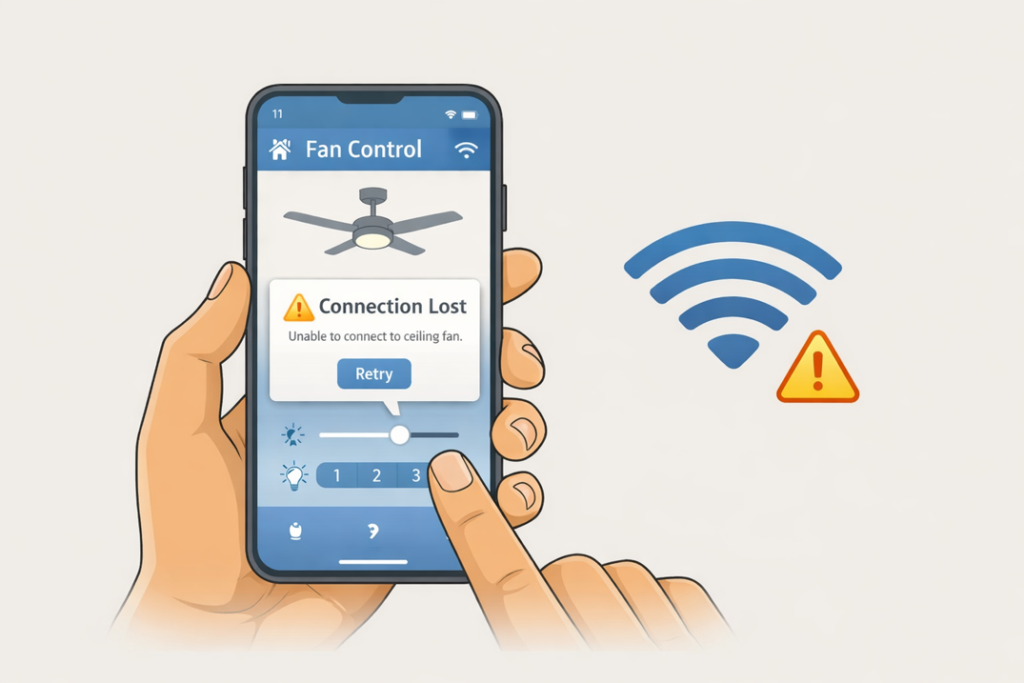
Firmware updates can fail: Most smart fans support over-the-air updates, which sounds convenient until an update fails mid-installation and bricks your wireless module. This is rare but documented often enough to warrant concern. And when a firmware update fails at 11 PM and your bedroom fan is unresponsive? You’ll briefly question every life choice that led to your ceiling fan requiring an Internet connection. Best practice would be to update during times when losing functionality for a day or two wouldn’t be disruptive.
Voice control is usually reliable, but not perfect: Alexa might mishear “set bedroom fan to medium” as “maximum”, or Google Assistant might interpret “turn on the fan” as turning on lights instead. You develop phrasing that works reliably, but it’s not quite the seamless experience that marketing suggests.
Integration complexity increases: You might start with just the native app, then add voice control, hub integration and presence detection automation. Each integration point is another potential failure point. Troubleshooting which layer has issues could become tedious.
Cloud services shut down: While major brands will likely maintain services for years, smaller manufacturers have abandoned apps, leaving “smart” fans that revert to basic RF remote functionality. Matter certification should mitigate this risk for newer fans, but it’s a legitimate concern for proprietary Wi-Fi fans.
The Final Spin
For the right household, smart ceiling fans are a worthwhile upgrade, enhancing comfort control and smoothly integrating with existing smart home infrastructure.
For everyone else, a quality traditional ceiling fan with remote control delivers about 80% of the benefit at 40% of the cost – and that’s perfectly reasonable. Your great-grandparents managed just fine with pull chains. You can decide whether voice controlled airflow is progress, or just another thing to troubleshoot when the Wi-Fi goes out.
Ready to choose your fan? Check out our buyer’s guide to the best smart ceiling fans, which compares 7 top rated models across budget, features and performance.