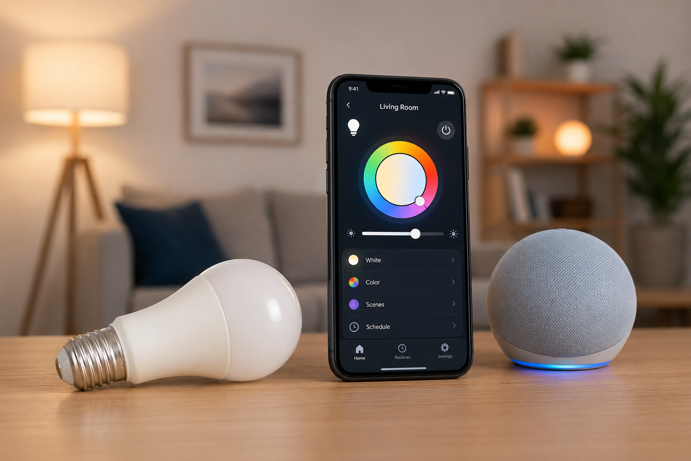
A smart bulb looks almost identical to a regular LED bulb. Same shape, same standard screw base. What makes it smart is what’s on the inside – LED lighting hardware, a small onboard controller, and a wireless radio that allow the bulb to receive commands from your phone, a voice assistant or an automated routine, without you touching a switch.
This guide explains how smart bulbs work, which wireless protocols they use, what a hub is and whether you need one, and how smart bulbs compare to smart switches – so you can make the right choice for your setup.
What’s Inside a Smart Bulb
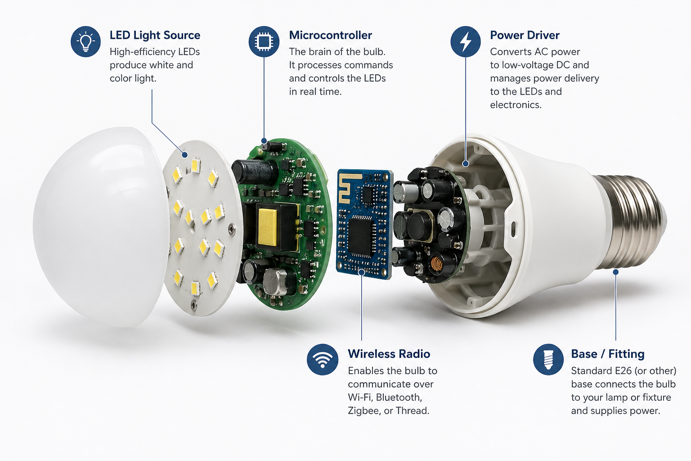
A smart bulb combines three things that a regular LED bulb doesn’t have – a wireless radio, a microcontroller, and in color bulbs, multiple LED channels that can be mixed to produce various colors and color temperatures.
The LED side works the same way as any modern bulb. LEDs produce light when electrical current passes through a semiconductor material. Different semiconductor compounds produce different colors – red, green, blue and white LEDs can be combined and dimmed independently to produce a wide range of colors and warm or cool white tones. The microcontroller manages this mixing process in real time, adjusting each channel in response to commands it receives over the wireless radio.
The wireless radio is what makes the bulb controllable. Depending on the protocol the bulb uses (Wi-Fi, Bluetooth, Zigbee or Matter), the radio communicates with your phone, a hub, or directly with a smart home platform. When you tap a button in an app or trigger an automation, a signal travels to the bulb’s radio, the microcontroller interprets it, and the LEDs respond. The whole process typically happens in under a second.
How Smart Bulbs Connect: Wireless Protocols Explained
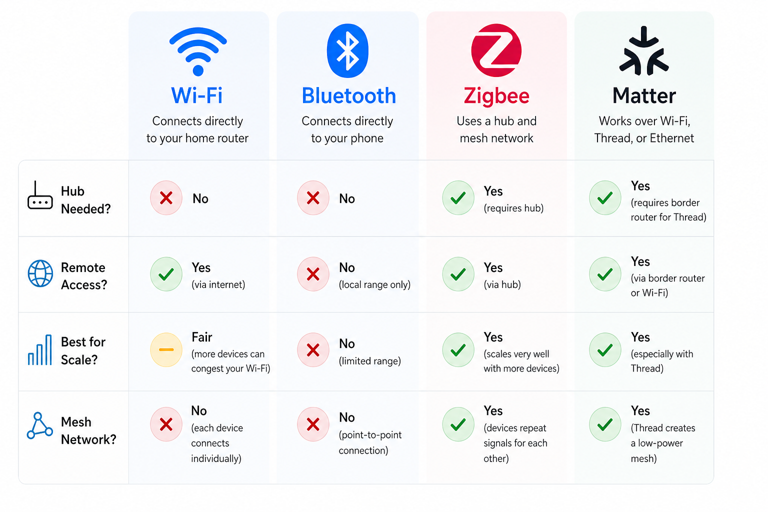
The wireless protocol a smart bulb uses determines how it connects, how reliable it is at scale, and what other equipment you might need. There are four main options.
Wi-Fi
Wi-Fi bulbs connect directly to your home router, no hub required. Setup is straightforward. Screw in the bulb, download the app, and connect to your 2.4GHz Wi-Fi network. This simplicity makes Wi-Fi bulbs the easiest entry point into smart lighting. Govee is one of the most prominent examples of a brand that uses Wi-Fi across its bulb range.
The limitation becomes apparent as you add more bulbs. Each Wi-Fi smart bulb is an independent device on your network. In a home with many smart devices already, adding ten or fifteen bulbs can increase network congestion and reduce overall reliability. Wi-Fi bulbs work well for smaller setups. They become less ideal for whole-home lighting.
Bluetooth
Bluetooth bulbs connect directly to your phone without needing a hub or your Wi-Fi network. Many smart bulbs include Bluetooth as a starting option. Philips Hue bulbs, for example, work over Bluetooth for basic control without a Bridge. Range is usually reliable within a single room. It may reach farther in open spaces, but walls and floors reduce performance quickly. Bluetooth-only control also means you lose remote access when you leave the house, since there’s no Internet connection involved.
Zigbee
Zigbee is a low power wireless protocol that operates on a mesh network. Rather than each bulb connecting independently to a central point, most line-powered Most Zigbee bulbs relay signals to each other – acting as repeaters, passing commands along to bulbs further away. This means the more Zigbee bulbs you have, the more reliable the network becomes. That’s the opposite of how Wi-Fi scales.
Zigbee bulbs require a compatible hub, a small device that connects to your router and manages the Zigbee network. Philips Hue’s Bridge is the most well known example. The hub requirement adds upfront cost, but it’s the reason Hue systems are considerably more reliable at scale than Wi-Fi alternatives. If you want to understand the Zigbee protocol in more detail, the Zigbee protocol guide covers it thoroughly.
Matter
Matter is a newer smart home standard backed by Apple, Google, Amazon and others. It’s designed to make smart devices work across platforms without compatibility issues. Unlike Wi-Fi or Zigbee, Matter is an application layer standard (not a radio protocol). It defines how devices communicate and share commands. Matter devices can connect over Wi-Fi, Ethernet or Thread, depending on the product. Many smart bulbs use Thread as their underlying network. Thread supports low power mesh networking similar to Zigbee, improving reliability without adding load to your Wi-Fi. A Thread Border Router is required for Matter over Thread. Devices like an Apple HomePod Mini or a compatible Amazon Echo serve this role. For a deeper look, the Matter protocol guide covers the full picture.
Do Smart Bulbs Need a Hub?
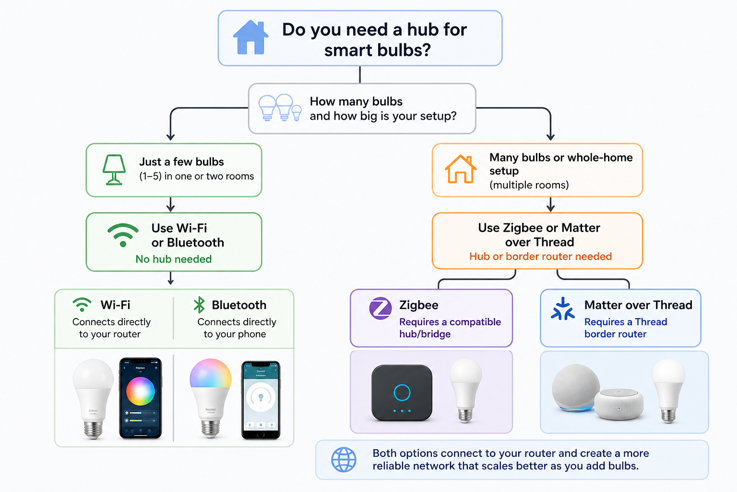
It depends on the protocol. Wi-Fi and Bluetooth bulbs don’t need a hub, as they connect directly to your network or phone. Zigbee bulbs require a compatible hub. Matter over Thread bulbs require a Thread Border Router to connect the Thread mesh to your home network. Matter over Wi-Fi bulbs connect through your router instead, with no border router needed.
The hub question is really about what you want your lighting to do. For a few bulbs in one or two rooms, a hub-free Wi-Fi setup is perfectly adequate. For a whole-home system with reliable automations and away-from-home control, a hub-based system like Philips Hue is more reliable over time. The hub adds upfront cost but removes a ceiling on what the system can do.
How Smart Bulbs Are Controlled
Smart bulbs can be controlled in several ways, and most support more than one simultaneously.
App, Voice and Automation Control
App control is the primary method for most people. Each brand has its own app (Philips Hue, Govee Home, LIFX), where you can turn bulbs on and off, set brightness and color, create scenes (saved combinations of settings), and build schedules. Depending on the wireless protocol used by the bulb, app control can work from anywhere with an Internet connection, not just from inside the home.
Voice control works through Alexa, Google Home or Apple HomeKit, depending on which assistants the bulb supports. Once linked, you can control bulbs with spoken commands – turn a room on, set a specific brightness, switch to a scene – without opening an app. Not all bulbs support all three assistants. Govee has traditionally focused on Alexa and Google Home, although select newer Matter-compatible Govee products can also work with Apple Home through Matter. Philips Hue supports all three assistants across its full range.
Automations are where smart bulbs become genuinely useful. An automation is a rule that triggers a lighting change based on a condition. This could be a time of day, a sunset or sunrise, a motion sensor detecting movement, your phone arriving home via geofencing, or another smart home device signaling a change. Basic automations like schedules and scenes are available on most platforms. Advanced automations with sensor triggers and conditional logic require a hub-based system like Philips Hue or a capable smart home platform.
Wall switches remain the one practical drawback with smart bulbs. A smart bulb needs constant power to stay connected to your network. If someone turns off the wall switch, the bulb loses power and drops off the network. It can’t respond to app or voice commands until the switch is flipped back on. This is the most common frustration with smart bulbs in shared households – and the core reason some people choose smart switches instead.
Smart Bulbs vs Smart Switches: Which Makes More Sense?
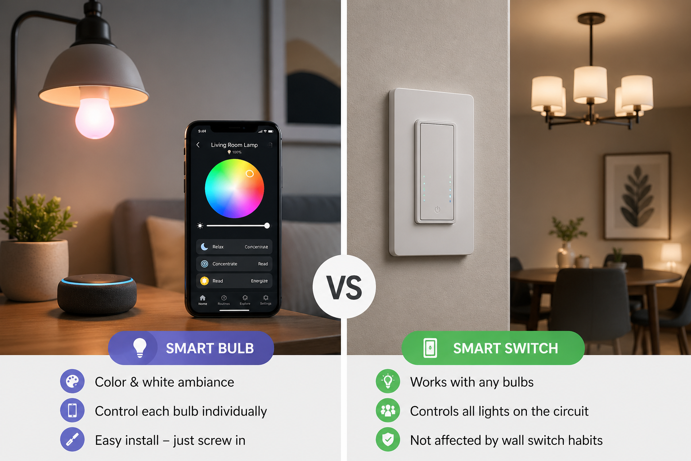
Smart bulbs and smart switches solve the same problem – controllable lighting – but from opposite ends. Understanding the difference will help you choose the most suitable approach for each situation in your home.
How Smart Switches Work
A smart switch replaces the physical wall switch. The switch itself contains the wireless radio and connects to your network. The bulbs in the fixture can be ordinary LED bulbs. They don’t need to be smart because the intelligence is in the switch. When the switch receives a command, it controls power to the entire fixture.
Many smart switches require a neutral wire in the wall box to function, although some models are designed to work without one. Installation involves working with household wiring, which is beyond the comfort level of some homeowners. The upside is that once installed, a smart switch works with any bulb and survives the wall switch problem entirely. Because the switch itself is the smart device, it stays connected to the network regardless of whether the lights are on or off.
When Smart Bulbs Make More Sense
When color and color temperature control matter, smart bulbs are the stronger choice. No smart switch can make a standard bulb change color. That capability is built into the bulb itself. If you want warm candlelight in the evening, cool daylight for focus, or color scenes for ambiance, smart bulbs are the only way to achieve it without a complete fixture replacement.
Installation is also simpler. Screw them in, connect to the app, and you’re done. There’s no wiring involved, no neutral wire to worry about, and no electrician required. For renters, for rooms where you want to experiment before committing, or for lamps and fixtures where a switch isn’t the natural control point, smart bulbs are the more practical choice.
When Smart Switches Make More Sense
For fixtures controlled by wall switches in shared spaces, such as hallways, living rooms and kitchens, smart switches are the stronger choice. Household members habitually use the physical switch, and the wall switch problem doesn’t exist with a smart switch. That means no frustration from bulbs dropping off the network because someone flipped the switch out of habit.
Economically, switches also scale better in multi-bulb fixtures. A single smart switch controlling a six-bulb chandelier costs less than six smart bulbs and gives you one point of control for the whole fixture. If color isn’t a requirement and you just need reliable on/off, dimming and scheduling, a smart switch delivers that more cleanly.
Using Both Together
Many smart home setups use both. Smart bulbs in bedside lamps, desk lamps and accent fixtures, where color control is useful. Smart switches for overhead lighting in shared spaces where the wall switch gets used regularly. The two approaches aren’t mutually exclusive. They solve different problems in different parts of the home.
What Smart Bulbs Cost to Run
Smart bulbs are LED bulbs, and LED bulbs use significantly less energy than the incandescent and halogen bulbs they replace. A typical smart bulb rated at 9 to 10 watts replaces a 60 watt incandescent – roughly 85% less electricity for the same light output. The wireless radio and microcontroller add a small standby power draw when the bulb is powered on but not lit, usually somewhere between 0.2 and 1 watt depending on the bulb and protocol. That’s negligible in terms of energy cost.
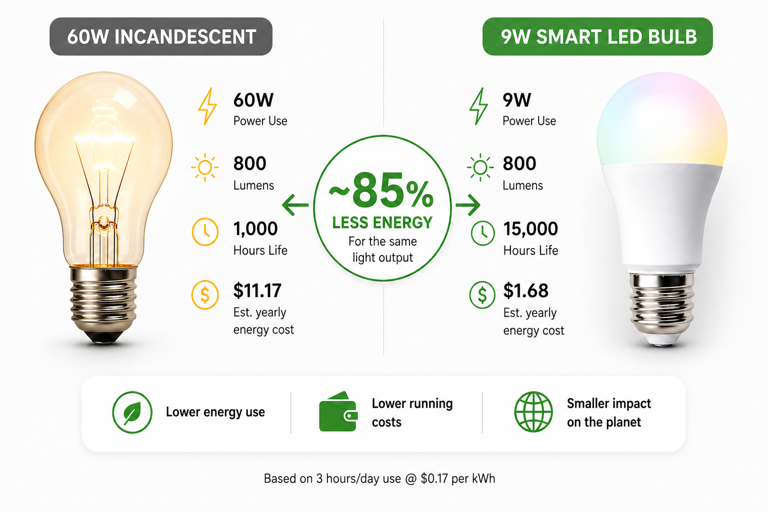
The real energy benefit of smart bulbs isn’t the LED efficiency alone. It’s that automations and scheduling make it easier to avoid leaving lights on unnecessarily. A bulb that turns off automatically when you leave a room, or powers down on a schedule, saves more energy through behavior change than through raw efficiency numbers.
Do Smart Bulbs Work in Any Lamp or Fixture?
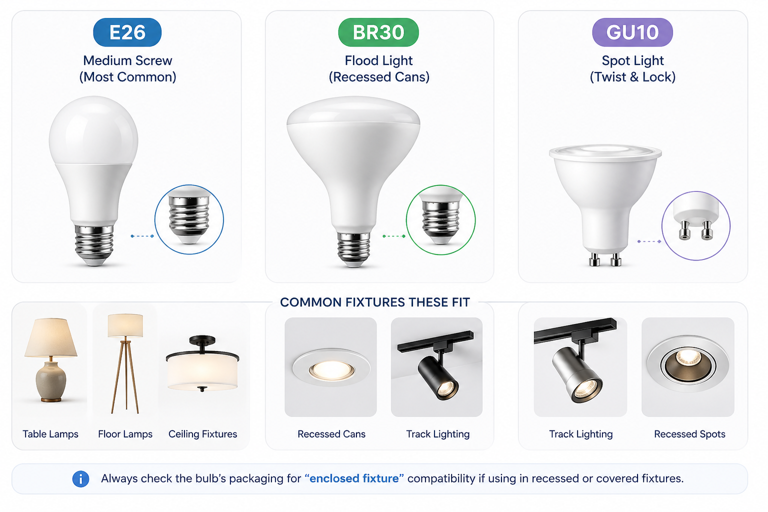
Most smart bulbs use standard E26 (medium screw) bases in the US, which fit the majority of table lamps, floor lamps and ceiling fixtures. BR30 flood bulbs fit recessed cans. GU10 spots fit track lighting and some recessed fixtures. Standard base types are covered across most smart bulb ranges.
The main compatibility issue is dimmer switches. A smart bulb manages its own dimming electronically. It doesn’t need a dimmer switch to dim, and in many cases a dimmer actively interferes with smart bulb function, causing flickering or connection problems. In most cases, smart bulbs work best on standard on/off switches. Some dimmers cause flickering, buzzing or connection issues, unless left at full brightness or specifically approved by the manufacturer. If you’re in any doubt, replacing a dimmer with a standard switch before installing a smart bulb removes the risk entirely.
Enclosed fixtures (recessed cans with airtight covers, for example) can cause heat build-up that shortens bulb life. Check whether the smart bulb you’re considering is rated for enclosed fixtures before installing it in one.
Choosing the Right Smart Bulb Setup
The protocol choice is the most important decision. A Wi-Fi bulb is the easiest starting point for one or two bulbs in a single room. Growing setups across multiple rooms benefit from a Zigbee system with a hub, which delivers better reliability at scale. Apple ecosystem households will find the cleanest fit with a Matter-compatible bulb or a Zigbee system with HomeKit support like Philips Hue. Where color effects are the main goal (e.g. in gaming setups or entertainment areas), a Wi-Fi brand like Govee delivers strong results at lower cost.
If you’re deciding between brands, the Philips Hue vs Govee comparison covers the two most popular options in detail, including protocol differences, app quality, ecosystem size, and price. For a broader look at how smart lighting fits into a connected home, the Smart Home 101 guide is a useful starting point.
The Bright Choice Comes Down to Control
Smart bulbs make the most sense when you want control at the bulb level – brightness, color, scenes, schedules and voice commands. They work especially well for lamps, bedrooms, desks and accent lighting where flexibility matters most.
For overhead fixtures in busy shared spaces, a smart switch is often the better answer. For larger setups, the protocol matters just as much as the bulb itself. Wi-Fi keeps things simple, Zigbee improves reliability at scale, and Matter makes cross-platform compatibility easier.
The smartest setup is the one that fits how your home already works. Choose convenience over novelty, reliability over gimmicks, and lighting becomes something you stop thinking about – because it simply works.