If you’ve been comparing Philips Hue vs Govee smart bulbs, you’ve probably noticed they’re recommended for very different reasons. Philips Hue has been the premium name in smart lighting for over a decade. Govee has become the budget friendly alternative that keeps showing up in recommendations. The question most people are asking isn’t “which is better?” – it’s “which is right for my situation?”
This guide breaks down the real differences between Philips Hue and Govee, including how each system works, what you’re paying for, and which one makes more sense depending on how you plan to use your smart lighting. A LIFX vs Govee comparison is included at the end for those choosing between budget and mid-range standalone options.
The Core Difference
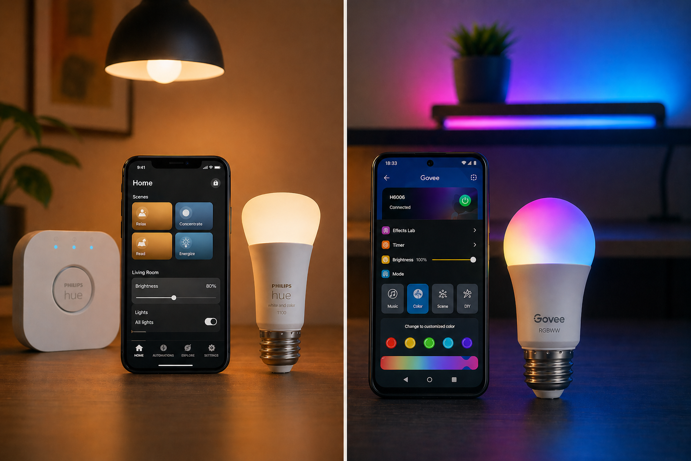
Philips Hue is a whole-home smart lighting system built for reliability, automation depth and long term expandability. Govee is a range of affordable, Wi-Fi connected smart bulbs and LED accessories built for visual effect and ease of entry. Both do smart lighting, but they’re designed around different priorities.
Quick Comparison
| Philips Hue | Govee | |
|---|---|---|
| Protocol | Zigbee + Bluetooth, Matter via Bridge, or direct Matter on compatible newer bulbs | Wi-Fi + Bluetooth |
| Hub required? | Optional – Bluetooth for basic control, or Bridge for full features | No hub – Wi-Fi direct |
| Voice assistant support | Alexa, Google Home, Apple HomeKit | Alexa, Google Home (select Matter-compatible products support Apple Home) |
| Color accuracy | Prioritizes tunable white light quality, consistent across color temperatures | Optimized for color vibrancy, whites less consistent across color temperature range |
| Ecosystem size | Very large – bulbs, strips, fixtures, switches, sensors | Bulbs, LED strips, panels, outdoor lights |
| Automation depth | Advanced – schedules, sensors, geofencing, routines | Basic – schedules, scenes, music sync |
| Price per bulb | $35-$55 depending on type | $8-$13 per bulb (often sold in 4-packs) |
| Best for | Whole-home setups, Apple users, automation depth | Budget entry, accent lighting, color effects |
Comparison based on standard A19 smart bulbs from each brand.
Philips Hue pricing reflects the White and Color Ambiance range. Govee pricing reflects the standard RGBWW A19 4-pack.
How Each System Works
Philips Hue
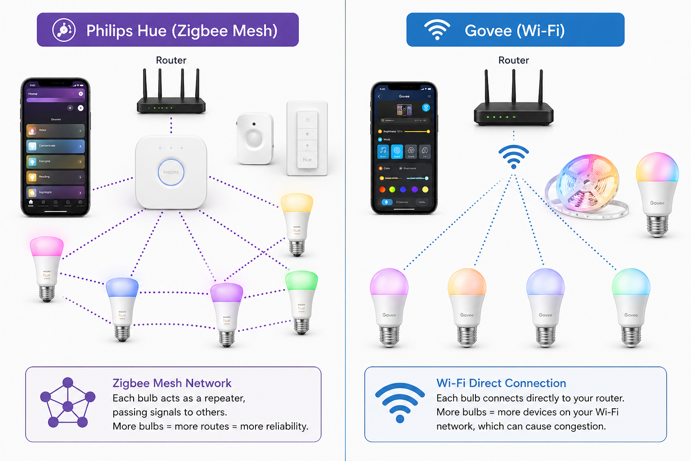
Philips Hue bulbs use Zigbee as their primary communication protocol – a low power mesh network where each bulb acts as a node, relaying signals to other bulbs in the system. This mesh architecture is one of the reasons Hue has a reputation for reliability. The more bulbs you have, the more routing paths exist, and the less likely you are to experience commands that don’t get through.
You can use Hue bulbs with Bluetooth alone, which works for basic on/off, dimming and color control without any hub. For the full feature set – away-from-home control, automations, Apple HomeKit integration, and multi-room scenes – you need a Hue Bridge. In a Bridge-based setup, the Bridge connects to your router via Ethernet and handles the Zigbee communication between your Hue lights and the rest of your smart home. Current options include the standard Hue Bridge (around $60) and the newer Hue Bridge Pro (around $100), which supports larger setups (150+ lights and 50+ accessories) and faster performance for more complex systems.
Philips Hue now supports Matter in two ways. The safest route is still through the Hue Bridge, which exposes connected Hue lights to Matter-compatible platforms. Some newer Matter-enabled Hue bulbs can also pair directly without a Bridge, but only where the bulb itself supports Matter and you have a suitable Matter controller with Thread Border Router support, such as a HomePod Mini, compatible Echo or supported Google Nest Hub. If you’re building a broader Matter-based smart home, Hue integrates more cleanly than it used to, but the exact setup path depends on the bulb generation and controller you use.
Govee
Govee smart bulbs connect directly to your home Wi-Fi. There’s no dedicated hub required and no separate protocol to think about. You download the Govee Home app, connect the bulb to your 2.4GHz Wi-Fi network, and you’re up and running. The setup process is typically faster than Hue’s, especially if you’re not already invested in a hub.
The trade-off for Wi-Fi simplicity is reliability at scale. Each Govee bulb is an independent Wi-Fi device on your network, which works well for a handful of bulbs but can create congestion as you add more devices to an already busy home network. Govee supports Alexa and Google Home across its standard bulb range. Select newer Matter-compatible Govee products can also work with Apple Home through Matter, but this applies to a limited range of products rather than the brand’s bulbs generally – making Govee a poor fit for households primarily in the Apple ecosystem.
The Govee Home app controls everything – scenes, schedules, color modes, music sync and routines. The app is functional but less polished than Hue’s, and automation options are more limited. You can set schedules and trigger scenes, but you don’t have the sensor-based or geofencing automations that Hue supports.
Light Quality
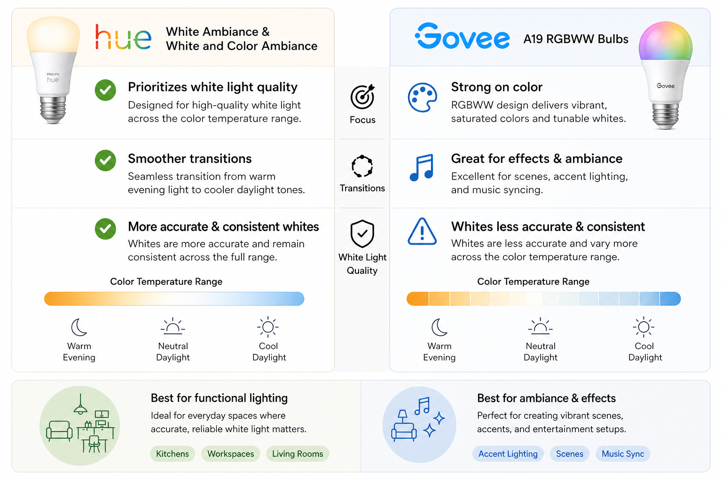
Hue’s White Ambiance and White and Color Ambiance bulbs prioritize white light quality across the color temperature range, with smoother transitions from warm evening light to cooler daylight tones. If you’re using smart lighting to replace functional household lighting in living rooms, kitchens or workspaces, that quality is noticeable day to day.
Govee A19 RGBWW bulbs produce solid colors and have an RGBWW configuration that includes both saturated color and tunable white tones. For vibrant color effects, such as setting a scene, syncing to music or accent lighting, Govee delivers good results at its price point. Where the difference becomes apparent is in white light quality. Govee’s whites are less accurate and less consistent across the color temperature range than Hue’s. For a bedside lamp or a living room ambient setup, this may not be important. For a kitchen or a workspace where you need reliable, accurate white light, it becomes more relevant.
Ecosystem and Product Range
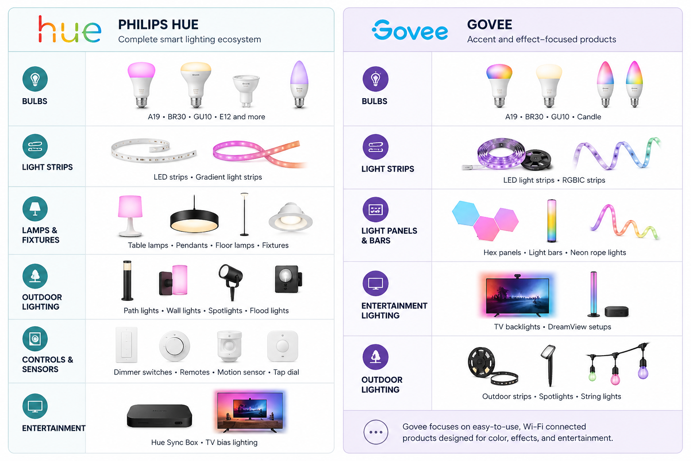
Philips Hue has one of the largest smart lighting ecosystems available. Beyond A19 and BR30 bulbs, the range covers GU10 spots, E12 candelabra, LED strips, gradient light strips, floor lamps, desk lamps, outdoor lighting, wall fixtures, smart switches, motion sensors, and the Hue Sync Box for TV bias lighting. All products work together through the same app and Bridge. If you want to build a cohesive smart lighting environment throughout your home (bedrooms, kitchen, outdoor, entertainment area), Hue can cover every scenario.
Govee’s product range is smaller and has a different focus. The standard bulb lineup covers the most common bulb base types, but the brand’s most distinctive products are its LED strips, gradient light bars, and entertainment sync products like the Govee TV backlight. These are accent and effect-focused products. If you want to add a gaming setup ambient effect, a bedroom color accent, or an affordable TV bias light, Govee’s range is well suited. It’s less suited to replacing your whole-home lighting.
Automation and Smart Home Integration
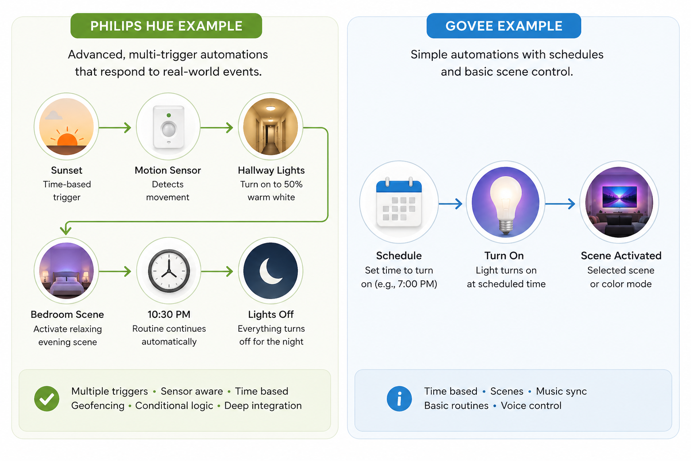
Hue’s automation depth is one of its strongest selling points. Through the Hue app and Bridge, you can build routines triggered by time of day, sunrise and sunset, motion sensors, platform-based accessory triggers, or geofencing (lights on when you arrive home, off when you leave). Scenes can be programmed to shift color temperature gradually throughout the day to follow natural light. The Hue ecosystem integrates natively with Alexa, Google Home, Apple HomeKit, Samsung SmartThings, and via Matter with other compatible platforms. If your smart home setup is built around any of these platforms, Hue fits cleanly into it.
For many buyers, the real Govee vs Philips Hue decision comes down to whether you value lower cost or deeper automation. Govee’s options are more limited. You can schedule lights on and off, set scenes, sync to music, and create basic routines in the Govee Home app. There’s no geofencing, no native motion sensor integration, and no Apple HomeKit across the standard range. For Alexa and Google Home users who want voice control and basic scheduling, Govee covers the essentials. For anyone building more complex automations across multiple device types, Govee quickly becomes a ceiling rather than a foundation.
Price
The price gap between the two brands is significant. At the time of writing, a single Philips Hue White and Color Ambiance A19 bulb typically runs $35-$55. If you’re starting fresh with a Bridge, add $60 for the standard Bridge or $100 for the Bridge Pro. Starter kits that bundle two or four bulbs with a Bridge are available and represent better per-bulb value, but the upfront cost of building out a room or two with Hue adds up quickly.
Govee is considerably cheaper. A four-pack of Govee A19 RGBWW bulbs typically runs $28-$40, and there’s no hub cost. For someone who wants color-changing smart bulbs in two or three fixtures without a major investment, Govee’s entry cost is hard to argue with.
The honest framing is that Hue generally costs more because it delivers more for whole-home setups, with better light quality, deeper integrations, a larger ecosystem, and a more reliable network architecture. Whether that’s worth the premium depends entirely on what you’re trying to do with your lighting. For accent and effect lighting, Govee’s price-to-feature ratio is genuinely strong. For whole-home functional lighting with long term expandability, Hue’s total cost becomes easier to justify over time.
Which Should You Choose?
Choose Philips Hue if:
You’re building a smart lighting setup across multiple rooms and want everything to work together reliably. If you’re in the Apple ecosystem, Hue is the stronger option here. Govee’s standard bulb range doesn’t support HomeKit, and while select newer Matter-compatible Govee products can work with Apple Home, that support is limited. Beyond ecosystem fit, Hue makes sense if you want advanced automations – sensor triggers, geofencing, and sunrise/sunset routines that run without manual input. White light accuracy makes a big difference for everyday functional spaces like kitchens and workspaces, and Hue is notably better in that regard. Finally, if you’re planning to expand gradually, Hue’s large ecosystem means each new purchase integrates smoothly with what you already have.
Choose Govee if:
You want to add color-changing bulbs to one or two fixtures without spending much. You’re primarily using Alexa or Google Home for voice control. You want LED strips or entertainment sync products for a gaming setup, bedroom or entertainment area. You’re newer to smart lighting and want to experiment without committing to a hub and premium pricing. You don’t need Apple HomeKit and aren’t building complex automations.
LIFX vs Govee: The Third Option
If you’ve been comparing Philips Hue and Govee, LIFX is worth knowing about as a middle-ground option. Like Govee, LIFX bulbs connect directly to Wi-Fi, so no hub required. Unlike Govee, LIFX punches considerably harder on light quality.
LIFX A19 bulbs are rated at around 1100 lumens, noticeably brighter than the standard Govee A19 bulb’s 800 lumen output, and the white light quality is generally considered closer to Hue than to Govee’s standard RGBWW range. LIFX supports Alexa, Google Home and Apple HomeKit, making it one of the few hub-free smart bulb options with native HomeKit support. Unlike Philips Hue, it doesn’t require a separate bridge for full voice assistant compatibility. In day-to-day use, response times also tend to feel faster than Govee’s, particularly with voice commands and app control.
The trade-off is price. LIFX bulbs typically run $20-$35 per bulb, which puts them above Govee but below Hue’s Color Ambiance range. And like Govee, individual LIFX bulbs sit as standalone Wi-Fi devices. You don’t get Hue’s mesh architecture or the same level of automation depth.
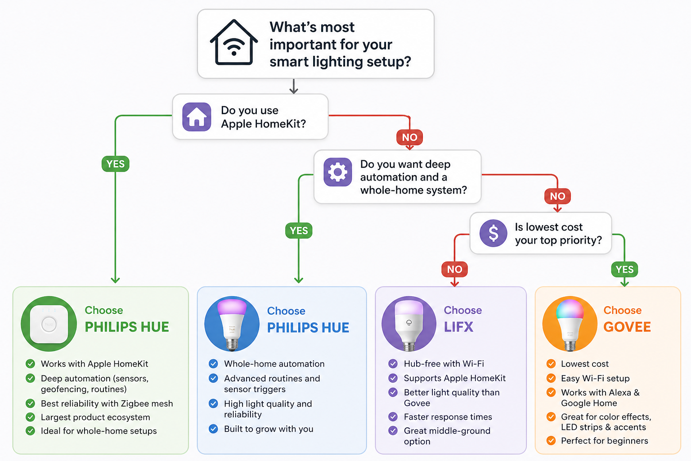
The short version: If you want hub-free setup with HomeKit support and more consistent white light quality than Govee, LIFX is the stronger choice despite the higher price. If you’re primarily on Alexa or Google Home, and budget is the primary driver, Govee delivers more color effect per dollar. If you’re building a whole-home setup with deep automation, Hue remains the most capable option of the three.
Smart Choice, Bright Results
Philips Hue and Govee work well for different reasons because they’re built with different priorities in mind. Hue makes more sense for whole-home lighting, stronger automation, better white light quality, and a system that can grow with your setup. Govee makes more sense for affordable color, quick setup, and simple smart lighting without the higher upfront cost.
The expensive mistake is rarely choosing the “wrong” brand. It’s buying for today without thinking about six months from now. A cheap system becomes expensive when you replace it. A premium system feels wasteful when you never use what made it premium.
Start with the role your lighting needs to play. Functional everyday lighting and long-term automation point toward Hue. Accent lighting, entertainment spaces, and budget-first upgrades point toward Govee. Once the purpose is clear, the choice usually is too.
If you’re still deciding whether smart bulbs or smart switches make more sense for your setup, the how do smart bulbs work guide covers that comparison alongside the basics of how smart lighting systems are structured. For a broader look at how smart lighting fits into a connected home, the Smart Home 101 guide is a good starting point.